EasyManua.ls Logo

Duracell D350-M1 - User Manual

Duracell D350-M1
8 pages
Print Icon
To Next Page IconTo Next Page
Loading...
Mobile App Commissioning Manual
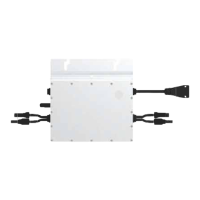
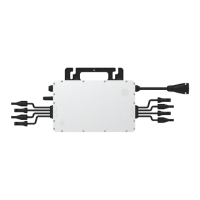
About the Microinverter
This system is composed of a family of microinverters that convert direct current (DC) into alternating
current (AC) and feeds it into the public grid. The system is designed for the incorporation of one
microinverter for one, two, or four photovoltaic modules. Each microinverter works independently to
deliver the maximum power generation of each photovoltaic module. This setup enables the user to
control the production of a single photovoltaic module directly, consequently improving the exibility and
reliability of the system.
About the Manual
This manual contains important instructions for the D350-Ml
/
D700-M2
/
D1500-M4 microinverters. It
must be read in its entirety before installing or commissioning the equipment. For safety, only qualied
technicians or account administrators, who have received training or have demonstrated skills can install
and maintain this microinverter under the guide of this document.
Other Information
Product information is subject to change without notice. Please refer to Power Center ocial website at
www.duracellpowercenter.com for the latest version of the installation manual.

Other manuals for Duracell D350-M1

Questions and Answers

  • J
    Jennifer WeaverAug 7, 2025
    What to do if my Duracell Inverter shows a grid over voltage error?
    • D
      Douglas WilliamsAug 8, 2025
      When a grid over voltage situation occurs with your Duracell Inverter, it should self-clear once the grid voltage returns to its normal range. However, if this alarm happens frequently, it's recommended to check if the grid voltage is within the acceptable range. If it's not, you may need to contact your local power operator or, with their consent, adjust the grid overvoltage protection limit using the Power Center+ monitoring system.
  • S
    savannahmyersAug 11, 2025
    How to fix a Duracell Inverter that is offline?
    • J
      Jack CruzAug 12, 2025
      If your Duracell Inverter is showing as offline, first ensure that the microinverter is working normally. Then, check the communication status between the DTU and the monitoring system, or between the DTU and the microinverter and correct as required.
  • J
    james68Aug 16, 2025
    How to troubleshoot over temperature protection on Duracell D350-M1?
    • C
      Christine GarciaAug 16, 2025
      If your Duracell Inverter is experiencing over temperature protection issues, check the ventilation and ambient temperature around the microinverter and make any necessary corrections.
  • H
    Heidi GarciaAug 20, 2025
    What to do if my Duracell Inverter has a firmware error?
    • M
      Mrs. Rhonda AdamsAug 20, 2025
      If your Duracell Inverter displays a firmware error, verify that the firmware is correct and attempt the upgrade again. Also, check the communication status between the DTU and the monitoring system, or between the DTU and the microinverter.
  • V
    Victoria OrozcoAug 25, 2025
    What to check if my Duracell D350-M1 reports a grid disconnection?
    • C
      Clayton WilliamsAug 25, 2025
      If your Duracell Inverter indicates a grid disconnection, check whether the AC switch or AC wiring is normal.
  • C
    Caroline KelleyAug 28, 2025
    Why is my Duracell Inverter showing a power grid outage?
    • M
      Megan LaraAug 29, 2025
      If your Duracell Inverter indicates a power grid outage, please check whether there is a power grid outage.
  • G
    George QuinnSep 1, 2025
    How to fix a grid config parameter error on my Duracell Inverter?
    • C
      Chase HammondSep 2, 2025
      If your Duracell Inverter displays a grid config parameter error, check if the grid configuration parameter is correct and upgrade again.

Summary

Important Notes

Product Range

Describes the App commissioning process for specific Power Center microinverter models.

Target Group

Specifies that the manual is for qualified technicians/account administrators only.

Safety Instructions

Important Safety Instructions

Details essential safety precautions for installation and operation of microinverters.

Explanation of Symbols

Explains the meaning of various symbols used in the manual for safety and compliance.

Radio Interference Statement

States that the microinverter complies with FCC rules but may cause interference if not installed correctly.

Initial Login and Password Management

App Login Process

Step-by-step guide to logging into the Duracell Micro Inverter mobile application.

Password Change Procedure

Instructions on how to change the password within the mobile application for security.

Plant Creation and Information

Plant Information Entry

Details on entering essential information like plant name, type, capacity, and address.

Owner Management

Add Owner Details

Steps to add owner information, including login account, password, and contact details.

Select Existing Owner

Instructions on how to select an existing owner when creating a new system.

Device Binding

Add DTU to System

Guide to adding the DTU (Data Transfer Unit) by manual entry or scanning its barcode.

Add Microinverters to System

Process for adding microinverters by serial number, either manually or via barcode scan.

Site Creation and Configuration

PV Array Layout Creation

Steps for creating the PV array layout, including name, azimuth, inclination, and module placement.

Site Settings Configuration

Configuration of site settings like currency, electricity price, and network options.

Duracell D350-M1 Specifications

General IconGeneral
BrandDuracell
ModelD350-M1
CategoryInverter
LanguageEnglish

Related product manuals