17
● A vacuum
● Pressurized air
Never clean your generator with a bucket of water or a hose. Water can get inside the
working parts of the generator and cause a short circuit or corrosion.
Checking the Oil
The generator is equipped with an automatic shutoff to protect it from running on low oil.
Nonetheless, you should check the oil level of the generator before each use to ensure that
the generator crankcase has a sufficient amount. To check the oil level:
1. Make sure the generator is on a level surface.
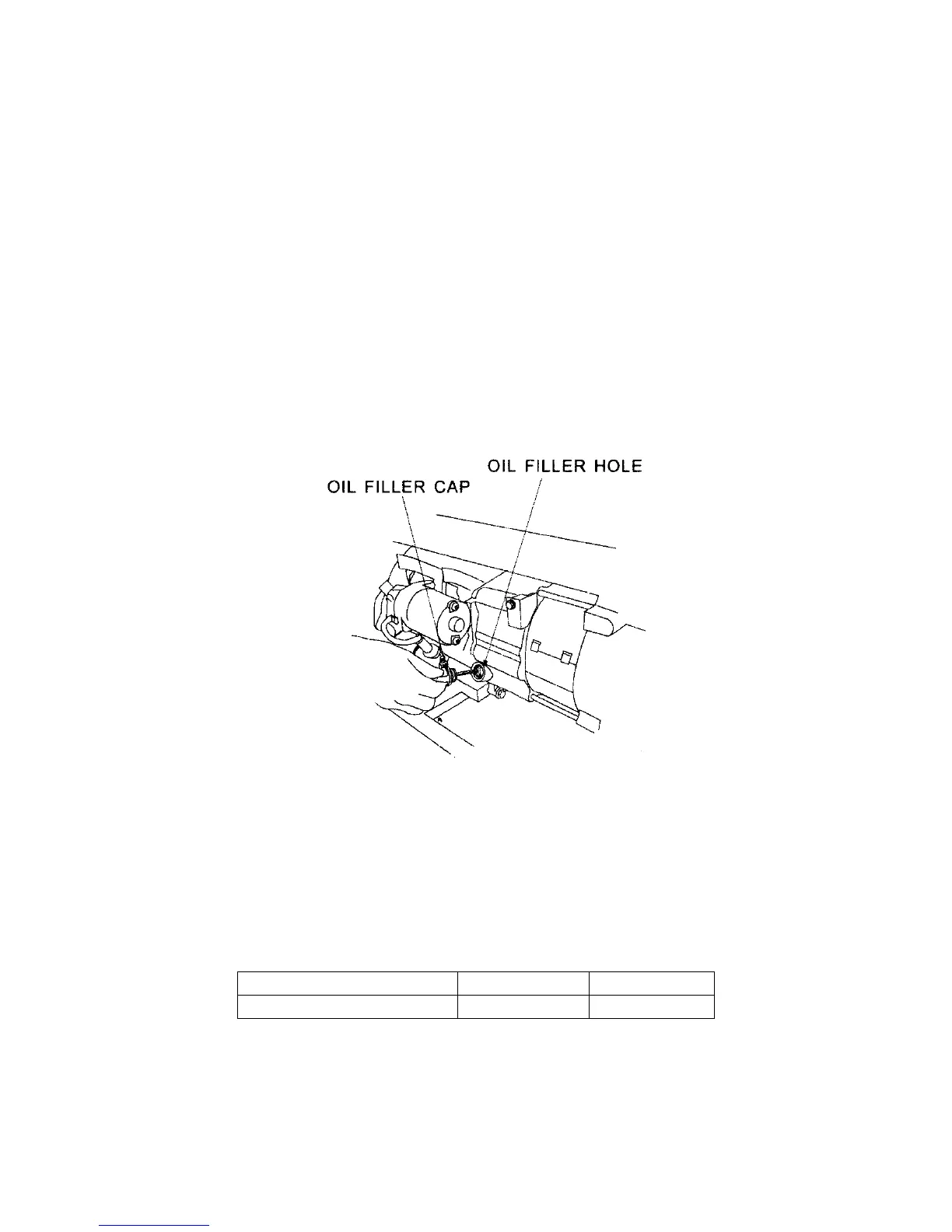
2. Unscrew the oil filler/dipstick cap (see figure 14).
3. With a dry cloth, wipe the oil off of the stick on the inside of the cap.
4. Insert the dipstick as if you were replacing the cap and then remove again. There
should now be oil on the stick. If there is no oil on the stick, or oil only at the very end of
the stick, you should add oil until the engine crankcase is filled. See "Changing/ Adding
Oil" in this section.
5. Be sure to replace cap when finished checking oil.
Figure 14- Checking the Oil
Changing/ Adding Oil
You should check the oil level of your generator according to the maintenance schedule in
figure 13. When the oil level is low you will need to add oil until the level is sufficient to run the
generator.
The oil capacity of your generator engine is listed in figure 15.
Model number XP6500E XP8500E
Engine oil capacity
37 fluid oz. 37 fluid oz.
Figure 15- Engine Oil Capacity.


 To Next Page