EasyManua.ls Logo

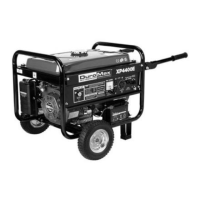
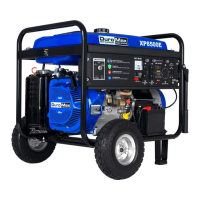
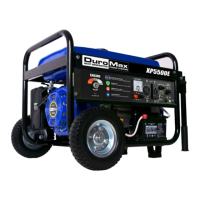
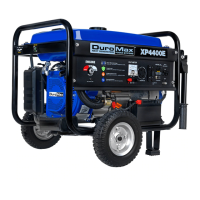
DUROMAX XP4400E - User Manual

DUROMAX XP4400E
36 pages
Print Icon
To Next Page IconTo Next Page
Loading...
DLlrCJ
NEXT
GENERATION
IVISI~
POWER
SYSTEMS
lfiM\
Gasoline
Powered
Generator
Owner's
Manual
XP4400
D
XP4400E
D
customer_service@maxtool.com
or call 1-800-629-3325 (option 3) Monday -Thursday 6am to 7pm, Friday - Saturday 6am to 3pm. PST
support@maxtool.com
or call 1-800-629-3325 (option 3) Monday -Thursday 6am to 7pm, Friday - Saturday 6am to 3pm. PST
This manual provides information regarding the operation and maintenance
of
these products.
We have made every effort to ensure the accuracy of the information
in
this manual.
We reserve the right to change this product at any time without prior notice.

Questions and Answers

  • S
    Sheryl FarmerJul 26, 2025
    How to start a DUROMAX Portable Generator when it won't start?
    • W
      William MaxwellJul 26, 2025
      If your DUROMAX Portable Generator won't start, consider these potential causes and solutions: * Ensure the engine switch is set to “ON”. * Verify the fuel valve is in the “OPEN” position. * Close the choke. * Check if the engine is out of gas and add gas if needed. * Replace contaminated or old gas. * Clean or replace a dirty or broken spark plug. * Make sure the generator is on a level surface to prevent low oil shutdown. * Add or replace oil if it is low.
  • R
    Randy LangAug 5, 2025
    What to do if my DUROMAX Portable Generator engine runs but has no electrical output?
    • K
      Kathryn MurphyAug 5, 2025
      If your DUROMAX Portable Generator's engine runs but provides no electrical output, check the following: * Ensure the circuit breaker is in the “ON” position. * If using an extension cord, try a different one to rule out bad connecting wires/cables. * Test with a different electrical device to ensure the initially connected device isn't faulty.
  • M
    Michael BanksAug 14, 2025
    Why doesn't my DUROMAX XP4400E support all connected electrical devices?
    • B
      Bradley LittleAug 14, 2025
      If your DUROMAX Portable Generator runs but struggles to support all connected devices, the issue might be: * The generator is overloaded, so try connecting fewer electrical loads. * A short circuit in one of the connected devices, try disconnecting any faulty or short-circuited electrical loads. * A dirty air cleaner, in which case you should clean or replace it.

Summary

Generator Features

General Safety Procedures

Package Contents

Generator Components

Preparing the Generator for Use

Initial Generator Setup

Detailed steps for initial setup, including adding oil, gasoline, and grounding.

Subsequent Generator Use

Procedures for checking oil and gas levels before starting the generator.

Starting the Generator

Using the Generator

AC Power Usage

How to connect electrical devices using AC power, including wattage considerations.

Voltage Selector Switch Operation

Explanation of the voltage selector switch function and usage guidelines.

DC Power Usage

Instructions for using the DC receptacle to charge 12-volt batteries safely.

Stopping the Generator

Maintenance and Care

Checking Engine Oil Level

Procedure for checking the engine oil level before each generator use.

Changing and Adding Engine Oil

Guide on how to drain, add, or replace engine oil according to the schedule.

Air Cleaner Maintenance

Steps for cleaning and maintaining the air cleaner element for optimal performance.

Fuel Filter Cup Cleaning

Instructions for cleaning the fuel filter cup to trap dirt and water from fuel.

Spark Plug Maintenance

How to inspect, clean, and gap the spark plug for proper engine ignition.

Storage and Transport Procedures

Generator Specifications

Troubleshooting Guide

Generator Assembly and Mounting

Carbon Brush Replacement

Step-by-step guide for replacing the carbon brush on the electric machine.

AVR Replacement

Instructions for replacing the Automatic Voltage Regulator (AVR) on the generator.

Wiring Diagram (XP4400)

Exploded View and Parts List (XP4400)

DUROMAX XP4400E Specifications

General IconGeneral
Starting Wattage4400W
Running Wattage3500W
Fuel TypeGasoline
Fuel Tank Capacity4 Gallons
Run Time at 50% Load8 Hours
Start TypeElectric / Recoil
Noise Level69 dB
Engine Size208cc
Engine7 HP Air Cooled OHV
Dimensions17 x 17 in
Outlets2x 120V 20A
AC Output120/240V
DC Output12V

Related product manuals