11
The Choice of Battery
The Installment And Replacement Of Battery
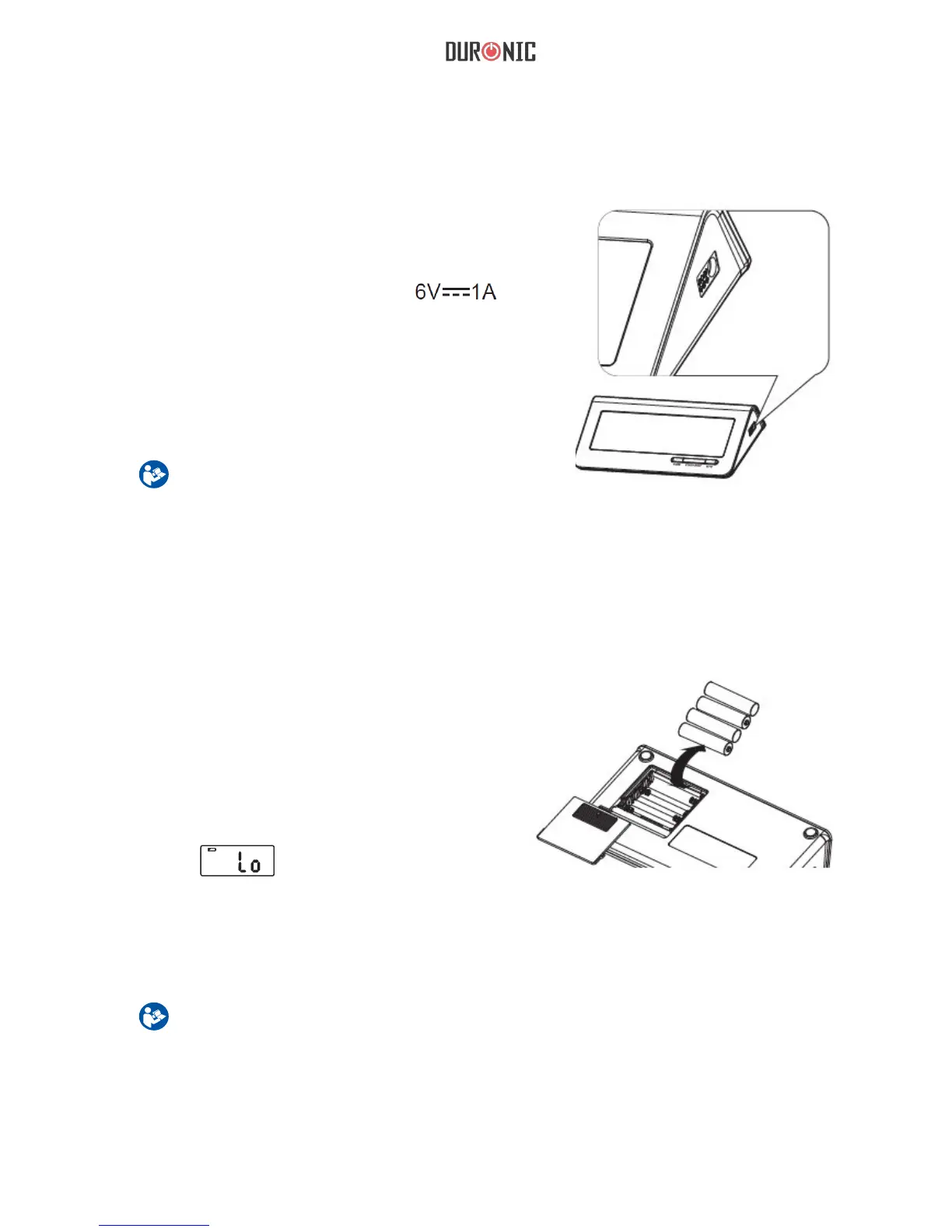
1.Battery powered mode:
6VDC 4*AAA batteries
2.AC adaptor powered mode:
(Can be supplied by AC adaptor model
UE08WCP-060100SPA only!)(Not Included)
Right picture is the socket for power
adapter.
Caution
In order to get the best results and protect your
monitor, please use the right battery and special
power adapter.
Caution
Remove batteries if the device is not likely to be used for some time.
The old batteries are harmful to the environment, do not dispose with other daily trash.
Remove the old batteries from the device and follow your local recycling guidelines.
Do not dispose of batteries in re. Batteries may explode or leak.
1. Slide off the battery cover.
2. Install the batteries by matching
the correct polarity, as shown.
3. Replace the cover.
Replace the batteries whenever the
following happens:
The shows
The display dims
The display does not light up


 To Next Page