Home
Duronic
Blood Pressure Monitor
BPM450
Page 13
Duronic BPM450 - Page 13
124 pages
Manual
Save Page as PDF
To Next Page
To Next Page
To Previous Page
To Previous Page
Loading...
13
4.
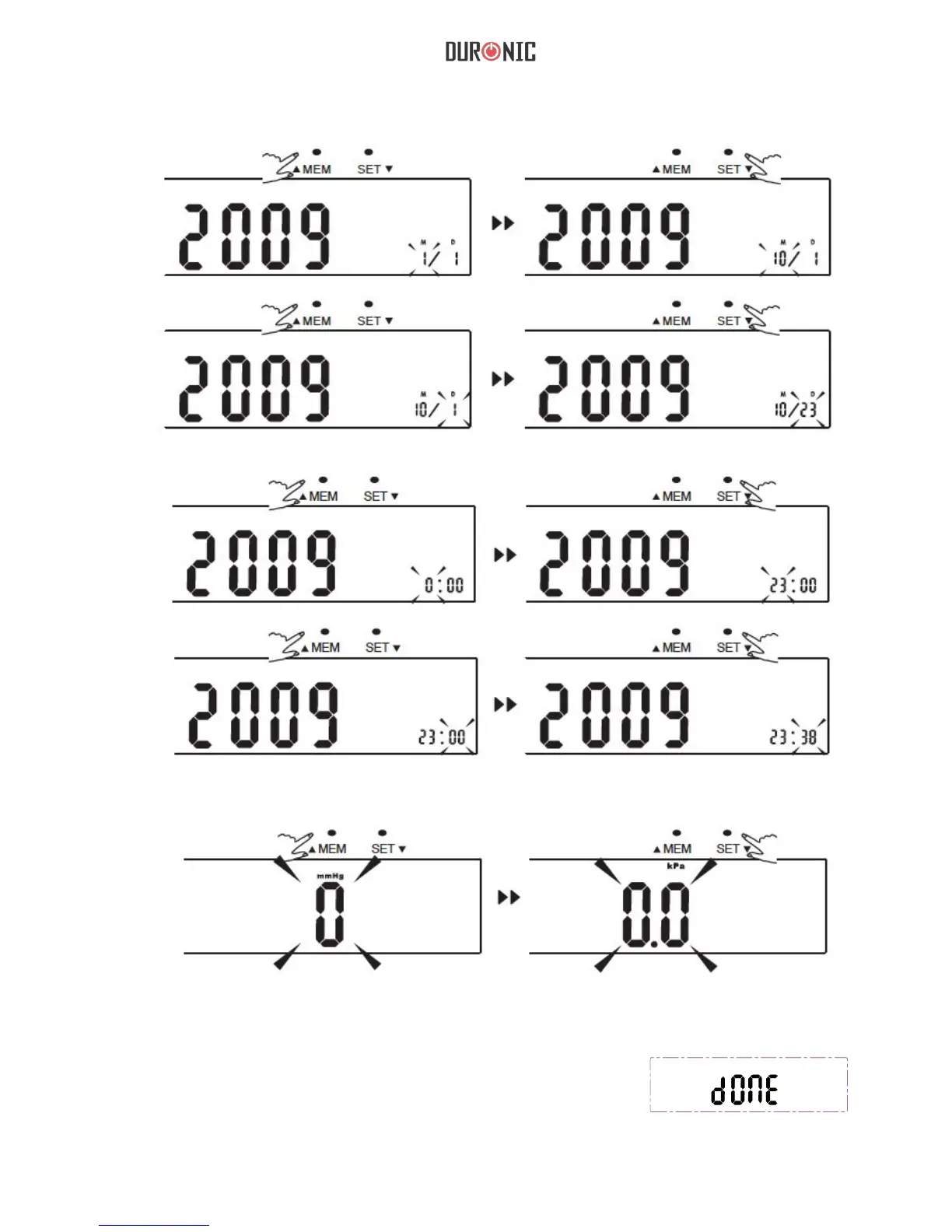
Repeat steps 2 and 3 to s
et the [MONTH] an
d [D
A
Y
].
5.
Repeat steps 2 an
d 3 to set the [HOUR] and [MINUTE].
6.
Repeat steps 2 an
d 3 to set the [UNIT
].
7
.
Af
ter the unit is s
et,
th
e right pi
cture
will sh
ow
,then it turn of
f automatic
ally
.
12
14
Table of Contents
Main Page
English
3
Table of Contents
3
English Manual
5
Safety Information
7
Lcd Display Signal
9
Monitor Components
10
Installing and Replacing the Batteries
11
Setting Date, Time and Measurement Unit
12
Measurement
14
Tie the Cuff
14
Start the Measurement
15
Recall the Records
16
Delete the Records
17
Tips for Measurement
18
Maintenance
19
What Are Systolic Pressure and Diastolic Pressure
20
What Is the Standard Blood Pressure Classification
20
Irregular Heartbeat Detector
20
Why Does My Blood Pressure Fluctuate Throughout the Day
21
Why Do I Get a Different Blood Pressure at Home Compared to the Hospital
21
Is the Result the same if Measuring both Arms
21
Authorized Component
24
Contact Information
24
Emc Guidance
24
Complied European Standards List
25
Manuel D'utilisation en Français
29
Français
30
Information de Sécurité
31
Affichage LCD
33
Eléments du Tensiomètre
34
Choix de L'alimentation
35
Installer Et Changer Les Piles
35
Paramètres
36
Serrer Le Brassard
38
Commencez la Mesure
39
Memoire
40
Parcourir Les Sauvegardes
40
Supprimer Les Sauvegardes
41
Maintenance
43
Qu'est-Ce que la Pression Systolique Et Diastolique
44
Quelle Est la Classification des Normes de Pression Artérielle
44
Est-Ce que la Mesure Est Identique si la Mesure Est Effectuée Sur Le Bras
45
Depannage
46
Specifications Techniques
47
Composants Autorises
48
Conformes Aux Normes
48
Compatibilite Electromagnetique
49
Gebrauchsanleitung auf Deutsch
53
Deutsch
54
Beschreibung
55
Sicherheitsinformation
55
LCD Anzeige Zeichen
57
Komponenten des Bildschirms
58
Die Batterien Einlegen
59
Messprinzip
59
Die Manschette
62
Anzeigen der Gespeicherten Werte
64
Löschen des Speichers
65
Pflege
67
Was ist die Standard Blutdruck-Eistufung
68
Was ist Systolischer Druck und Diastolischer Druck
68
Sollte ich der Selbe Arm jedes Mal Messen
69
Warum ist meiner Blutdruck Änders als in Krankenhaus
69
Warum Variiert mein Blutdruck während des Tages
69
Fehlersuche
70
Spezikikationen
71
Kontakt
72
Europäischen Normen
73
Manual de Instrucciones en Español
77
Español
78
Información de Seguridad
79
Pantalla LCD
81
Componentes del Monitor
82
Elección de Alimentación
83
Instalación de las Baterías/Reemplazo
83
Ajustar Manguito
86
Obtención de una Medición
87
Recuperar Registros
88
Eliminar Registros
89
Mantenimiento
91
Cuál es la Clasificación Estándar de la Tensión Arterial
92
Qué es la Presión Sistólica y la Presión Diastólica
92
Por qué MI Presión Arterial Fluctúa a lo Largo del Día
93
Solución de Problemas
94
Componente Autorizado
96
Información de Contacto
96
Lista de Normas Europeas
97
Manuale D'istruzioni in Italiano
101
Italiano
102
Informazioni DI Sicurezza
103
Componenti del Monitror
106
Installare E Cambiare Le Batterie
107
Impostare Data, Ora E Unità DI Misura
108
Effettuare una Misurazione
111
Eliminare I Record
113
Che Cos'è la Classi Icazione Standard Per la Pressione Sanguigna
116
Cosa Sono la Pressione Sistolica E la Prssione Diastolica
116
I Risultati Rimangono Invariati a Differenza da Quale Braccio Sia Effettuata la Misurazione
117
Perchè la Mia Pressione Snaguigna È Varia Durante la Giornata
117
Perchè la Misurazione Ottenuta a Casa È Diversa Dalle Misurazioni Effettuate Dal Medico
117
Risoluzione Problemi
118
Informazioni DI Contatto
120
Other manuals for Duronic BPM450
Instructions
146 pages
Related product manuals
Duronic BPM150
134 pages
Duronic BPM200
147 pages
Duronic TMB-987
146 pages


 To Next Page