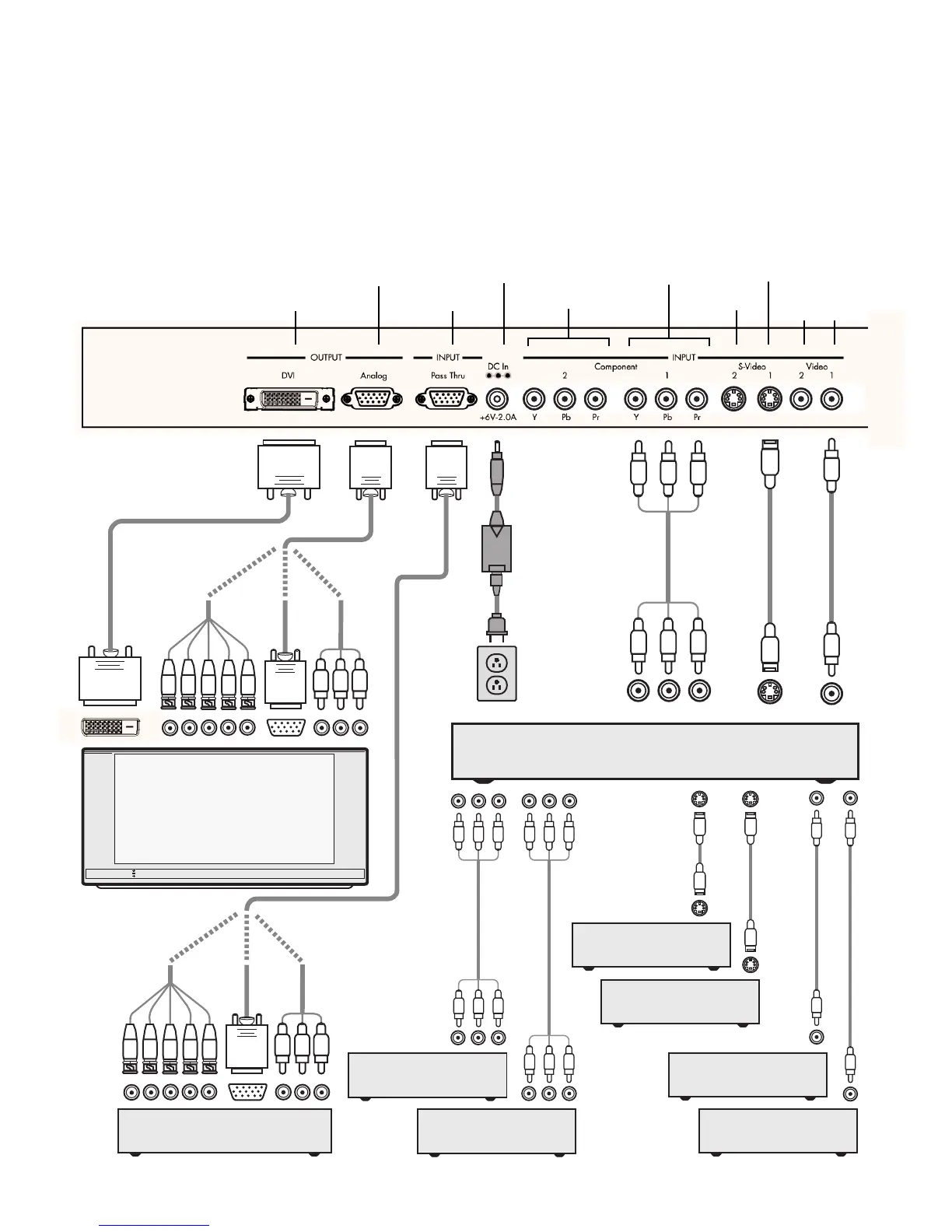
Progressively Scanned TV or Projector
Back of Unit
DVI-D Interface Cable
HD-15
HD Video
HD Satellite TV Tuner, PC, or
Progressive-Scan DVD Player
DVD Player or Other
Component Video Source
DVD Player or Other
Component Video Source
Universal
Power
Adaptor
AC Mains
(100-240
VAC
50/60 Hz)
Component
Video Cable
S-Video Cable
S-Video Cable
S-Video Cable
Composite Video Cable
Composite Video Cable
Composite Video Cable
Y-Pb-Pr
Audio/Video Preamplifier/Processor or AV Receiver
Set-Top Box or
Other S-Video Source
VCR or Other
S-Video Source
Video Game or Other
Composite Video Source
VCR or Other
Composite Video Source
Component Video Cable
Component Video Cable
5x BNC
HD-15
3x RCA
or
or
DVI-D
5x BNC
HD-15
3x RCA
or
or
or
A common variation of this setup is to use an A/V receiver as the switch between all
the sources, with the output of the A/V receiver being the only input to the iScan Ultra.
7
Installation and Set-Up (continued)
Configuration
Variation with
A/V Receiver
Analog Output 6V DC Power Supply Input Component Video 1 Input S-Video 1 Input
Digital/DVI Output Pass-Thru Input Component Video 2 Input S-Video 2 Input
Composite Composite
Video Video
Input 2 Input 1



 To Next Page