To Next Page
B
blevinsteresaJul 26, 2025
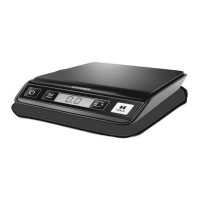
How to reset Dymo P3 Scales when a negative number is displayed?
- RrporterJul 26, 2025
If a negative number is displayed on your Dymo Scales, simply press the button to reset the scale to zero.

How to reset Dymo P3 Scales when a negative number is displayed?
If a negative number is displayed on your Dymo Scales, simply press the button to reset the scale to zero.
How to fix Dymo Scales with no display?
If there is no display on your Dymo Scales, replace the batteries.
What to do if my Dymo P3 Scales display shows '00000'?
If your Dymo Scales display reads '00000', it means the item you're weighing exceeds the scale's maximum capacity. Remove the item immediately to prevent damage.
Why does my Dymo P3 display read 0.0 with an item on the platform?
If your Dymo Scales display reads '0.0' with an item on the platform, it could be due to a couple of reasons. Either the Tare/Zero button was pressed while the item was on the scale, or the scale lost power and was turned back on with the item still on the platform. In either case, remove the item from the platform.
What does 'LO' mean on my Dymo P3 Scales?
If 'LO' is displayed on your Dymo Scales, it indicates that the batteries need to be replaced. Please replace them.
Instructions for inserting the three AAA batteries into the scale.
How to turn the digital postal scale on and off using the power button.
Procedure for placing an item on the scale and obtaining its weight.
How to use the Tare/Zero button to exclude container weight.
Method to freeze the displayed weight after removing the item.
Instructions to switch between pounds and kilograms display.
 General
| Maximum Capacity | 5 kg |
|---|---|
| Readability | 1 g |
| Power Source | 3 AAA batteries |
| Auto Power Off | Yes |
| Tare Function | Yes |
| Platform Size | 15 cm x 15 cm |
| Units of Measurement | g, kg, oz, lb |