
 To Next Page
H
Hayley BeckAug 15, 2025
What to do if Dymo S100 Scales display 00000?
- JJay MillerAug 16, 2025
If your Dymo Scales display '00000', it means the item on the scale exceeds its maximum capacity. Remove the item immediately to prevent damage.

What to do if Dymo S100 Scales display 00000?
If your Dymo Scales display '00000', it means the item on the scale exceeds its maximum capacity. Remove the item immediately to prevent damage.
What to do if Dymo S100 Scales display reads 0.0 with an item on the platform?
If your Dymo Scales display reads 0.0 with an item on the platform, it may be because: 1. The Tare/Zero button was pressed while an item was on the scale. 2. Power to the scale was disconnected or turned off and then on again with an item on the scale. In both cases, remove the item from the platform.
Why do Dymo Scales display LO?
If your Dymo Scales display 'LO', it indicates that the batteries need to be replaced. Please replace the batteries.
How to fix Dymo S100 Scales with no display?
If your Dymo Scales have no display, ensure the scale is properly plugged in. If it is, try replacing the batteries.
What to do if Dymo S100 display a negative number?
If your Dymo Scales display a negative number, press the button to reset the scale to zero.
What to do if my Dymo S100 display shows 00000?
If your Dymo Scales display reads '00000', it means the item on the scale exceeds its maximum capacity. Remove the item immediately to prevent damage.
Why does my Dymo S100 Scales display read 0.0 with an item on it?
If your Dymo Scales display reads 0.0 with an item on the platform, it could be due to pressing the Tare/Zero button while the item was already on the scale, or because the power was disconnected/turned off and then on again with the item on the scale. Remove the item from the platform in both cases.
How to fix a Dymo Scales with no display?
If your Dymo Scales have no display, make sure the scale is properly plugged in. If it is, try replacing the batteries.
What does LO mean on my Dymo Scales?
If 'LO' is displayed on your Dymo Scales, you should replace the batteries.
What to do if my Dymo S100 Scales shows a negative number?
If a negative number is displayed on your Dymo Scales, press the button to reset the scale to zero.
Instructions for unpacking, checking contents, and preparing the scale for initial use.
Details on powering the scale using the power adapter, USB cable, or AAA batteries.
Guides on activating the scale, deactivating Auto Shut Off, and powering down the device.
Covers basic weighing and using the Tare feature for accurate measurements.
Learn how to freeze the display to read weight after removing the item from the scale.
How to switch between English (pounds) and metric (kilograms) units for weighing.
Instructions for mounting the detachable display to metallic or non-metallic surfaces.
Essential advice on proper handling, operation environment, and maintenance for scale longevity.
Provides detailed technical data including capacity, weight increments, accuracy, and operating parameters.
Lists common problems, error messages, and their corresponding solutions for user assistance.
Details the one-year limited warranty, what is covered, and how to make a claim.
States compliance with FCC rules for Class B digital devices and potential interference measures.
Steps to prevent damage from static electricity when connecting or handling the scale.
Guidance on responsible disposal and recycling of the electronic equipment.
Instructions on how to provide comments and suggestions to improve user documentation.
 General
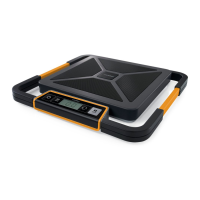
| Type | Electronic postal scale |
|---|---|
| Accuracy | - g |
| Customs code | 8423829000 |
| Auto power off | Yes |
| Country of origin | China |
| Batteries included | No |
| Maximum weight capacity | 100 kg |
| Product color | Black |
| Power requirements | 3 x AAA/LR03 |
| Package depth | 446 mm |
| Package width | 92 mm |
| Package height | 465 mm |
| Package volume | 19.0799 L |
| Package weight | 4400 g |
| Quantity outer carton | 2 pc(s) |
| Net weight of outer carton | 8.800 kg |
| Gross weight of outer carton | 9.525 kg |
| Master (outer) case width | 204 mm |
| Master (outer) case height | 491 mm |
| Master (outer) case length | 464 mm |
| Master (outer) case volume | 46476.1 cm³ |