EasyManua.ls Logo

Dyna FM-3 - Assembly of Circuit Boards; RF Circuit Board (PC-7) Assembly

Dyna FM-3
32 pages
Print Icon
To Next Page IconTo Next Page
To Previous Page IconTo Previous Page
Loading...
ASSEMBLY
INSTRUCTIONS
You
will first
assemble
the
three
etched
circuit
boards
PC-7,
PC-8
and
PC-12,
and
then
mount
these
and
other
components
on
the
chassis
and
complete
the
wiring.
The
use of
protectively
coated
circuit
boards
in
the
Dynatuner,
on
which
most
of
the
components
are
mounted,
greatly
simplifies
assembly
of
the
kit,
and
contributes
consider-
ably
to
its
outstanding
performance.
Close
attention
to
the
suggestions
made
here
will
enable
you
to
realize
the
fullest
capabilities
of
the
Dynatuner.
On
each
etched
circuit
board
all of
the
cOlll.ponent posi-
tions
are
diagrammed
on
the
top
of
the
board
(the
side
without
the
copper).
The
identification
symbol
for
each
component
is
marked
between
the
holes
into
which
its
leads
will be
inserted.
Resistors
may
be
identified
from
the
color
code
on
the
parts
list.
The
first
color
stripe
is
nearest
the
end
of
the
resistor.
Any
fourth
color
stripe
may
be
ignored.
Each
capacitor
'is
marked
with
its
value
and
any
special
characteristics.
Other
special
components
will be
identified
as
they
are
called
for in
the
assembly
process.
To
speed
assembly,
it
is
suggested
that
you
first
compare
the
com-
ponents
with
the
parts
list
and
sort
them
accordingly.
The
edge
of a
corrugated
box
makes
a
handy
storage
rack
for
resistors
and
small
capacitors.
Before
starting
assembly
of
the
etched
circuit
boards,
observe
detail
A.
A
GOOD
SOLDERING
JOB
IS
ESSEN-
TIAL
TO
THE
SATISFACTORY
PERFORMANCE
OF
YOUR
TUNER.
Soldering
to
etched
circuit
boards
is eas-
ier
than
conventional
point-to-point
wiring
when
it
is
done
correctly.
The
copper
side
of
each
Dynatuner
board
is
coated
with
a
corrosion
inhibitor
which is
also
conducive
to
soldering,
but
there
is
no
substitute
for good
soldering
technique.
SNIP
OFF
EXCESS
LEAD
I
CORRECT
SOLDER
CONNECTION
NOTE
BODY
OF
RESISTOR
IS
PRESSED
TIGHT
TO
BOARD.
MAKE
SOLDER
flOW
SMOOTHLY
FROM
LEAD
TO
COPPER.
SNIP
OfF
EXCESS
LEAD
CLOSE
TO
SOLDER.
DETAIL
A
Be
sure
that
enough
heat
reaches
both
the
copper
on
the
board
and
the
wire to be
soldered
to
make
a
smooth
solder
junction.
When
making
connections
to
the
eyelets,
be
sure
that
the
solder
flows from
the
wire to
the
board,
across
the
eyelet,
so
that
the
eyelet
is
soldered
to
the
wire
and
to
the
board
at
the
same
time.
Tlw
insulating
wax
or
enamel
used
on
the
leads
of
some
components
(capacitors,
chokes)
may
prevent
good
contact
when
these
leads
are
soldered,
if
all
of
the
insulation
has
not
been
removed
from
that
part
of
the
lead
which
is to be soldered. Avoid
getting
solder
on
the
outer
}S"
edge
of
the
boards.
This
area
contacts
the
chassis
when
the
boards
are
installed
and
solder
splashes
here
will
prevent
~miform
contact,
stressing
the
board.
ASSEMBLY OF
THE
R.F. CIRCUIT BOARD
PC-7
l(
J
Position
the
PC-7
etched
circuit
board
in
front
of
you
as
in
the
pictorial
diagram.
Support
the
board
over
an
open
box
or
between
two
objects
so
that
the
leads
from
the
components
may
project
through.
Insert
all
of
the
one-half
watt
resistors
in
their
places
on
the
circuit
board.
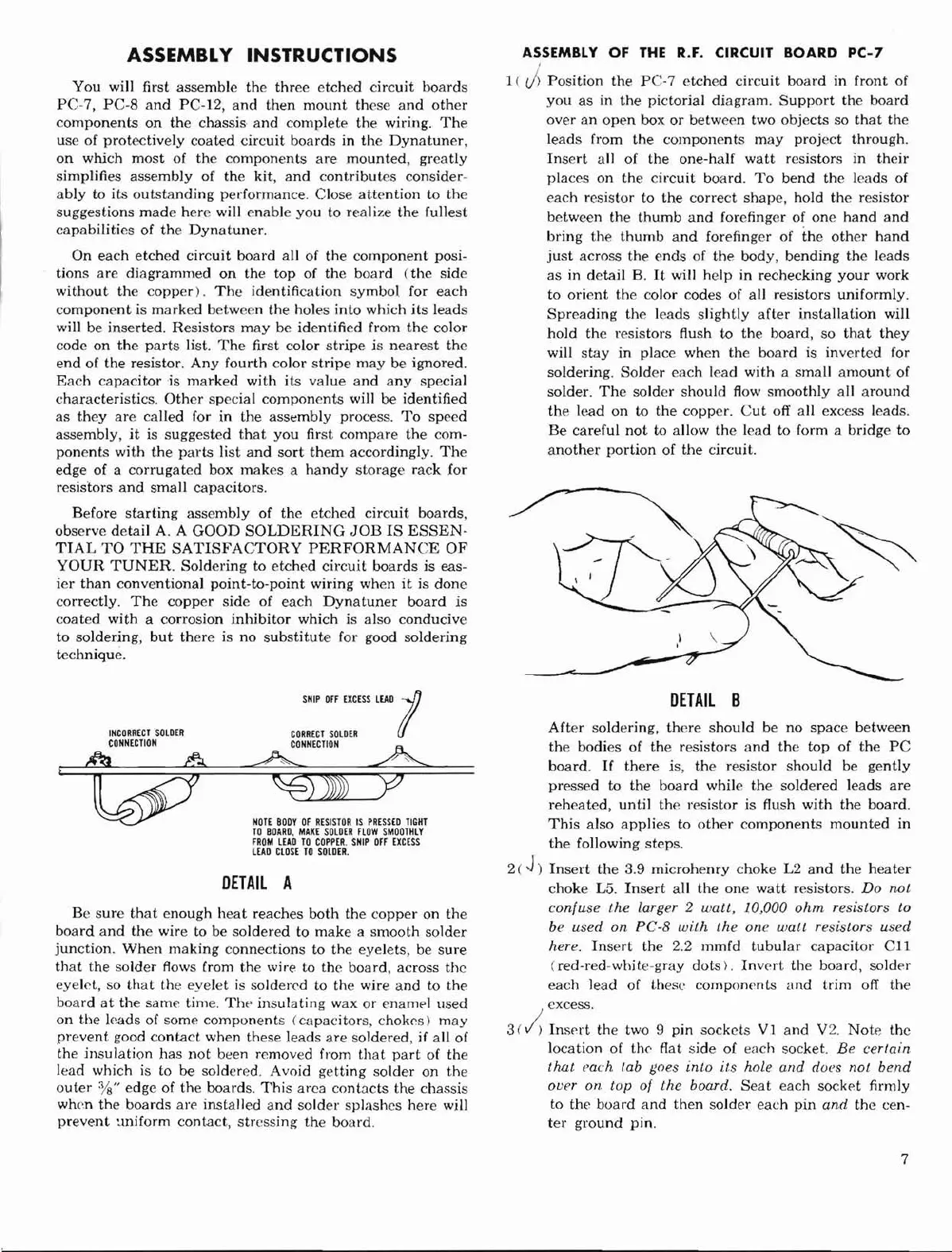
To
bend
the
leads
of
each
resistor
to
the
correct
shape,
hold
the
resistor
between
the
thumb
and
forefinger of
one
hand
and
bring
the
thumb
and
forefinger of
the
other
hand
just
across
the
ends
of
the
body,
bending
the
leads
as
in
detail
B.
It
will
help
in
rechecking
your
work
to
orient
the
color
codes
of
all
resistors
uniformly.
Spreading
the
leads
slightly
after
installation
will
hold
the
resistors
flush
to
the
board,
so
that
they
will
stay
in
place
when
the
board
is
inverted
for
soldering.
Solder
each
lead
with
a
small
amount
of
solder.
The
solder
should
flow
smoothly
all
around
the
lead
on
to
the
copper.
Cut
off
all
excess leads.
Be
careful
not
to allow
the
lead
to
form a bridge
to
another
portion
of
the
circuit.
DETAIL
B
After
soldering,
there
should
be
no
space
between
the
bodies
of
the
resistors
and
the
top
of
the
PC
board.
If
there
is,
the
resistor
should
be
gently
pressed
to
the
board
while
the
soldered
leads
are
reheated,
until
the
resistor
is flush
with
the
board.
This
also
applies
to
other
components
mounted
in
the
following
steps.
2('))
Insert
the
3.9
microhenry
choke
L2
and
the
heater
choke
L5.
Insert
aU
the
one
watt
resistors. Do not
confuse
the
larger 2
watt,
10,000
ohm
resistors to
be used
on
PC-B
with
the
one
wall
resistors used
here.
Insert
the
2.2
mmfd
tubular
capacitor
Cll
(red-red-white-gray
dots).
Invert
the
board,
solder
each
lead
of
these
components
and
trim
off
the
excess.
3
(;;
Insprt
the
two 9 pin
sockets
VI
and
V2.
Note
the
location
of
the
flat
side
of
each
socket.
Be
certain
that each lab goes
into
its hole
and
dor:s
not
bend
over on top of
the
board.
Seat
each
socket
firmly
to
the
board
and
then
solder
each
pin
and
the
cen-
ter
ground
pin.
7