Need help?
Do you have a question about the Dynisco LMI 4000 Series and is the answer not in the manual?
Accessory for Flow Ratio tests, enabling safe weight handling.
Guidelines for optimal laboratory bench setup and placement.
Step-by-step guide for installing the pneumatic lift system.
Instructions for installing the digital encoder module.
Detailed steps for attaching encoder components and plates.
Warning about high temperatures and the risk of burns.
Precautions regarding electrical safety and high voltage components.
Safe handling and precautions for mercury thermometers.
Warning about potential pinch hazards from moving parts or weights.
Precautions and recommendations for materials emitting hazardous fumes.
Essential checks to perform before operating the instrument.
Navigating instrument configuration and system parameters.
Procedure for editing test programs and parameters.
Executing configured test programs.
Guide to using the instrument's keypad for operation.
Accessing various calibration options within the SYS mode.
Accessing instrument test functions within the SYS mode.
Configuring system settings and instrument options.
Procedures for creating, recalling, and saving test programs.
Defining and entering parameters specific to Method A tests.
Defining and entering parameters for Method A/B tests.
Defining and entering parameters for Method B tests.
Defining and entering parameters for Flow Ratio tests.
Initiating and executing a configured test program.
Formula for calculating Melt Flow Rate (MFR) in Method A.
Inputting specific parameters for the Method A experiment.
Step-by-step guide for loading the sample into the barrel.
Initiating the test run after sample loading.
Weighing the collected sample for accurate MFR calculation.
Formulas used for calculating apparent melt density in Method A/B.
Setting up a Method A/B test program.
Configuring the instrument for a Method A/B test.
Steps for inserting the timing flag for measurement.
Procedure for cutting the extrudate sample.
Formulas for calculating Melt Volumetric Flow Rate (MVR) in Method B.
Setting up timing flags for Method B testing.
Setting up a Method B test program.
Executing the Method B test procedure.
Step-by-step guide for performing the actual test.
Preparing the instrument and verifying settings before the run.
Procedure for loading the barrel with the sample material.
Cleaning procedures after completing the Method B test.
Step-by-step guide to performing the Flow Rate Ratio test.
Procedures for performing Intrinsic Viscosity calculations on the indexer.
Steps for preparing the instrument for standard operating procedures.
Detailed steps for conducting the standard operating procedure test.
Procedures for cleaning the instrument after tests.
Details specific to the digital encoder option for Method B.
Step-by-step guide for installing the digital encoder.
Setting up and programming the digital encoder for use.
Full calibration procedure for the digital encoder.
Calibrating the digital encoder.
Routine maintenance procedures for the instrument.
General troubleshooting guide for common issues.
Troubleshooting the pneumatic lift system.
Common problems encountered and their solutions.
Setting up USB communication with Daisy software.
 General
| Standards | ASTM D1238, ISO 1133 |
|---|---|
| Die Bore Diameter | 2.095 mm (0.0825 in) |
| Die Length | 8.000 mm (0.315 in) |
| Cylinder Diameter | 9.550 mm (0.376 in) |
| Piston Diameter | 9.474 mm (0.373 in) |
| Test Methods | Procedure A |
| Accuracy | ±0.5% |
| Repeatability | ±0.5% |
| Power Supply | 50/60 Hz |
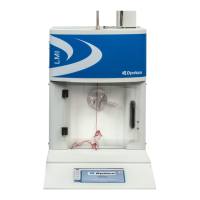
| Description | Melt Flow Indexer |

 To Next Page