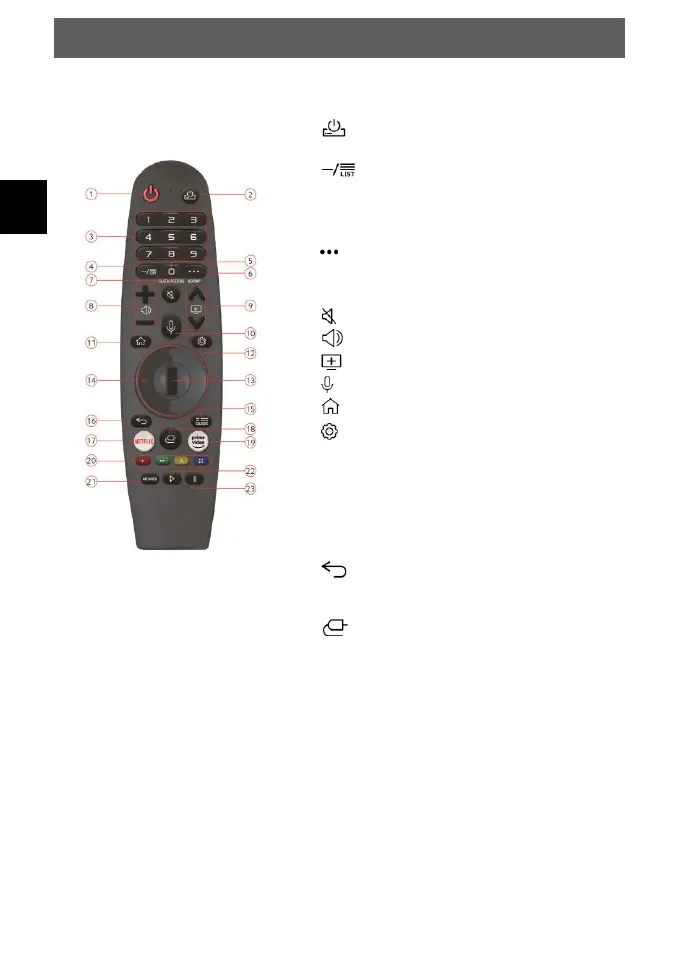
1. POWER: To switch the device on or standby
2. : Set-Top-Box On/Off
3. NUMBER KEYS: Direct program selection
4. : Channel ist
5. 0/ QUICK/ACESS:
• Brief: Number key 0
• Hold: Quick Access
6. :
• Brief: Screen remote
• Hold: Audio description On/Off
7. : Disable or enable the sound
8. +/-: Adjust the volume level
9. /: Channel selection
10. : Activate Voice assistant
11. : Smart Functions
12. : Quick Settings
13. Mouse / OK:
• Mouse /: Scroll pages & Channel
change
• OK: Confirm selection
14. ARROWKEYS: Move within the menu
15. GUIDE: Electronic Program Guide
16. BACK: Return to the previous menu / Exit the
menu
17. NETFLIX: Open Netflix
18. : Input picker
19. PRIME VIDEO: Open Prime Video
20. Color buttons:
• Menu: Menu function as displayed
• TV Teletext mode: Open further teletext
pages directly
21. MOVIES: Call Movies from the Internet
22. :
• TV mode: Live Play back
• USB mode: Play
23. : Pause



 To Next Page