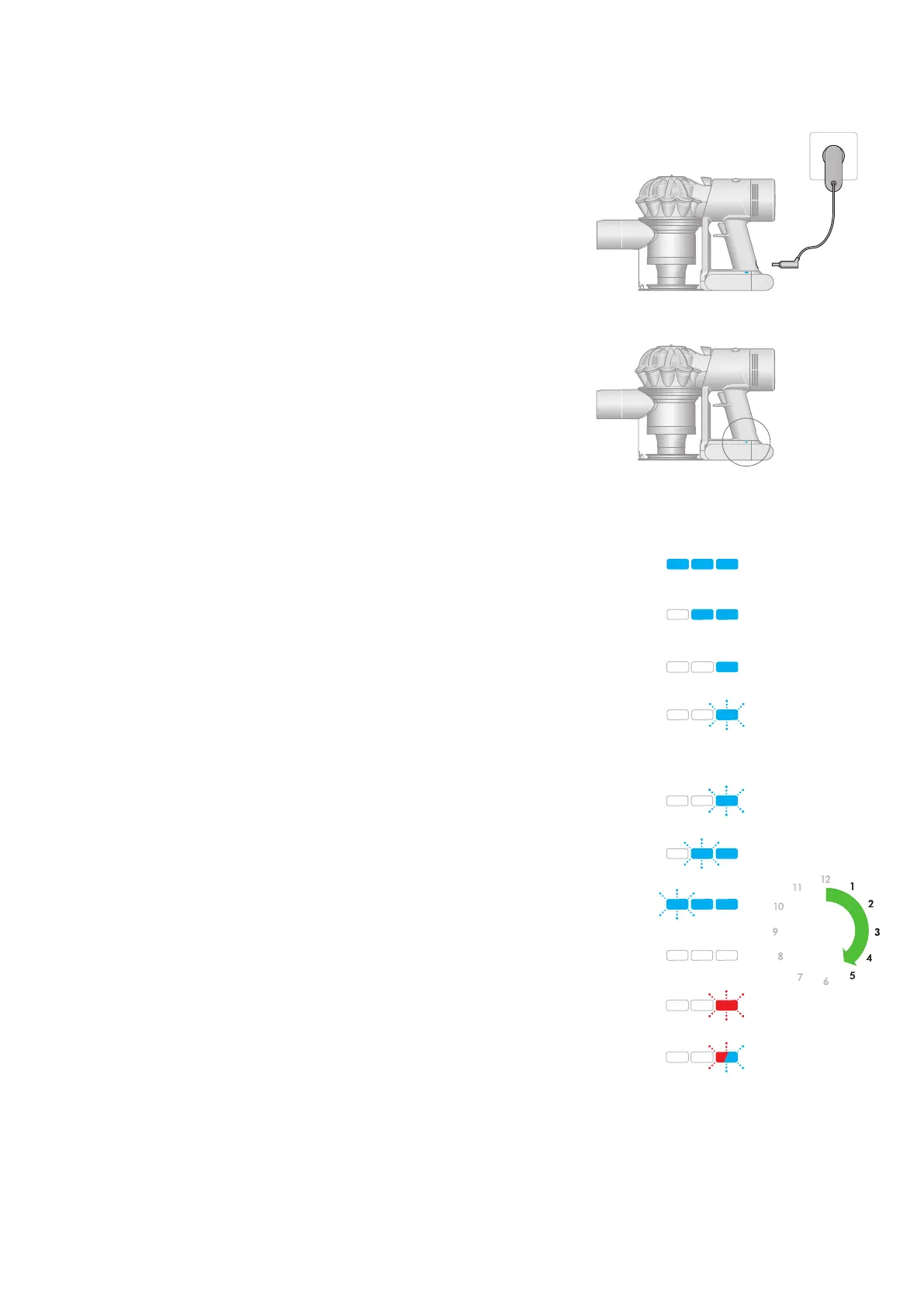
Battery LEDs
Charging LEDs
During use, high charge.
Charging, low charge.
Charging, medium charge.
Charging, nearly full.
Fully charged.
Battery fault.
Charger fault.
During use, medium charge.
During use, low charge.
Empty.
4.5 hrs4.5 hrs
Charging your machine
Connect your machine to the charger and fully charge before first use.
A full charge will take approximately 4.5 hours. While your battery
is charging, the LEDs will flash with the current level of charge.
These lights will turn off once your machine is fully charged.
One light flashing
alternately red and blue.
Two flashing blue lights on
the side of the battery.
No lights illuminated on
the side of the battery.
Three flashing blue lights
on the side of the battery.
One flashing blue light on
the side of the battery.
One flashing red LED.
All LEDs lit with a
solid blue light
Two LEDs lit with a
solid blue light
One LED lit with a
solid blue light
One blue LED flashing.
The LED lights
are located on
the side of the
battery unit.
Insert the charging cable into the charging point at the back of
the vacuum, at the bottom of the handle. Plug the cable into a
wall socket to begin charging.







 To Next Page