Ú
the time display from the pre-programmed
time “:”
Ú
the date display fronm the pre-programmed
date “--”.
In these cases you can …
Ú
search for an RDS radio station manually.
is is explained in chapter .. “Manually
setting and saving radio stations”.
Ú
select an RDS radio station from those auto-
matically saved to the xed programme po-
sitions. is is explained in chapter ..
“Selecting saved radio stations”.
Ú
alternatively, you can set the time and date
manually. is is explained in chapter .
“Manual setting of the date and time”.
7.2 Manual setting of the date and time
ô
Notice:
Manual time and date settings are corrected
automatically as soon as an RDS radio station
is received in radio operation.
ô
Notice:
In carrying out the steps 2 to 9, you have ca. ten
seconds for each one. If one step is delayed, you
must start again from step 1.
1
Switch the RDS Radio Alarm o by pressing
the button “POWER On/O”
s.
2
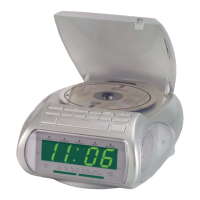
Press the button “Memory”
g
once. In the
display
d
the hour indicator blinks.
3
Set the hour indicator by pressing the but-
tons
o
resp.
a
. Subsequently press
the button
i
to change to the setting of
the minutes indicator. e minute indicator
is now blinking.
4
Set the minute indicator by pressing the
buttons
o
resp.
a
.
5
Press the button “Memory”
g
again once.
In the display
d
the day indicator for the
date blinks. Set the day indicator by pressing
the buttons
o
resp.
a
. e weekday
indication before the date indication is au-
tomatically adapted for the set date display.
e abbreviations in the display
d
stand for
the following weekdays:
MON
æ
Monday
TUE
æ
Tuesday
WED
æ
Wednesday
THU
æ
ursday
FRI
æ
Friday
SAT
æ
Saturday
SUN
æ
Sunday
6
Press the button
i
to change to the
setting of the month indicator. e month
indicator now blinks.
7
Set the month indicator by pressing the
buttons
o
resp.
a
.
8
Press the button
i
again to change to
the setting of the year indicator. e year
indicator now blinks.
9
Set the year indicator by pressing the but-
tons
o
resp.
a
.
10
Press the button “Memory”
g
again once.
In the display
d
“HR” blinks. HR in-
dicates the hour display format, as used
in the majority of the European and Asian
countries.
To change to the hour AM/PM display for-
mat, typical in the USA: Press the button
o
resp.
a
once. In the display
d
“12HR”
blinks, the time is now shown in the 12 hour
display format.
|



 To Next Page