SHANGHAI ESURVEY GNSS CO., LTD.
4
2.3 Battery Indicator
Through the battery indicator, you can know the battery level:
Number of green indicator
2.4 Power Button
Through the power button, you can achieve the following:
Power on the receiver: long press the button for 3 seconds and release it. All
indicator lights will be on.
Power off the receiver: long press the button for 3 seconds, release it until you hear
the voice Power off?, and press the button again.
Broadcast the current mode: press the button after powering on. The receiver will
broadcast the current working mode, including rover, base or static.
Self-check: to troubleshoot the receiver when the receiver cannot work normally,
long press the button for 2 seconds, release it until you hear the voice Power off?,
and long press the button for 3 seconds until you hear the voice Self-check.
Check the battery level: press the button. The battery indicator shows the battery
level.
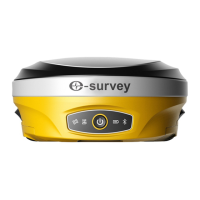
2.5 5-pin Port
Through 5-pin port, you can connect an external radio and external power, or output
NMEA messages.
Definition of this port is as follows:


 To Next Page