SHANGHAI ESURVEY GNSS CO., LTD.
3
2 E300 at a Glance
The E300 Pro main body is designed with magnesium alloy material to provide durable
usage and better heat dispersion and light weight 940g. And when it's fully charged, it can
continuously work for 12h.
2.1 Appearance
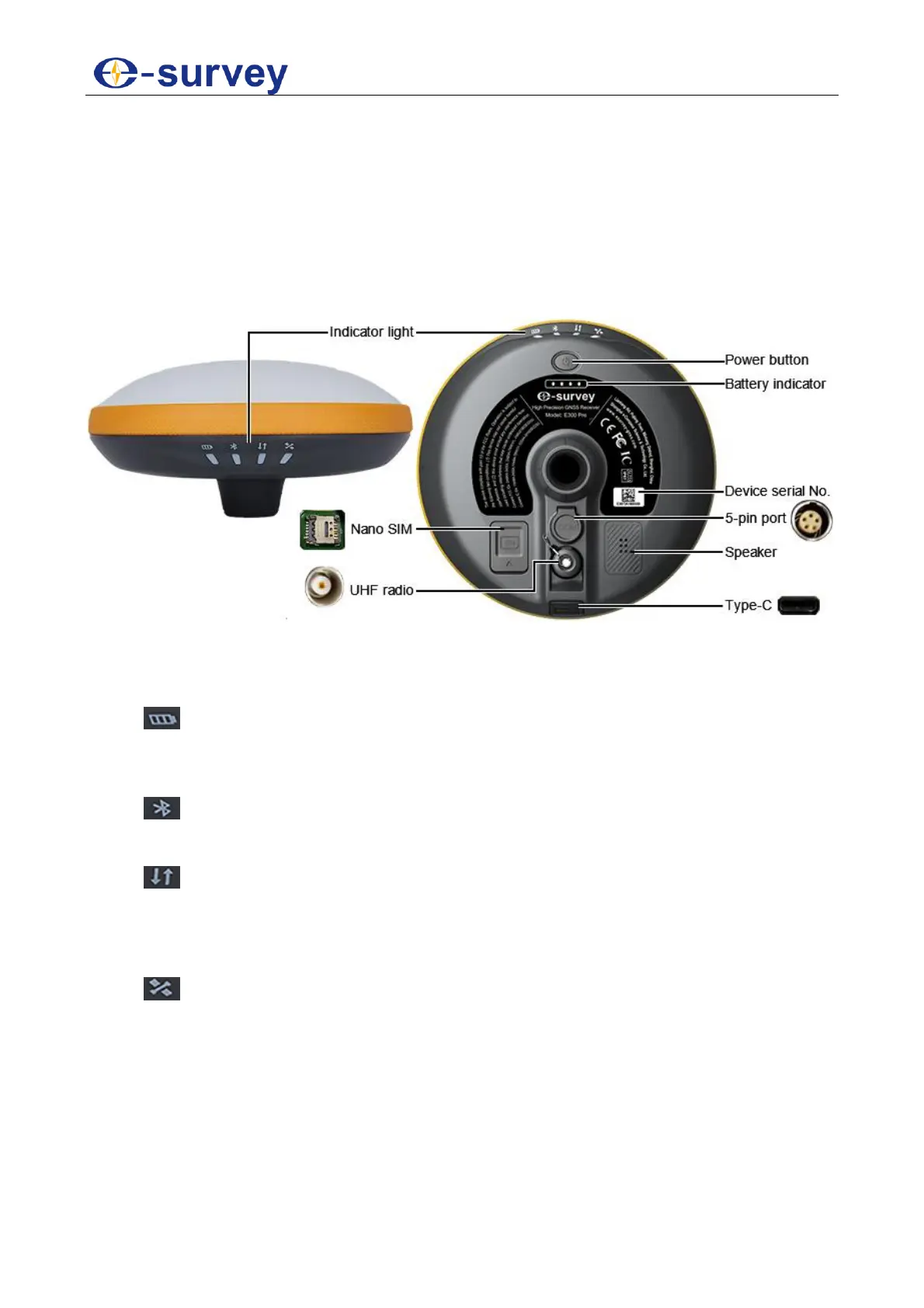
The E300 Pro main body is as follows:
2.2 Indicator Light
Through the color of the indicator light, you can know the following:
Battery status
o Green: battery level 30% - 100%.
o Flashing green: battery level 10% - 30% (speaker will beep).
o Flashing red: battery level below 10%.
Bluetooth status
o Off: Bluetooth not connected.
o Blue: Bluetooth connected.
Datalink status
o Green: datalink is ready to start.
o Flashing green: datalink is transmitting data normally.
o Flashing blue: light flashes according to the interval with raw data recording
enabled.
Satellite status
o Off: no receiving satellites.
o Green: fixed solution.
o Flashing red: receiving satellites without no solution status.
o Flashing green: have solution but not fixed.
o Flashing red and green alternately: the mainboard abnormal.


 To Next Page