11
Go to Table of Contents
Microphone Level
User 1
Speak into the microphone and adjust the microphone level so that the input volume is in the
[Good] range.
Increase the microphone level if the input volume is too low, and decrease the microphone level
if the input volume is too high.
Back
Input Volume
Microphone Level
OK
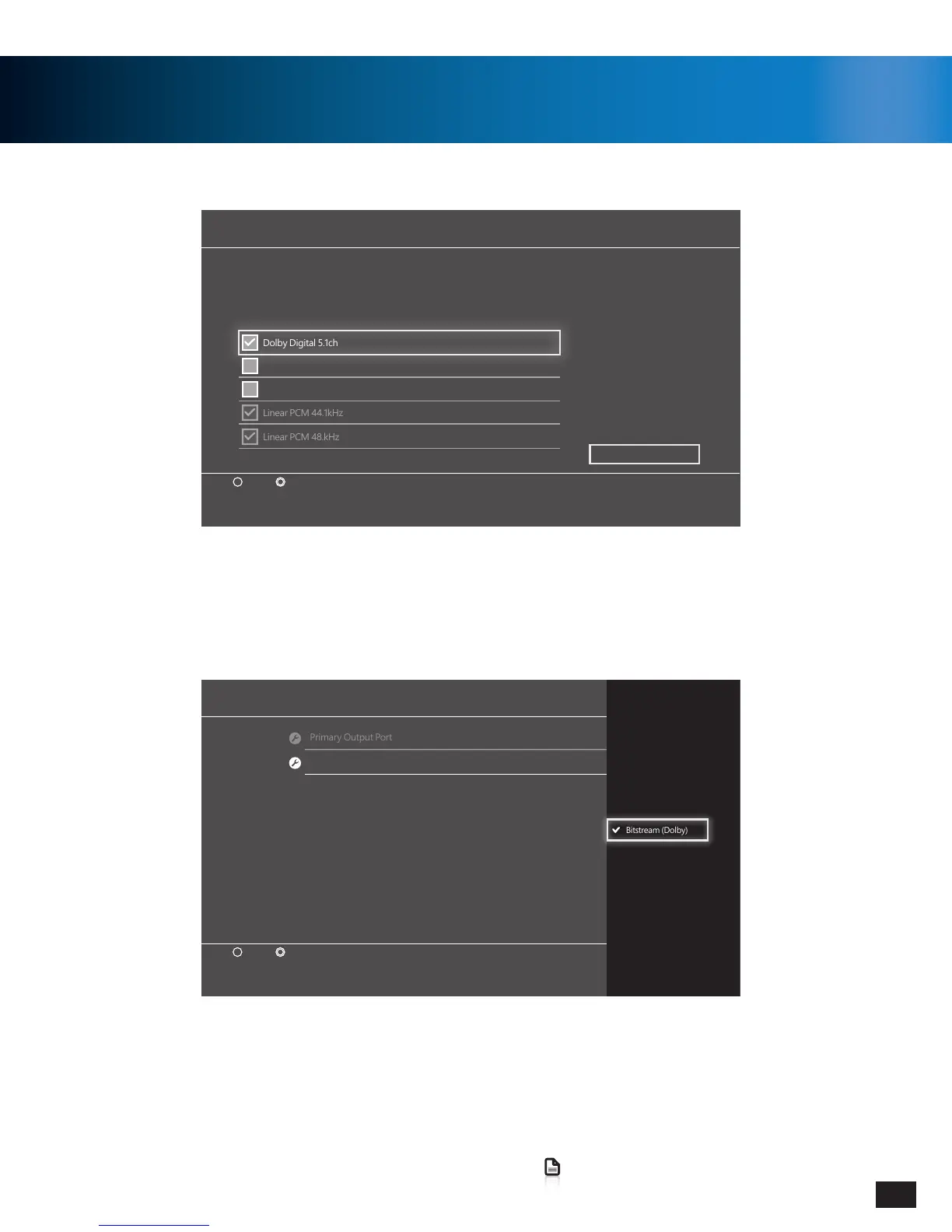
Audio Output Settings
Audio Format (Priority)
Enter Back
Linear PCM
Bitstream (Dolby)
Bitstream (DTS)
x
Primary Output Port
Enter Back
x
Select the input format supported by the device (TV, AV amplifier or receiver) that is connected using the
DIGITAL OUT (OPTICAL) port.
Note that if the device does not support the selected format, the speakers might be damaged.
Dolby Digital 5.1ch
DTS 5.1ch
AAC
OK
PS4
™
Setup
3. Go to Settings >> Sound and Screen >> Audio Output Settings >>
Audio Format (Priority)
4. Select Bitstream (Dolby)
1. Go to Settings » Sound and Screen » Audio Output Settings » Primary Output Port »
Digital Out” (OPTICAL).
2. Select Only Dolby Digital 5.1ch.
Note: Do NOT select DTS 5.1ch.


 To Next Page