Move your caravan or trailer into the open. We recom-
mend using a spacious area with sucient safety dis-
tance to persons and objects until you are practised in
manoeuvring with the easydriver.
Activate the easydriver with a double-click
on the I/O button on the remote control.
All status LEDs will light up in short se-
quence. A short signal sound and the contin-
uously lit trailer symbol indicate readiness
for operation.
Check whether the easydriver is operational
by pressing the buttons on the remote con-
trol.
B2 Switching ON the easydriver
B3 Swivelling on the drive rollers
Use the remote control to move the drive rollers onto
the tyres.
Loosen the hand brake of your caravan or
trailer only once the easydriver has been
completely swivelled o.
You can now manoeuvre according to the
symbols shown on the remote control. The
vehicle only moves as long as you are
holding one of the buttons.
B4 Manoeuvring
The remote control automatically switches o and has
to be switched on again when you do not press a but-
ton within 60 seconds.
GB8
7. Commissioning/operation
Switch on the main switch. Ensure that all
drive units are uncoupled from the vehicle
tyres.
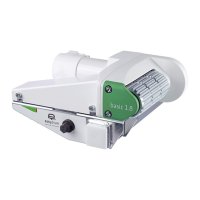
B1a Switching on the system 1.8
Take care that no persons remain in the
manoeuvring range of the trailer or caravan
during manoeuvring!
Also check the side of the caravan or trailer
opposite you.
Keep a sucient safety distance while
manoeuvring.
Always remain at a sucient distance to the
drive rollers, also during maintenance or
cleaning work.
Switch the system to a current-free state and
secure the vehicle against rolling before work-
ing in the area of the drive rollers
Caution: Read the FAQs (A5) when the drive rollers
do not turn.
B1b Switching on the system 2.3
Switch on the remote switch. The LED of the
switch is lit up in green when the system is
switched on.
Ensure that all drive units are uncoupled from
the vehicle tyres
The display flashes until the swivelling-on process has
been completed. The motor drive automatically switch-
es o once the end position has been reached. The
manoeuvring process may only be performed in this
position.
The symbol is permanently lit up once the swivelling-
on process has been completed.
English
Press the two arrow buttons on the
remote control and hold them down
until the drive rollers have been fully
extended.


 To Next Page