1. Key features
Color JPG/PDF scan selection
900/600/300 dpi scan selection
Direct save JPG/PDF file to microSD card
Support microSD card up to 32GB
Driver free to download for Windows 7 / Vista / XP and
Mac OS10.4 or above (direct plug-in, driver installation not required)
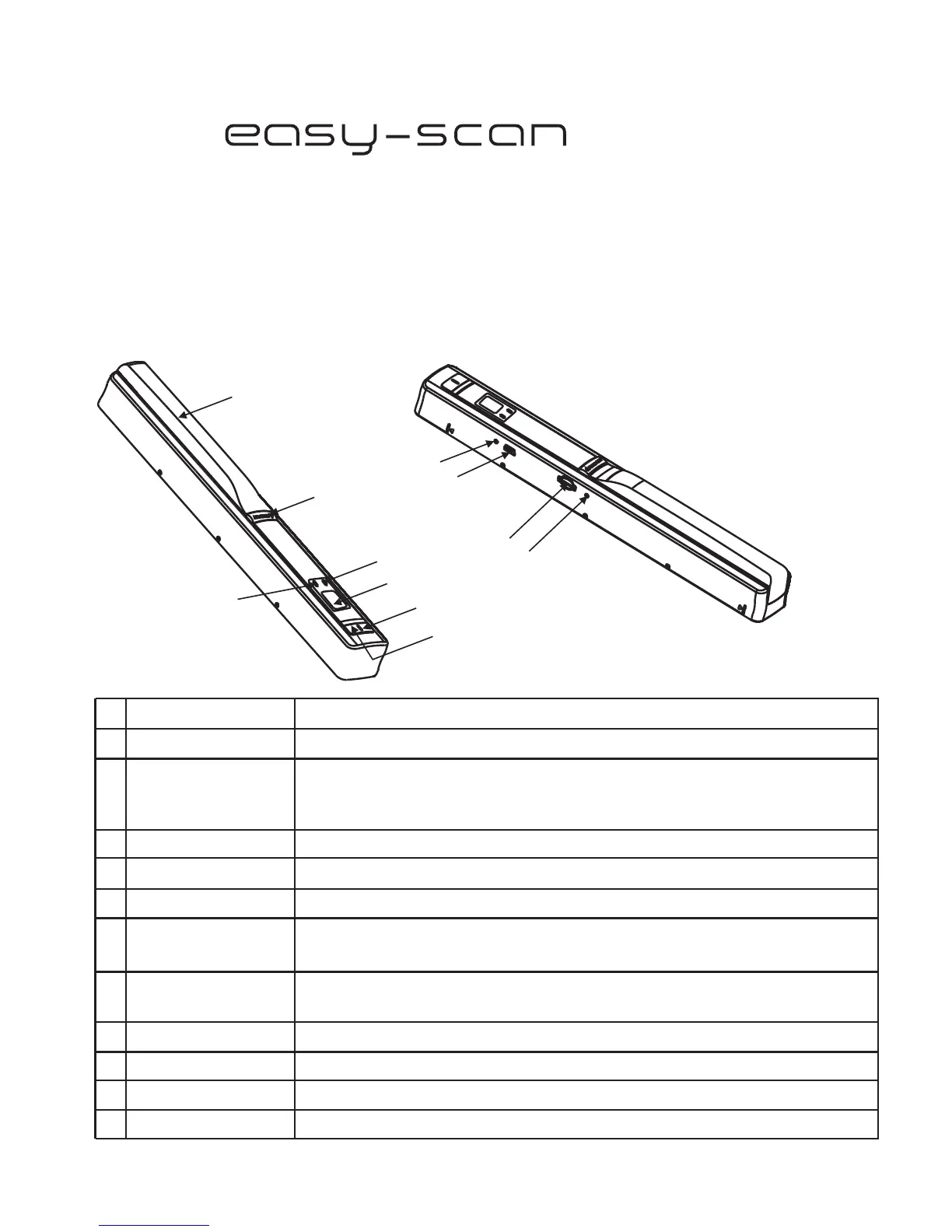
Part Function
1
2
3
4
5
6
7
Battery door
For 2x AA alkaline batteries
Power/Scan
Power On/ Off: Press and hold this key for 2 seconds to turn
power on or off. In power on mode, press this button to start scan,
press this button again to stop
LCD screen
Scanning status display
Resolution
JPG/PDF
Select High(900dpi)/Middle(600dpi/)Low(300dpi) resolution;
High/ /Low resolution mode icon will be displayed on status LCDMiddle
Select scan, JPG/PDF
mode icon will bedisplayed on status
LCD
JPG/PDF
USB interface
SD card slot
MicroSD card storage location.
Download photo to a computer via USB cable provided.
Scan LED indicator
8
2. Functional parts
Ready for scan: Green LED on
Error LED indicator
Over speed: Red LED on
9
10
Format button
Press this button to format the microSD card.
Manual
11
Time set
Press to enter Time setting mode
1
2
3
5
7
6
4
8
9
10
11


 To Next Page