11
OK button
ÎÎÎÎ
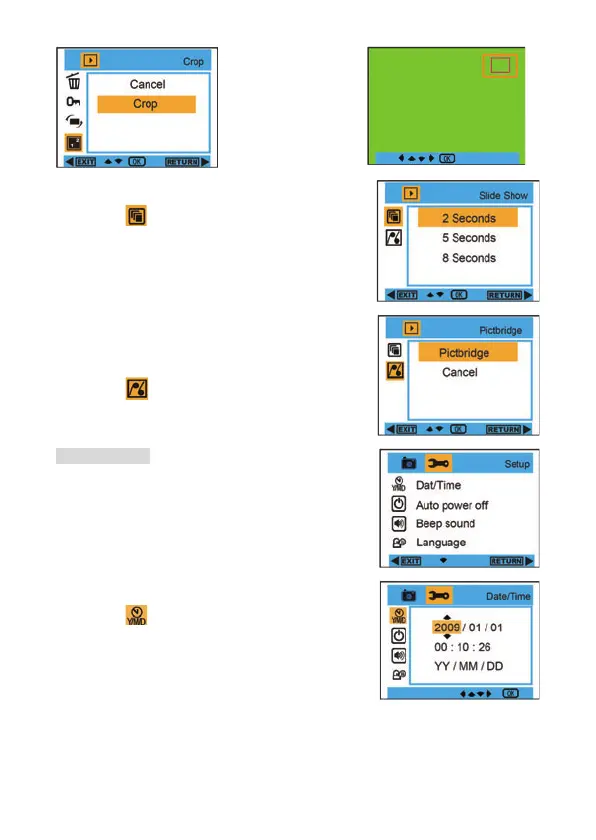
Slide Show :
1. Enter into Playback mode, and press Menu button to
select ”
Slide Show ”.
2. Press OK button, and then press Up/Down button to
select
2 / 5 / 8 seconds.
3. After selection, please press OK button to confirm, or
select Right button to return without any selection.
Pictbridge :
Your camera allows you to print the photos with printer. The
operation is as below:
1. After Choosing the photo, then press MENU/Left button
into Playback mode, and press Up/Down button to
select “
Pictbridge” or exit.
2. Connect your camera to compatible printer with USB
cable correctly for printing.
Camera Setup
Under Camera or Video Mode, please press Menu/Left
button, and then press Right button to enter into setting list.
Press Up/Down button to select
Date/Time , Auto power
off , Beep sound , Language , Date Stamp , Frequency ,
Format , or Default Setting.
Date/Time :
1. Enter into Camera Mode, and press Up/Down button to
select ”
Date/Time”.
2. Press OK button, and then press Up/Down/ Left /Right
button to set
Date/Time.
3. After selection, please press OK button to confirm, and
press Left button to exit. Or, select Right button to
return.














 To Next Page