20
第九步:切片软件设置
Step 9 - Slicing Software Settings
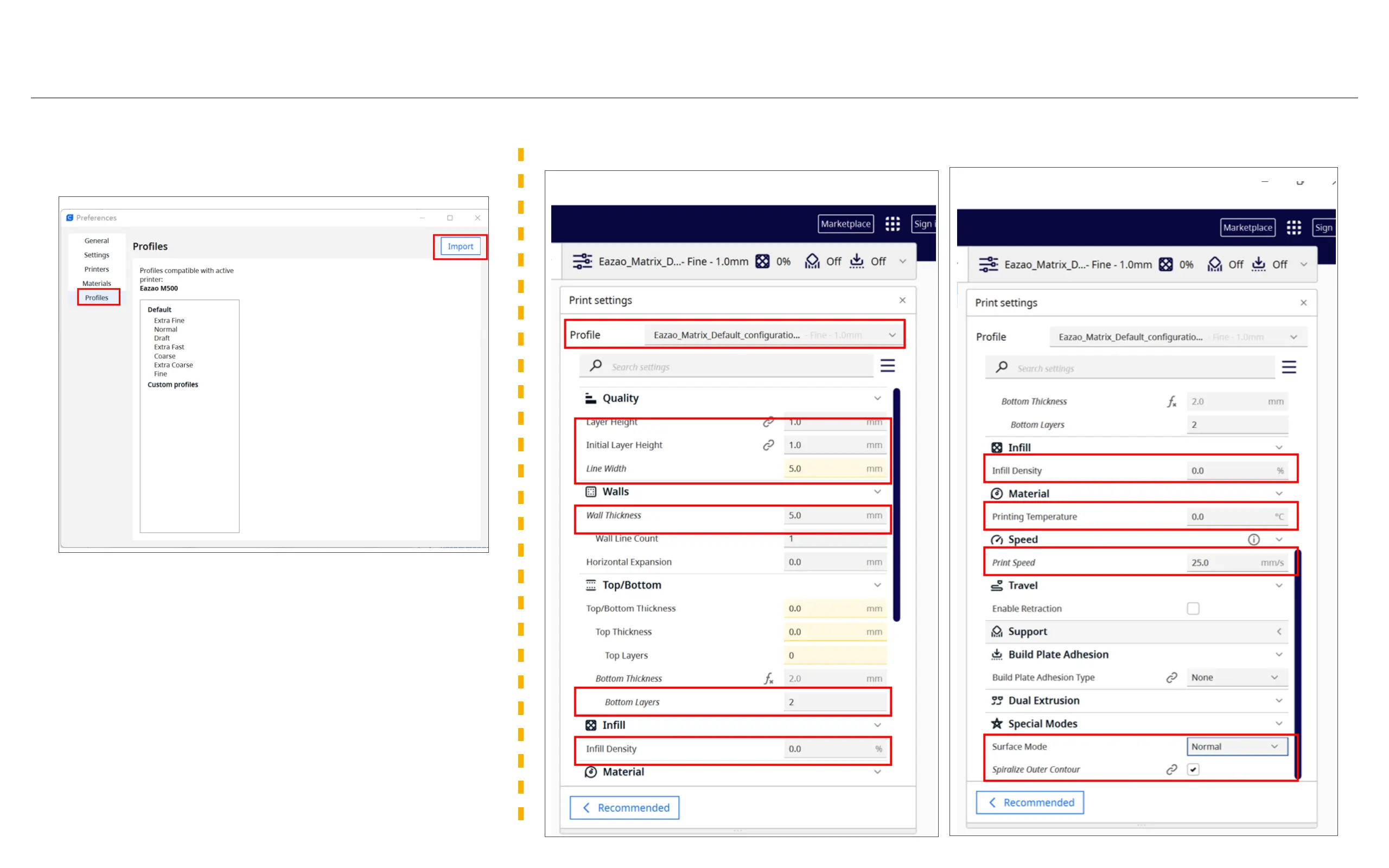
Import configuration file: Click "Preferences" and select "Pro-
files". Click "Import" in the upper right corner and select the
configuration file in the SD card: Eazao_Matrix_Default_con-
figuration_20230520 (the file is under the Cura folder in the SD
card).
导入配置文件:点击“Preferences”,选择“Profiles”。点击右上
角“Import”,选择SD卡内的配置文件:Eazao_Matrix_Default_
configuration_20230520(该文件在SD卡内Cura文件夹下面)。
After importing the file, you can click "Profile" on the right fig-
ure and select the configuration file settings. If the import fails,
you can configure the parameters yourself by referring to the
figure on the right.
导入文件后,可以在右图点击“Profile”,选择配置文件设置。如果
导入失败,可以参照右图手动配置参数。
2.Manual parameter setting /手动参数设置
1.Import parameter setting /导入参数设置



 To Next Page