33
CONSOLE INFORMATION
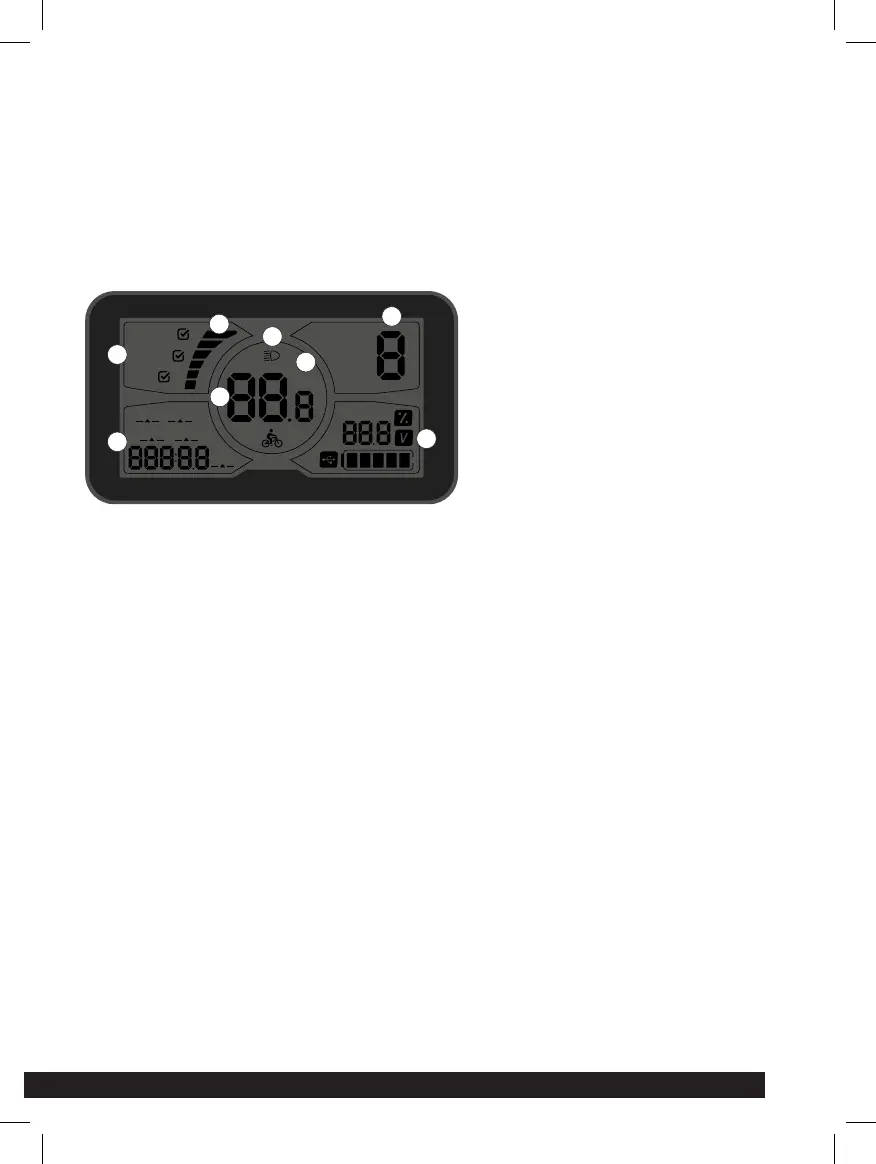
C600 CONSOLE FEATURES
The C600 oers a wide range of functions and indicators tailored to user
needs.
1. RIDING AND MODE
SELECTION
This feature is not
available by default.
2. CURRENT DISPLAY
This represents the
discharge current of the
controller , each segment
is 2A.
3. SPEED DISPLAY
Displays the current
speed.
4. BACKLIGHT
INDICATOR
Once powered on, click
ON / OFF and turn on the
backlight.
5. KM/H AND MPH
Select KM/H or MPH as the
current display unit.
6. INFORMATION DISPLAY
SET: the user enters the configuration interface; the The SET
icon will flicker at 1Hz.
PAS: displays the current output assist power.
Error: displays the current error code.
Note: if PAS assistance is at 0, the accelerator will not work.
7. DISPLAY OF DRIVING INFORMATION
ODO: ODO records driving mileage to use the accumulated
value it cannot be cleared.
TIME: displays the time at which the speed of a single trip is
greater than 1km/h.
Trip: The display shows the user’s individual driving.
8. BATTERY INFORMATION DISPLAY
Electricity percentage display: this function is unavailable by
default.
Voltage display: Shows current battery voltage.
Cycle time display: this function is unavailable by default.
Electric quantity display: shows the quantity of electric current.
SET
PAS
Error
KM/H
MPH
POWER
NORMAL
ECO
BMS
ODO TIME
TRIP 2
to GO
TRIP 1
1
2
3
5
6
7
4
8



 To Next Page