.ifs
—
gib;
580-80
év GO.°
.
2
°P
u
55083
22
Hold
button to start up and enter display 1.
€~7
,
r, >. 4313132C
-
t
BB
.
?
'Baan.
<2C'
EI
Cl
After power on for 5 seconds, hold
and
El
button at the
same time, single trip riding time (TM) and single trip distance (DST) flash,
hold tql button shortly, the content of both is cleared. If failed holding
the button within 5 seconds, it will automatically return the display interface after 5 seconds, original
content is preserved.
3.
Display 2
OBE
,
C5' .
fl uu
nol
.
2
-
53
U •
OCEILIO
22.
Hold !IR button si
-
ortly in display 1 to enter display 2.
El
1:1
EI
B sa
8138E18 -r88.
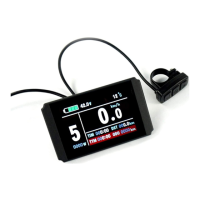
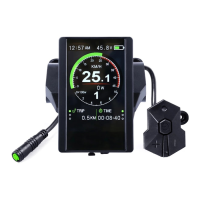
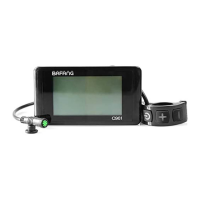
KT-LCD3 eBike Display User Manual
Dear customer, please read this manual before you use KT-LCD3 instrument. The manual will guide
you use the instrument correctly to achieve a variety of vehicle control and vehicle status display.
Functions and Display
Instruments using the structure form of instrument body portion and the operation buttons are
designed separately.
off the power. When the motor stops driving and when the e-bike is not used for
minutes, it will automatically shut down and turn off the motor power supply.
2. Display 1
a consecutive 5
Cruise
DOWN Button
Battery capacity indicatur
Backlight and headlights
The brake display
Single trip time
11
MXS
AVS
Mil
6Km/H push power assist
Riding speed(metric)
Riding speed
(imperial)
MAX speed
Average speed
Distance(metric)
Distance
(imperial)
1
2
3
4
1
7
.10
101
TM
Total trip time
Power dIsplay
Motor temperature
Motor fa hrenheit
12
DST
ODO
VOL
ASSIST
Trip distance
Total distance
Battery voltage
Pas level
TTM
MOTOR
°
C
8
MOTOR T
MOTOR W
Environment temperature
9
Environment fahrenheit
10
jt
Km/H
Or"
5
6
7
UP Button
SW Button
Operation
1. ON/OFF
Hold nal button long to turn on the power, and hold
1131
button long for a second time to turn
Hold
button long to turn on backlight and headlights (the
controller should have headlight drive output function); hold
es
button
long again to turn off the backlight and headlights.
2.2
Assist ratio gear (ASSIST) switch
Hold
n
or
ri
button shortly to switch 1-5 file gear. Gear 1 is for
the minimum power, gear 5 is for the highest power. Each startup will
automatically restore the gear shutdown last time(the user can set
randomly). Gear 0 is without booster function.
2.3 6Km/H assist promotion function
Hold
ta
button and "Pt flashes, the vehicle drives at the speed not
more than 6Km /h. Release
Cl
button, the function is invalid.
After the cruise function is turned on, the trip riding speed is greater
than 7 km/ h, hold
12
button long and enter cruise, the CRUISE lit. Brake
or hold any button to cancel.
2.5 Display and delete of single data
In the riding mode after 5 seconds, display 2 autorratically returns to display 1, and the original
motor power (MOTOR W) display is replaced with moto' operating temperature display
2.1
Turn on backlight and headlights
2.4 Cruise function
<WK
88,7.
as..'!
,
.ti'g
t-„.
8888
8
"
-ras
IMEM~Z~~111
•
888 88 ;
h
1313.P
"
8888
8 -i138.

 Need help?
 General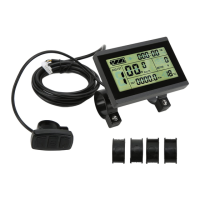

 To Next Page