EasyManua.ls Logo

eBike KT-LCD8H - User Manual

eBike KT-LCD8H
2 pages
Print Icon
To Next Page IconTo Next Page
Loading...
KT-LCD8H eBike Display User Manual
Dear customer, please read this manual before you use KT-LCD8HDisplay. The manual will guide you use
the instrument correctly to achieve a variety of vehicle control and vehicle status displays.
Functions
and
Display
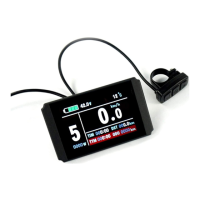
Instruments using the structure form of instrument body portion and the operation buttons are
designed separately.
1
UP Button
10
Backlight and headlights
2
SW Button
11
Environment temperature
3
DOWN Button
Environment fahrenheit
4 MOTOR
W
Power display
12 Km/H
Riding speed(metric)
5
ASSIST
Pas level
13
AVS
Average speed
6Km/H push power assist
MXS
MAX speed
6
THROTT
LE
Run sign
14
DST
Trip distance
7
Battery capacity indicator
ODO
Total distance
8 VO
L
Battery voltage
15
TIM
Single trip time
9
The brake display
TTM
Total trip time
1. Operation
1.
ON/OFF
Hold button long to turn on the power, and hold long for a second time to turn off
the power. When the motor stops driving and when the e-bike is not used for a consecutive
5 minutes, it will automatically shut down and turn off the motor power supply.
2.
Display
1
Hold button to start up and enter display .
2.1 Turn on backlight and headlights
Hold long to turn on backlight and headlights (the
controller should have headlight drive output function); hold
long again to turn off the backlight and headlights.
2.2 Assist ratio gear (ASSIST) switch
Hold or shortly to switch 1-5 file gear. Gear 1 is for
the minimum power, gear 5 is for the highest power. Eachstartup
will automatically restore the gear shutdown last time (the user can
set randomly). Gear 0 is without booster function.
2.3 6Km/H assist promotion function
Hold and flashes, the vehicle drives at the speed not
more than 6Km /h. Release button, the function isinvalid.
2.4
and
delete
of
single
data
After power on for 5 seconds, hold and at the
same time, single trip riding time (TM) and single trip distance
(DST) flash, hold button shortly, the content of both is
cleared. If failed holding the button within 5 seconds, it will
automatically return the display interface after 5 seconds, original content is preserved.
3.
Display
2
Hold button shortly in display 1 to enter display 2.
In the riding mode after 5 seconds, display 2 automatically
returns to display 1, and the original motor power (MOTOR W)
display is replaced with motor operating temperature display
(MOTOR ℃) display (the internal motor should be equipped
with the temperature sensor and the output of temperature detection signal).
4.
Display
3
Hold button shortly in display 2 to enter display 3.
In the riding condition, five seconds later, a single maximum
speed (MXS) display automatically returns to the real riding
speed (Km/H).
5.
In
display
3,
hold
button
shortly
(SW),and
the
display
will
re-enter
display
1.
6.
Hold
button
to
turn
off
the
display
and
the
power
supply
of
controller.
Question and Answer IconNeed help?

Do you have a question about the eBike KT-LCD8H and is the answer not in the manual?

Summary

KT-LCD8 H eBike Display Functions and Operation

Power ON;OFF and Automatic Shutdown

Controls the power for the ebike display and motor, with automatic shutdown after 5 minutes of inactivity.

Display 1 and Core Features

Accesses the main display and enables backlight, assist ratio, 6Km/H assist, and single data deletion.

Display 2 and Motor Temperature

Switches to Display 2, showing motor operating temperature instead of power.

Display 3 and Maximum Speed

Switches to Display 3, showing maximum speed (MXS) which reverts to riding speed.

Display 4 and Cycling Through Modes

Allows cycling through various display modes, including Display 4, via button presses.

Error Codes and Troubleshooting

Automatic Prompt Interface for Errors

Displays error codes for motor sensor, throttle, or short circuit faults, exiting automatically when resolved.

General Project Setting Procedures

Setting Maximum Riding Speed

Procedure to set the maximum riding speed (default 25Km/H) using buttons.

Setting Wheel Diameter

Procedure to set the wheel diameter specifications from a predefined range.

Setting Metric Units

Synchronous setting of metric units for speed, mileage, and ambient temperature.

Exiting Project Settings

How to save settings and exit the project setting environment.

Outline Drawings and Dimensions

Main Instrument Body Dimensions

Provides the physical dimensions for the main instrument body.

Double Brackets Mounting Dimensions

Details the dimensions required for mounting the double brackets.

Button Box Dimensions

Specifies the physical dimensions of the button box.

Wiring Diagram

Illustrates the wiring connections for the display.

eBike KT-LCD8H Specifications

General IconGeneral
Display TypeLCD
Voltage24V/36V/48V
Handlebar Size22.2 mm
Communication ProtocolUART
Waterproof LevelIP65
BacklightYes
FunctionsSpeed, Distance, PAS levels, Battery level, Error codes
CompatibilityKT Controllers
Operating Temperature-20°C to 60°C

Related product manuals