Need help?
Do you have a question about the eBike P850C and is the answer not in the manual?
Controls the display's power state, including automatic shutdown.
Adjusts the bike's assistance levels using UP/DOWN buttons.
Enables and sets a startup password for the display.
Sets the maximum speed limit for the e-bike.
Customizes the number of assistance levels available (3, 5, or 9).
Resets all settings to their original factory defaults.
Provides detailed battery status including voltage, current, capacity, and temperature.
The P850C is a custom-built e-bike display designed to provide riders with a comprehensive and user-friendly interface for managing their electric bicycle. Its primary function is to display key riding data and allow for various settings adjustments, enhancing the overall e-bike experience.
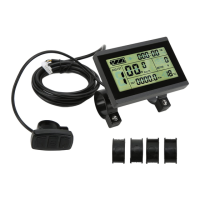
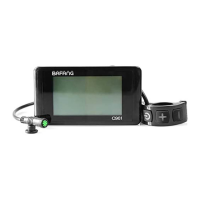
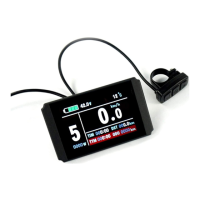
The P850C display serves as the central hub for monitoring and controlling your e-bike. It features a high-contrast 3.2-inch IPS color matrix screen that presents information clearly, even in varying light conditions. The display provides real-time data such as speed (current, average, and maximum), power output (digital, analog, or current), and battery status. It also tracks mileage, including odometer, trip distance, and riding time.
One of its core functions is managing the assist levels, offering 3, 5, or 9 levels of assistance, which can be customized to suit individual riding preferences. The display also includes a walking mode, providing a small amount of power to assist when pushing the bike. For safety and convenience, it features an error code indicator to alert users to potential issues with the e-bike system.
The P850C is equipped with an integrated headlight/backlight control, allowing users to turn the lights on or off and adjust screen brightness for daytime or nighttime riding. A light sensor is also included, which can be set to automatically adjust screen brightness based on ambient light.
The P850C is designed for ease of use with ergonomic external buttons.
Power On/Off: To power the display on or off, simply press and hold the "Power" button for 1 second. The display can be configured to automatically shut down after a period of inactivity, which can be set between 1 and 9 minutes. If a password is set, it must be entered upon power-on.
Assist Level Operation: Changing assist levels is straightforward. Short presses of the "UP/DOWN" buttons allow you to cycle through the available assist levels, from 0 (no assistance) up to 9 (maximum assistance). These levels can be further customized in the settings menu or via a USB programming kit.
Speed & Mileage Mode Switch: The "Power" button also functions as a toggle for switching between different speed and mileage display modes. A short press cycles through "TRIP," "ODO" (Odometer), "RANGE," "TIME," "MAX SPEED," and "AVG SPEED." The "RANGE" feature requires smart BMS support. If no operation is detected for 5 seconds, the display automatically reverts to the real-time speed display.
Headlight/Backlight Control: To activate or deactivate the headlight and backlight, press and hold the "UP" button for 1 second. The screen will adjust to the corresponding mode (daytime or night mode), provided an integrated headlight is fitted. It's important to note that if the battery level is too low, the motor will stop, but the light may continue to operate for a period, allowing safe pedaling home.
Walking Mode: For situations where you need to push your bike, the walking mode can be activated by pressing and holding the "DOWN" button for 2 seconds. This mode provides a low level of power assistance. This feature requires controller support.
Data Cleanup: To reset ride statistics such as average speed, maximum speed, trip distance, and riding time, press and hold both the "UP" and "DOWN" buttons simultaneously for 1 second. These statistics are not erased when the display is powered off.
Settings Menu Navigation: The P850C offers a comprehensive settings menu for advanced customization. To enter the settings menu, double-press the "Power" button (with an interval of less than 0.3 seconds). Once in the menu, use the "UP/DOWN" buttons to change parameter settings and the "Power" button to switch to the next item. Double-pressing the "Power" button again will exit the menu. The display will automatically exit the settings menu after 30 seconds of inactivity or if you start riding, for safety reasons.
Language and System Settings: Within the settings menu, you can adjust the display language (default is English) and switch between Metric and Imperial units for measurements.
Brightness Control: The backlight brightness can be adjusted from I (dark) to IIIII (very bright), with I being the default. This setting can be independently configured for daytime and night modes.
Auto Off Timer: The auto-off time, which determines how long the screen remains on without activity, can be set from 1 to 9 minutes or turned "OFF." If "OFF" is selected, the screen will only turn off when the power button is pressed. The default auto-off time is 5 minutes.
Battery Indicator: The battery indicator can be configured to display voltage, percentage, or be turned "OFF." Accurate percentage display requires a specialist battery.
Power Indicator: The power indicator can be set to show power output (Power) or current (Current). This data represents the power output from the battery, not the motor.
Clock Setting: The display includes a clock function. To set the year, month, day, hour, minute, and second, press the "Power" button to enter the clock setting menu and use the "UP/DOWN" buttons for adjustments. A battery inside the screen ensures the clock maintains time even when the display is off, and it charges when the screen is on.
Start Password: For added security, a start password can be set. To access the password setting menu, press the "Power" button. If "Start input ON" is enabled, the correct password must be entered before the display powers on. You have 30 seconds to input the password at power-up, otherwise, the display will power down.
Wheel Size Setting: The wheel size can be adjusted in the basic settings, with options ranging from 16 to 31 inches, including common sizes like 26, 27.5, and 29 inches.
USB Port Control: The USB port can be enabled ("ON") or disabled ("OFF"). When "OFF," the USB port is non-functional.
Light Sensor Sensitivity: The light sensor can be toggled "OFF/ON," and its sensitivity can be set to high, medium, or low.
Advance Settings (Password Protected): Access to advanced settings, such as speed limit, assist levels, and error codes, requires a password (default is '1919').
Speed Limit: The speed limit can be adjusted from 10 km/h to 45 km/h. The default is 25 km/h. It's crucial to note that the UK legal limit on roads is 25 KPH or 15.5 MPH. The speed and current limits are also restricted by the controller and motor.
Assistance Levels Customization: In the advance settings, you can customize the assistance levels, with options for 3, 5, 9, or UBE (factory default settings).
Error Code Display: The display can show the last 10 error codes, providing valuable diagnostic information.
The P850C incorporates features that aid in maintenance and troubleshooting.
Error Code Indicator: The display's ability to show error codes (e.g., 0x01 for Normal, 0x03 for Brake signal, 0x04 for Throttle on high position, etc.) is a key maintenance feature. When an error occurs, a warning icon appears, and the specific error code is displayed, helping users or technicians quickly identify and address issues with the motor, controller, battery, or sensors.
Battery Information: The "Battery info" section provides detailed data crucial for battery health monitoring, including voltage, current, average current, cycle times, capacity, remaining capacity, full charge capacity, temperature (max and min), and charge status. This information helps in understanding battery performance and potential degradation over time.
Product Information: The "Product info" section displays hardware and software versions, which can be useful for support and updates.
Factory Reset: The "Factory setting" option allows users to restore all parameters to their factory defaults. This can be a useful troubleshooting step if settings become corrupted or if a fresh start is desired.
Software Upgradeable: The P850C's software can be upgraded through UART, ensuring that the display can receive future improvements and bug fixes, extending its lifespan and functionality.
USB Charging Port: The integrated USB charging port (5V/500mA) allows for convenient charging of small electronic devices, adding to the display's utility.
Assembly Instructions: The manual provides clear assembly instructions, including torque values for screws and details on clamp installation and handlebar compatibility, which are important for proper setup and preventing damage. The use of rubber spacer rings for different handlebar sizes ensures a secure fit and prevents wear.
 Display
| screen size | 3.2 inch |
|---|---|
| screen type | IPS |
 Power
Power| battery supply voltage | 24V/36V/48V |
|---|---|
| rated operating current | 40 mA |
| max operating current | 100 mA |
 Ports & interfaces
| USB changing port voltage | 5V |
|---|---|
| USB changing port current | 500 mA |
| max output current to controller | 100 mA |
 Operating Environment
| operating temperature range | -20 to 70 ℃ |
|---|---|
| storage temperature range | -30 to 80 ℃ |
| off leakage current | < 1 uA |
 Weight and Dimensions
| length | 92 mm |
|---|---|
| width | 60 mm |
| height | 14 mm |

 To Next Page