1
Model: MCI-3000V4
General Information
The MCI-3000V4 is a multi units / apartments wireless intercom system that operates on the GMS mobile phone network.
It is very cost effective and saves you enormous hours of labor in installation and kilometers of wiring.
The MCI-3000V4 is operational on the 3G & 4G network and can be used for a building of apartments or for any complex
with up to 333 units. The installation takes a few minutes and requires connection to power supply and to the latch of the
pedestrian gate and to the driveway gate automation, if there is one. The unit requires a SIM card to be used to make
calls to the units. In addition, the MCI-3000V4 has an anti-vandal metal keypad that allows the users to open the gate
with a four digit pin code.
Explanation of how the intercom works:
There is a sign on the door station that says: “PRESS THE # KEY TO MAKE A CALL”.
When the visitor presses the # key, the system announces:
“Please press the unit number followed by the hash (#) key ”.
After which, the visitor will then press the unit’s number he wants to call, followed by the hash key.
For example, 903 # to call the unit Nine Hundred and Three. The system will then announce:
“Please wait; your call will be answered shortly ”.
The system will dial the first phone number of the unit which was programmed into the system, and wait
for the number of rings which was programmed. If there is no answer or in case line is busy, the system
will hang up automatically and dial the second and then the third number of the unit accordingly.
If there is no answer to any of the three numbers in the system, the system will then announce:
“Your call was not answered, please try later ”.
If the call was answered by any of the phone numbers, then, the owner of the unit can talk with the
visitor and press the hash key (#) on his phone to open the pedestrian gate (relay 1) or press the star key
(*) on his phone to open the driveway gate (relay 2). The system will then announce to the visitor:
“The gate is open, please come in ”.
GSM Access Control – opening the gate with mobile phones with no cost of a call
The unit can be programmed with 1000 phone numbers to become authorized users that are able to open the gate with
their mobile phone with no cost of a call or range limit. The system will respond to incoming calls and trigger the relay of
the unit according to the setting chosen (See section 6). The unit will trigger its output each time an authorized user calls
the SIM number of the unit and hang-up without answering the call. The unit will hang up to any unauthorized calls.
Metal Keypad Access Control
The system also can be programmed with 1000 pin-codes to enable the users to open the gate with a four-digit
pin-code on the metal keypad of the door station.
The SIM Card
You must use any MINI size SIM card which is not locked.
Insert the SIM card into any mobile phone and make sure that you can make a call.
YOU MUST call the mobile phone network (Telsra, Optus or any other network that the SIM card is
registered with) and cancel the Message Bank and the answering service on this SIM card.
N o t e!
• Make sure that you insert and remove the SIM card only when the power to the unit is OFF.
• You MUST NOT cut or extended the antenna’s cable or shorten it.
Important
! It is a must to read the instructions before installing and programming the unit.
Multi Channel GSM Intercom with Access Control

 Need help?
 General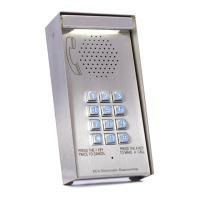

 To Next Page