Page 3 of 9
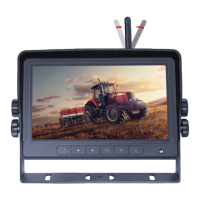
MONITOR PARTS IDENTIFICATION
OK
SEL
MENU
PAIR SYS MIR
VOL VOL
Press to enable or
disable mute
MUTE POWER
Press OK button to
enter menu item or
save user settings.
Press OK button -
shortcut for start/stop
recording
Volume decrease
and menu selection
left
Press to cycle
through camera
channels
Press to turn on/off
the monitor
Press to show menu
or exit menu
Volume increase
and menu selection
left
MIR - Flip selection
PAL/NTSC TV
system selector
Press to enter
pairing mode
Volume increase and
menu selection right
Jump key selector.
Fast jump to the
display mode
specied by SYSTEM
Menu Operation
• Press ‘M’ button on monitor or ‘menu’ button on remote control to show menu.
• Press ‘+’ or ‘- ‘button on monitor or VOL +/- on remote control to select sub-menu.
• Press button on monitor or ‘OK’ on remote control to enter sub-menu.
• Press ‘menu’ button again to return to the main menu.
Main Menu
Audio Source
• Select the channel that you want to hear the audio under split view mode.
• Press ‘+’ or ‘- ‘button on monitor or VOL +/- on remote control to switch option.
• Press on the monitor or ‘OK’ on the remote control to select the channel and exit the menu.



 To Next Page