GB
22
OPERATION
Cooling and air ow mode
• After turning on the air conditioner is in the cooling mode by default. You can also change the air
conditioner in the cooling mode using modes button 5. The cooling indicator is on.
• Using buttons 4 (up and down arrows) set the required temperature in the range from 17 °C to 30 °C.
• Press the air speed button 3 to choose between low, medium and high air speed.
Air ow mode
• Press the mode button 5 on the control panel or the proper button 5 on the remote control to select
air ow mode. The air ow indicator is on.
• Press the air speed button 3 to choose between low, medium and high air speed.
Dehumidi cation mode
• Press the mode button 5 on the control panel or the proper button 5 on
the remote control to select dehumidi cation mode. The dehumidi cation
indicator is on.
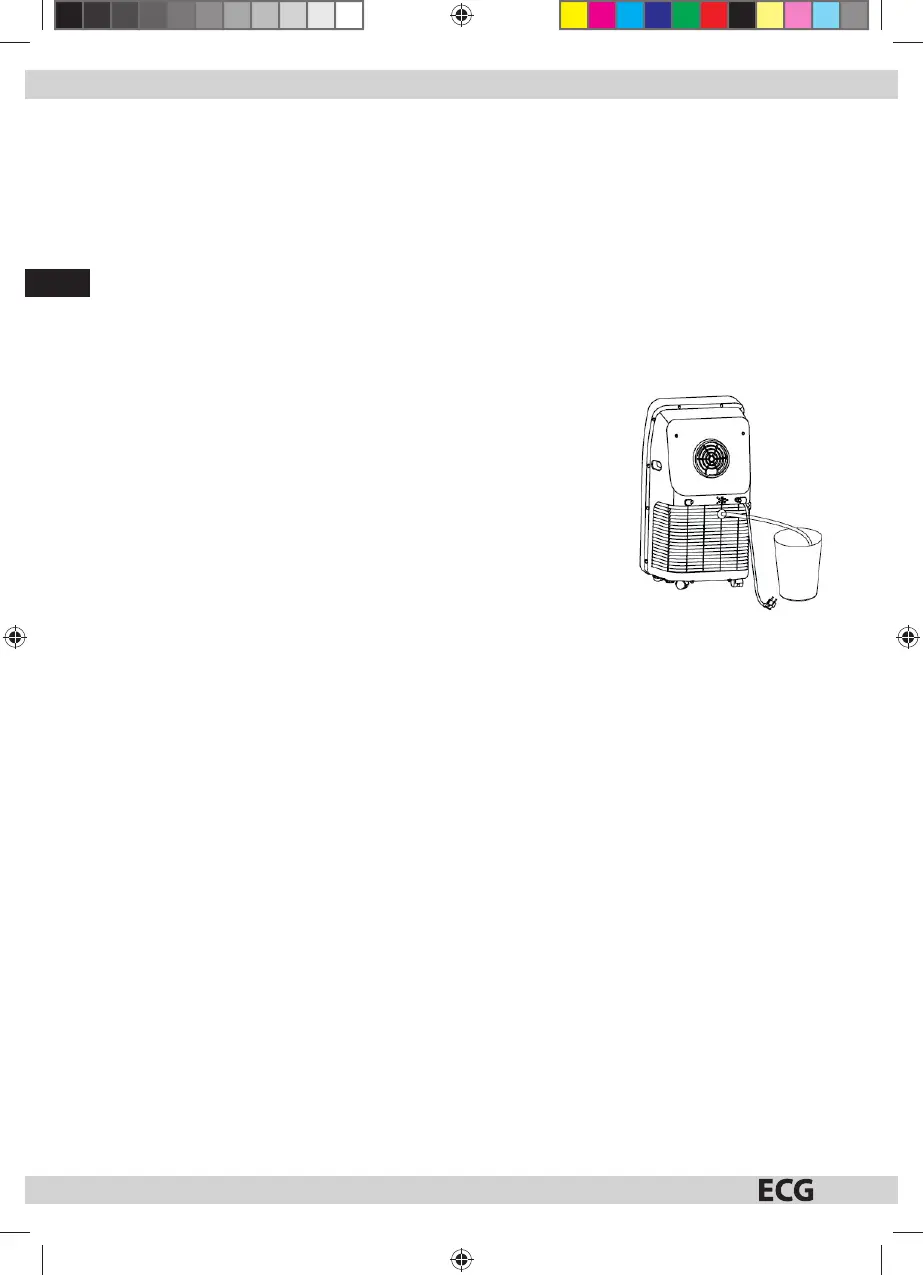
• As indicated in the picture, pull the plug from the drain for draining the
condensate 9 and insert hose in the outlet. Put the other end of the hose in
asuitable container or asink.
• If in the dehumidi cation mode the temperature in the room is higher
than 15 °C, the air conditioning compressor starts working. The operation is
then controlled as follows: When the temperature in the room drops below
13 °C, the compressor stops. When the temperature rises again above 15C,
the compressor starts again. If the interval between turning on and o the
compressor were less than 3 minutes, in order to protect the compressor
athree minutes delay was included before the restart.
• The fan runs by default at low speed and the speed of the air ow cannot be set in the dehumidi cation
mode.
• Temperature cannot be set.
Tip: When using the dehumidifying function remove the exhaust hose from the air conditioner. Otherwise, the
dehumidi cation is not e cient or the alarm “FL” appears indicating that it is full of water.
Automatic mode
• Press mode button 5 on the control panel or the proper button 5 on the remote control to select
automatic mode. The automatic mode indicator lights up.
• After selecting automatic mode the operating status depends on the ambient temperature: When
the ambient temperature is above 25° C, the air conditioner runs in cooling mode. When the ambient
temperature is lower than 25 ° C, the air conditioning runs in air ow mode.
Timer mode
• In the standby mode you can press the timer button 6 to set using the arrows 4 time to start the air
conditioning (0~24h). The timer indicator will light up.
• When turned on you can press the timer button 6 to set using arrows 4 time to shut o the air
conditioning (0~24h). The timer indicator will light up.
MK 103_manual_cz_sk_gb_hr.indb 22 1.2.2016 12:09:29



 To Next Page