17
Test interface B list above is for manufacturer use only
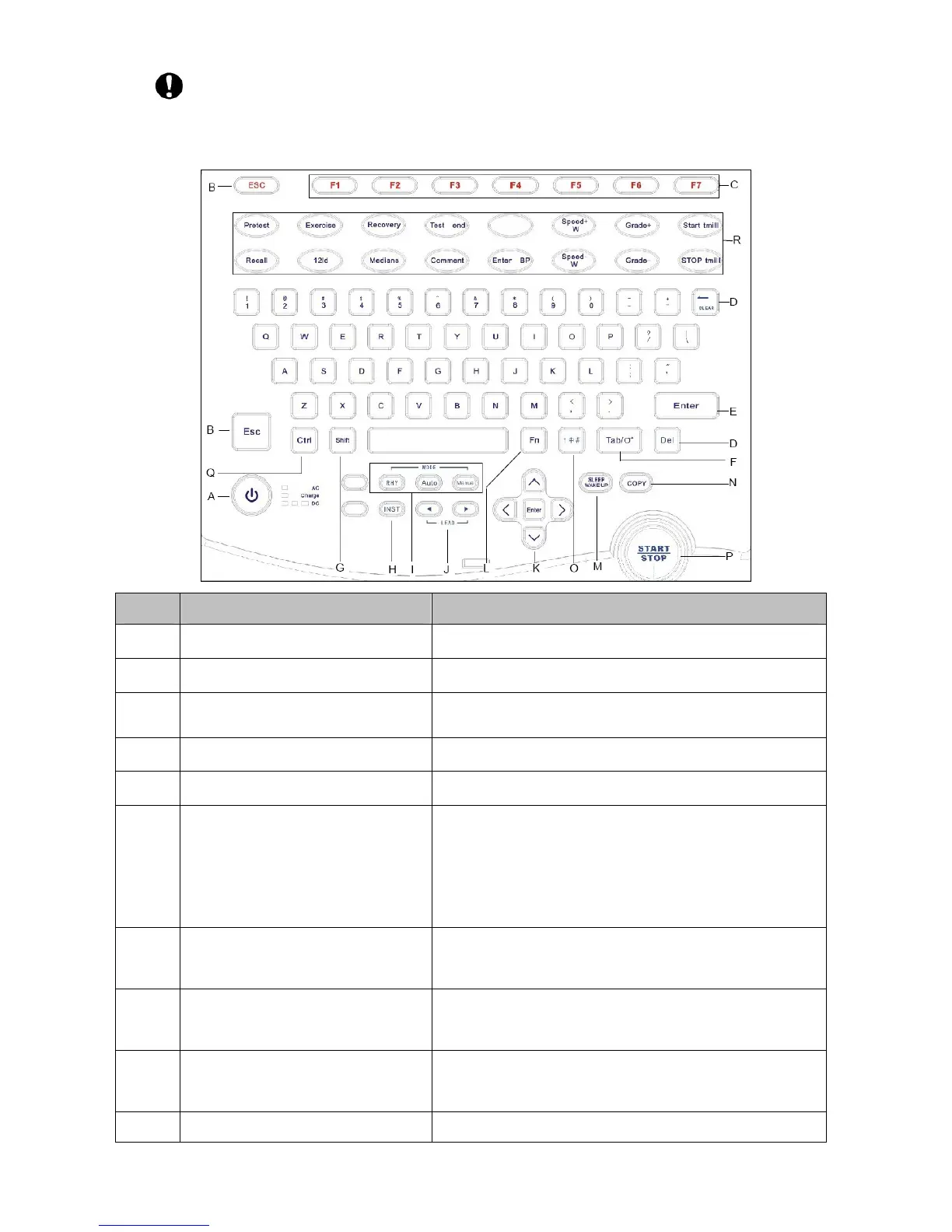
3.1.5 Keyboard and Its Functions
Sign Button name Function description
A ON/OFF Power on/ Power off
B Esc Cancel operation
C Function keys Select menu functions on the screen
D CLEAR/Del Delete the character
E Enter Confirm the operation
F Tab
When using Z-fold paper and enable Paper Marker,
press the tab key to advance the recording paper to
next black marker, it will stop advance paper once
the black marker is detected automatically
G Shift
Caps Lock, when it is on (off), pressing any letter can
type a Capital (lowercase) letter
H INST
Pressing the INST can decrease the polarization
voltage and reset the baseline to zero quickly
I MODE
Press the key to select working modes: manual, auto
and rhythm.
J LEAD Lead switch in manual mode.



 To Next Page