25
25
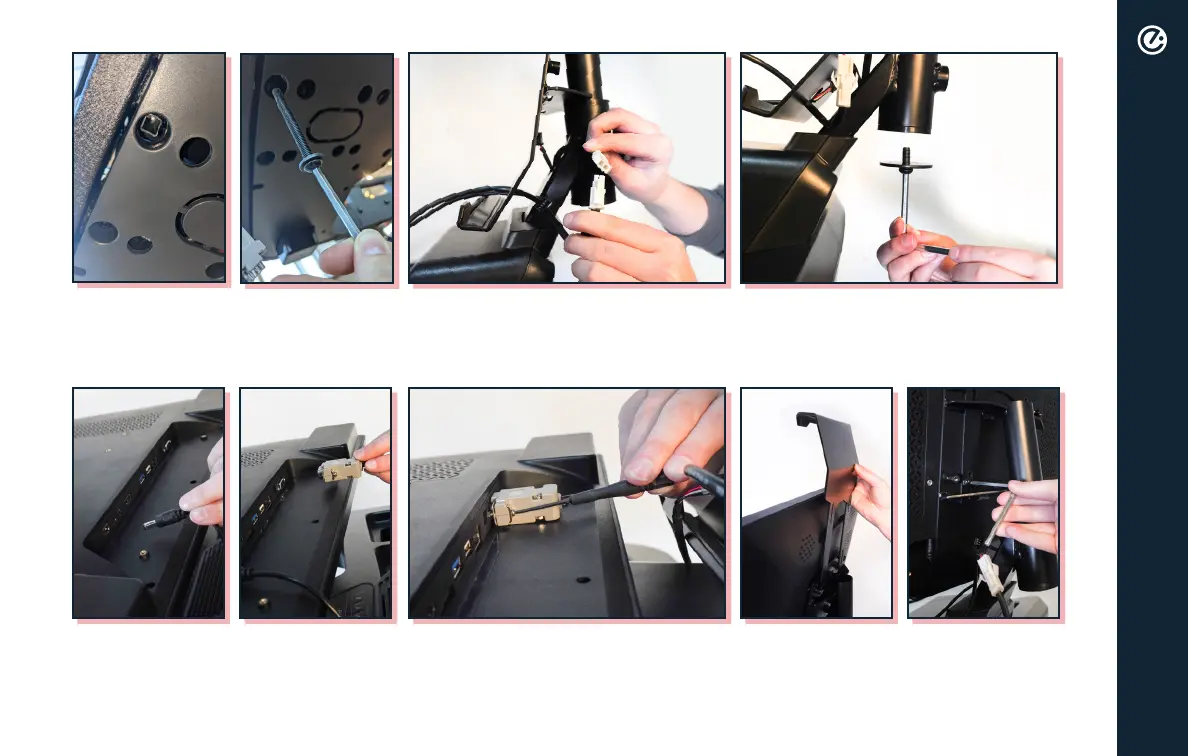
To secure the screen mounting base,
insert M8×75mm bolts with M8 flat
washers and tighten with the 5mm
Allen wrench.
To install the tablet mounting plate,
lower the lower mounting plate onto
base, connect remaining wires and
then thread through plate.
Insert the M8×20mm bolt and
large washer using the 5mm Allen
Wrench to the bottom of tablet
mount post.
While one person holds the tablet
up, another person will connect
wires to the tablet. The black round
cable goes into DC-IN and the RS232
Cable plugs into the RS232 Port.
Use the screwdriver to tighten the
RS232 plug, then set tablet onto
the plate.
Install upper tablet mounting plate
by placing it on top of the bottom
mounting plate, and use the M4×12mm
bolts with M4 spring washer and M4 flat
washer to secure tablet in place. Tighten
with Phillips head screwdriver.
assembly



 To Next Page