EasyManua.ls Logo

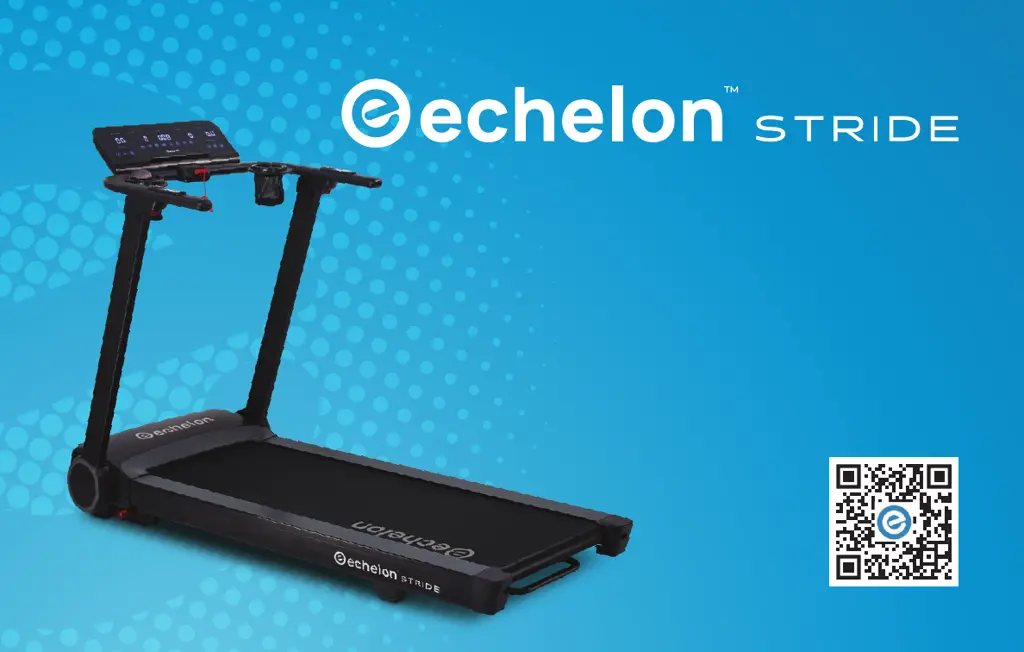
Echelon STRIDE - User Manual

Echelon STRIDE
36 pages
Print Icon
To Next Page IconTo Next Page
Loading...
INSTRUCTION MANUAL

Questions and Answers

  • S
    Shannon GrahamJul 28, 2025
    What to do if my Echelon STRIDE Treadmill has over-current protection?
    • T
      Tonya JenkinsJul 28, 2025
      If your Echelon Treadmill is showing an over-current protection error, try the following: 1. Check if any part on the motor is stuck. Unplug the power cable, adjust the motor, then plug it back in and restart the treadmill. 2. Check if the motor has a burned smell, if so, the motor needs to be changed. 3. Check if the lower control board has a burned smell, if so, the lower control board needs to be changed. 4. Check if the power outlet has a low voltage supply. If so, change the power outlet.
  • B
    Barry MendozaAug 1, 2025
    What to do if my Echelon STRIDE Treadmill has overloading protection?
    • C
      Cheyenne WalkerAug 1, 2025
      If your Echelon Treadmill is showing an overloading protection error, try the following: 1. Check if the power outlet has a low voltage supply. If so, change the power outlet. 2. Check if the lower control board has a bad smell. If so, change the lower control board. 3. Check if the wires connected to the motor are well connected.
  • B
    Brianna FernandezAug 6, 2025
    How to fix connection failure between PCB and Lower Control Board on Echelon Treadmill?
    • C
      Christina BakerAug 6, 2025
      To fix a connection failure between the PCB and the lower control board on your Echelon Treadmill: 1. Check that every wire is well connected between the PCB and the lower control board. 2. Check if any of the wires are damaged. 3. Check if the PCB or lower control board is in good condition. If any chip is damaged, change the PCB or lower control board.
  • G
    Gary HaleAug 10, 2025
    How to fix self-checking error on Echelon STRIDE controller?
    • C
      cookbrendaAug 10, 2025
      To resolve a self-checking error on your Echelon Treadmill controller: 1. Check if the wires of the motor are well connected and in good condition. 2. Check if the IGBT on the lower control board has a burned smell. If so, replace the lower control board. 3. Check if the PCB is in good condition.
  • L
    Laura BarkerAug 14, 2025
    What to do if there is no signal from the speed sensor on my Echelon STRIDE Treadmill?
    • B
      Billy ChangAug 14, 2025
      If your Echelon Treadmill isn't getting a signal from the speed sensor: 1. Check if the wire of the speed sensor is well connected. 2. Check if the wire or speed sensor is damaged. If so, replace the wire and speed sensor.
  • D
    Danielle PenaAug 18, 2025
    How to solve incline motor error on Echelon STRIDE?
    • J
      Jacob JonesAug 18, 2025
      To solve an incline motor error on your Echelon Treadmill: 1. Remove the Safety Key. 2. Press and hold both the “Start” and “Stop” buttons for over 3 seconds. 3. After the incline calibration is completed, test the treadmill again by powering it on and pressing the “Start” button.
  • R
    Ryan Wood MDAug 22, 2025
    What to do if there is EEPROM damage on the upper control board of my Echelon Treadmill?
    • A
      amywatersAug 22, 2025
      To address EEPROM damage on the upper control board of your Echelon Treadmill, replace the console (the upper control board is assembled together with the console).

Summary

FEDERAL COMMUNICATIONS COMMISSION (FCC) STATEMENT

FCC RF RADIATION EXPOSURE STATEMENT

Details RF radiation exposure limits and compliance requirements for the device, including minimum separation distance.

INNOVATION, SCIENCE AND ECONOMIC DEVELOPMENT CANADA (ISED)

CAUTION: CANADIAN RF EXPOSURE

Advises on Canadian RF exposure compliance requirements and necessary separation distances for the device.

IMPORTANT SAFETY INSTRUCTIONS

DANGER: ELECTRIC SHOCK HAZARDS

Critical safety warning regarding electric shock hazards and essential precautions to prevent them.

WARNING: FIRE, BURNS, INJURY RISKS

General warnings about fire, burns, electric shock, and personal injury risks associated with treadmill use.

WARNING LABELS OVERVIEW

PRODUCT SAFETY WARNING LABEL

Contains critical safety warnings, instructions for use, and child safety precautions.

PINCH HAZARD WARNING

Warns users about the potential hazard of pinching fingers or body parts in moving components.

ACCOUNT CREATION AND ACTIVATION

ACCOUNT SETUP STEPS

Steps to create a new account, including plan selection and payment method setup.

MEMBERSHIP ACTIVATION PROCESS

Guide for activating your Echelon membership via email and verifying payment details.

SET UP INSTRUCTIONS

TREADMILL UNFOLDING AND LOCKING

Instructions for unfolding the treadmill and locking the handlebars into their upright position.

POWER AND DEVICE HOLDER SETUP

CONNECTING THE TREADMILL POWER

Instructions for plugging in the treadmill power cord and inserting the safety key.

STARTING THE TREADMILL

FOLDING AND STORAGE PROCEDURES

SECURING FOLDED TREADMILL

BELT ADJUSTMENT PROCEDURE

CENTERING THE TREADMILL BELT

Procedure for adjusting the treadmill belt to ensure it remains centered on the running deck.

TREADMILL OPERATIONAL FEATURES

ERROR CODES & TROUBLESHOOTING (PART 1)

ERROR CODES E01-E04 TROUBLESHOOTING

Details common error codes E01 through E04 and their corresponding troubleshooting steps.

ERROR CODES & TROUBLESHOOTING (PART 2)

ERROR CODES E05-EEP TROUBLESHOOTING

Details common error codes E05 through EEP and their corresponding troubleshooting steps.

NO CODE SHOWN TROUBLESHOOTING

Troubleshooting for motor damage or circuit issues when no specific error code is displayed.

CUSTOMER SERVICE AND WARRANTY

Echelon STRIDE Specifications

General IconGeneral
Speed Range0.5 - 12.5 mph
Incline Range0% - 12%
Running Surface55" L x 20" W
Weight Capacity300 lbs
FoldableYes
ConnectivityBluetooth
Display10" HD Touchscreen
FoldingYes
Warranty1 year parts

Related product manuals