28
28
tablet adjustment
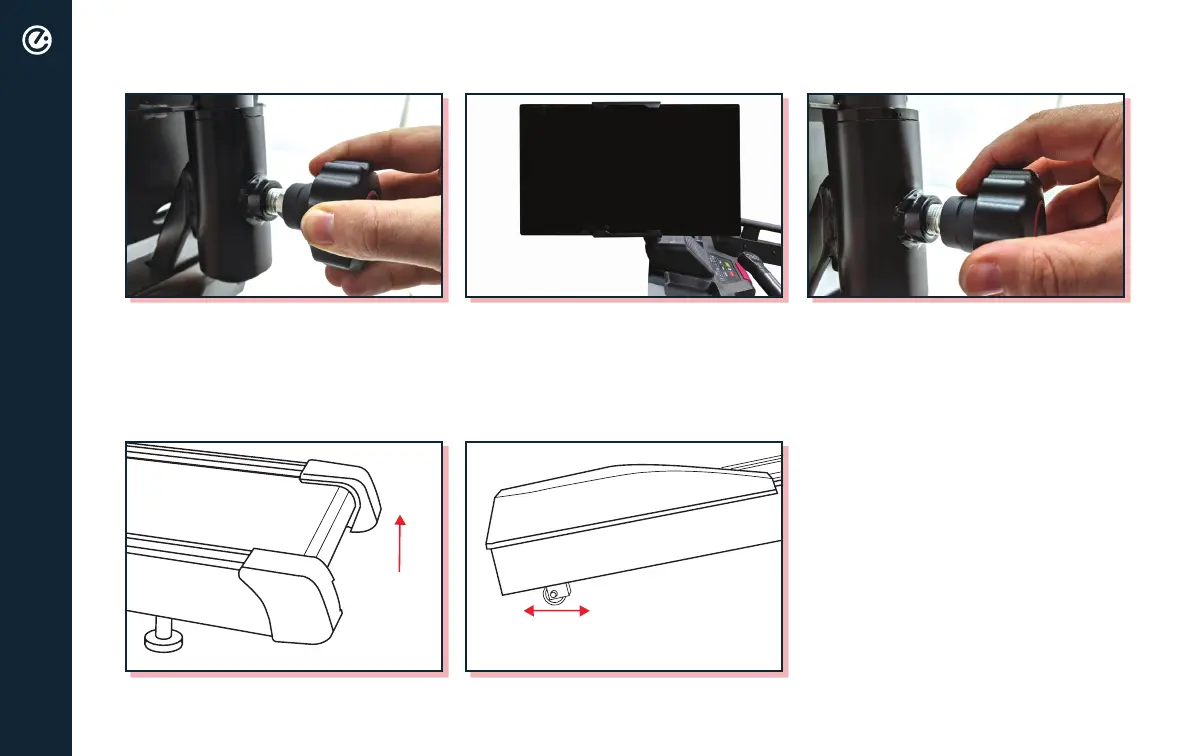
To adjust, loosen the knob to the left
and pull out the knob to swivel the
screen into desired position.
Once you have the screen set to the
desired position, make sure the pin
is fully engaged (as pictured) and
tighten down the knob securely.
universal tablet mount
moving and storage
ALWAYS turn off and unplug
power cord before moving
or storing.
ALWAYS make sure power cord
is stored in a secure location
when not in use.
EQUIPMENT IS HEAVY
USE ASSISTANCE WHEN MOVING.
DO NOT LIFT WITH YOUR BACK.
Once lifted, use the wheels located on both sides
of the front of the base to move the treadmill front or back.
With assistance, lift the back
of the treadmill.
WHEELS ARE LOCATED ON LEFT AND RIGHT
SIDE OF THE FRONT OF THE BASE
LIFT UP
FROM THE
BACK OF THE
BASE WITH
ASSISTANCE


 To Next Page