3. WAN , Wireless Settings
3.1 Configure IP Address of Network Card
Configure TCP/IP properties of your network card to Obtain an IP address automatically from ONT, or set the IP
address of the computer with the same network mask of the ONT. Then go to step 2. Web configuration Type 1.
Shortcut to access the internet
3.2 Wireless Settings
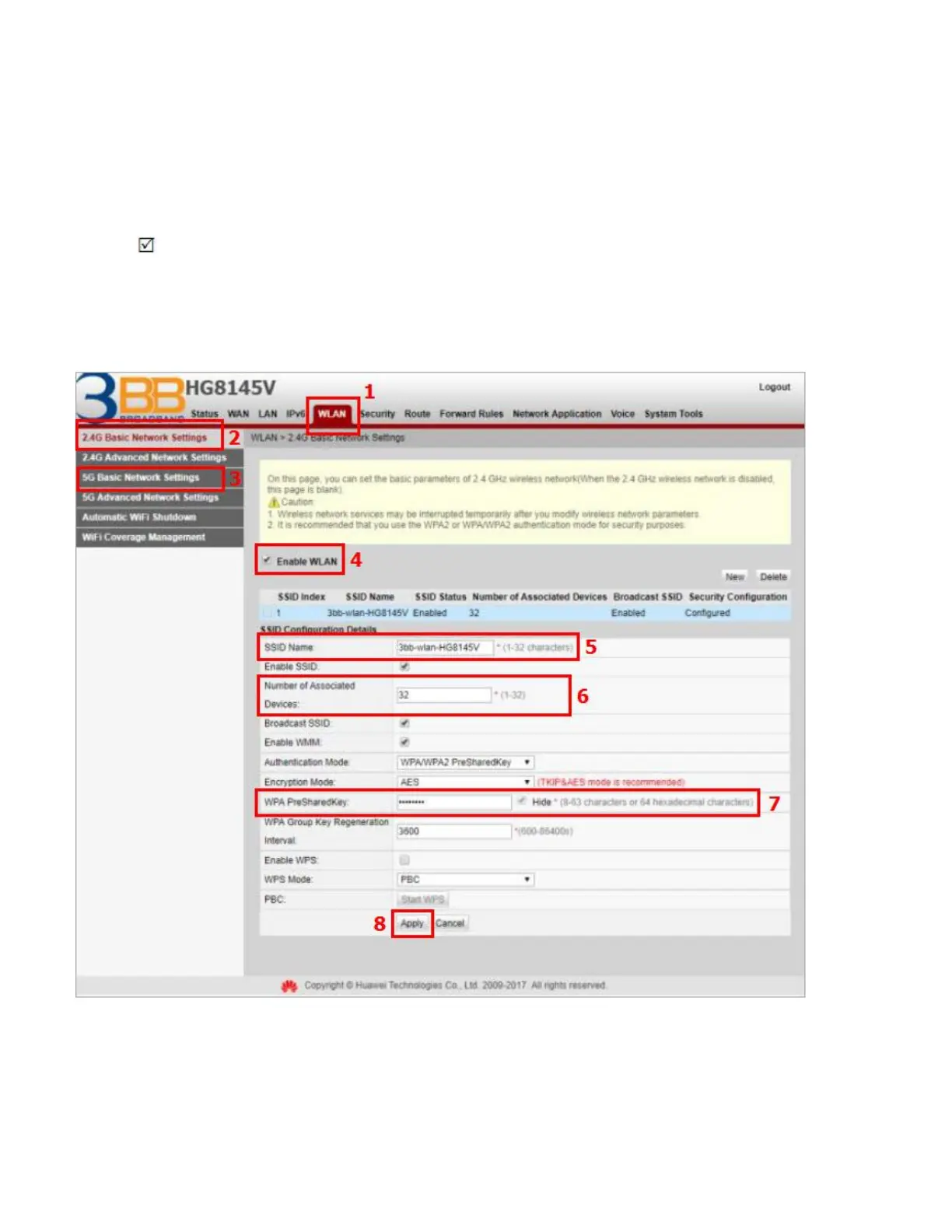
- Click WLAN(1) --> Click 2.4G Basic Network Settings(2) or 5G Basic Network Settings(3)
(You can choose to set both or just one signal)
The default SSID Configuration Details Setting.
- Tick Enable WLAN(4) to fill in setting information.
- SSID Name(5) ; set the name that you want (not more than 32 characters)
- Number of Associaled Device(6) ; You can set maximum 32 Associaled Device
- WPA pre-shared key(7) ; set the password that you want (8-63 characters)
- Click Apply (8)
- After finishing, enter URL Website access to Internet.



 To Next Page