2. Internet connection Settings
There are 2 type to set the Internet connection
Type 1. Shortcut
Step 1 Open the Internet Explorer (IE) browser and enter http://192.168.1.1/3bb.
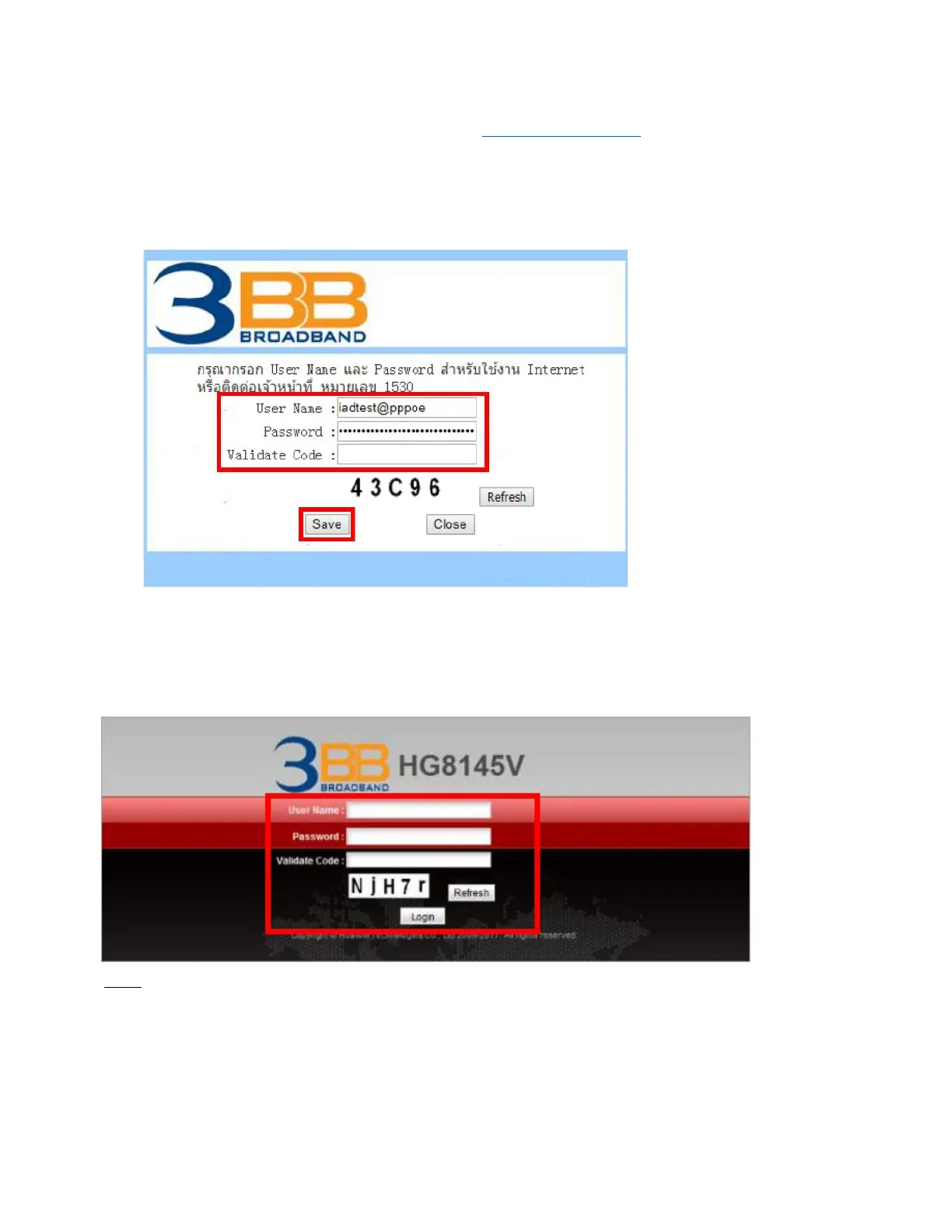
Step 2 In the Quick Configuration page that is displayed, enter the username, password (for surf internet) and
validate code.
After finishing, click Save to apply the internet settings.
Step 3 In the Quick Configuration page appears pop-up "Save Completed", click OK to close this page.
Step 4 In the Quick Configuration page that is displayed, click Close to close this page.
Type 2. General
Step 1 Open the Internet Explorer (IE) browser and enter http://192.168.1.1.
Step 2 In the login window, enter the username, password (see the device nameplate for the default username and
password Last 4 digit of Mac address) and validate code.
Step 3 Click Login. After the password is authenticated, the Web configuration window is displayed.
Note.
- If you do not perform any operations after logging in to the system for five minutes, you will exit the system
and the system automatically returns to the login interface.
- The system will be locked if you input incorrect username and password three consecutive times. One minute
later, it will be unlocked.



 To Next Page