93
R E M O T E 1 1
2 3 4 5 6
I N P U T S o o
A U T O L O A D
P R E S E T 1
Y E S
L C D M O D E
D I M M E D
D E L A Y U N I T S
s e c o n d s
SETUPMEN U
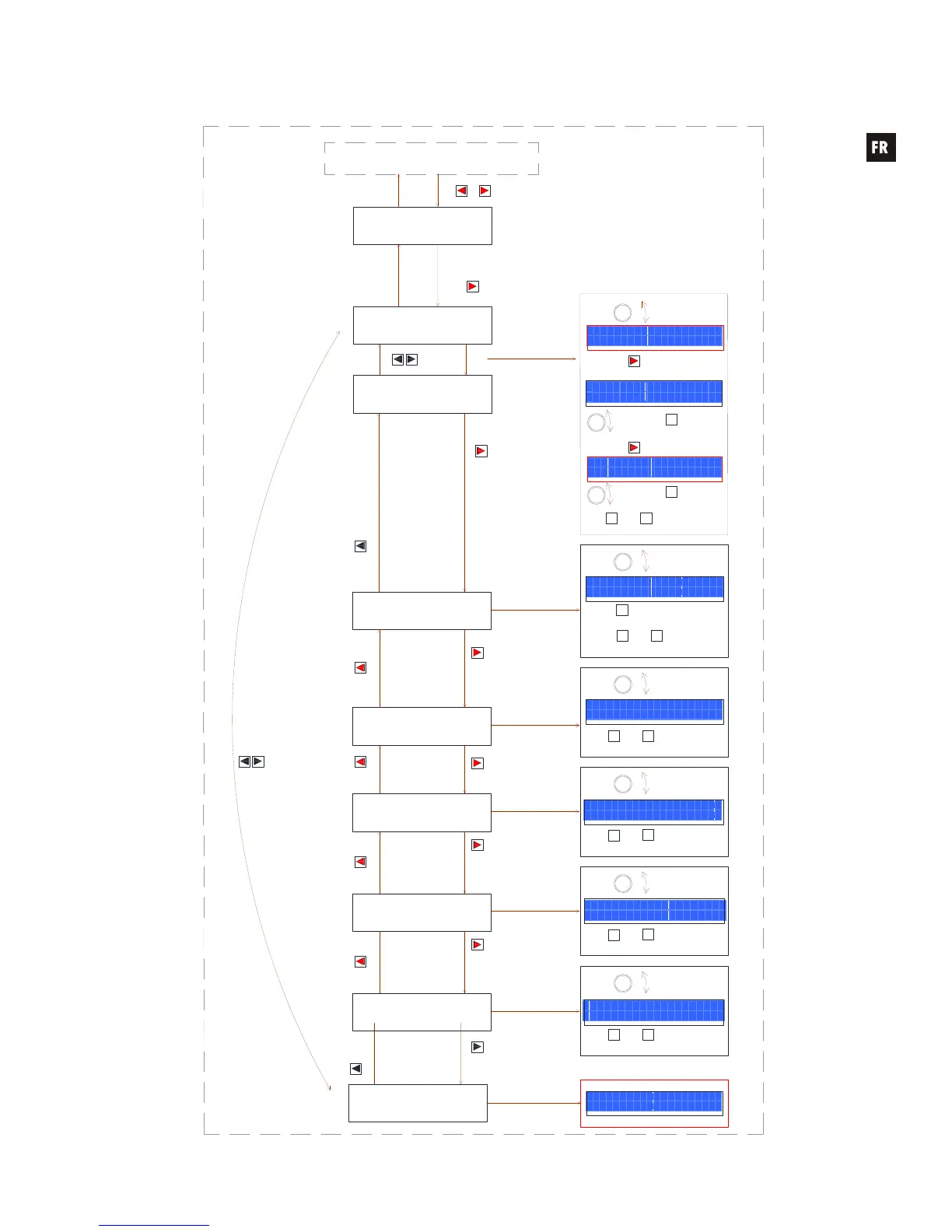
To enter the SETUP menu press & hold MENU left & right front keys.
When the LOCK MODE MENU appears, press MENU right key to really enter SETUP menu.
DAM614
REMOTE 1 MODE
FIRMWARE
VERSION
Move to next /
previous menu
MENU
Move to the
next menu
Press SHIFT + EXIT or wait 2 minutes to exit the setup mode.
Move to the
previous menu
REMOTE 4 MODE
MENU
Move to the
next / previous
REMOTE
Move to the
previous menu
EXTERNAL MUTE
R E M O T E 1 M O D E
I N S E L E C T O R + O U T V O L
R E M O T E 1
A B C D
O U T P U T S o o
INPUTS & OUTPUTS involved
LCD CONTRAST
Move to the
previous menu
Move to the
next menu
Move to the
next menu
Move to the
previous menu
LCD MODE
E X T M U T E
A B C D
o o
L C D C O N T R A S T
1 0 0
F I R M W A R E V E R S I O N
v 0 1 . 0 3 r 1 2
Press & Hold
both keys
EXIT
+
CANCEL
LOCK MODE
MANAGEMENT
MENU keys
Press key to enter
SETUP menu
MENU right
Rotate any
ZA to ZB
encoder to
edit value
+
CANCEL
Cancel edition / get
previous value
SHIFT key
Move to the
next menu
MENU
key
Rotate any
ZA to ZB to
edit
Select new
parameter
to edit
PARAMETER
key
->
Rotate any
ZA to ZB to
edit
Select new
parameter
to edit
PARAMETER
key
->
Move to the
next menu
MENU
key
Move to the
next menu
MENU
key
Rotate any
ZA to ZB
encoder to
edit value
+
CANCEL
Cancel edition
/ get previous
value
SHIFT
key
Select new
parameter to edit
PARAMETER
key
MENU
key
MENU
key
MENU
key
MENU
key
MENU
key
MENU
key
MENU
key
AUTOLOAD PRESET 1
Move to the
previous menu
MENU
key
+
CANCEL
Cancel edition
/ get previous
value
SHIFT
key
Rotate any
ZA to ZB
encoder to
edit value
+
CANCEL
Cancel edition
/ get previous
value
SHIFT
key
Rotate any
ZA to ZB
encoder to
edit value
Move to the
next menu
MENU
key
+
CANCEL
Cancel edition
/ get previous
value
SHIFT
key
Rotate any
ZA to ZB
encoder to
edit value
Move to the
next menu
Move to the
previous menu
DELAY UNITS
MENU
key
MENU
key
+
CANCEL
Cancel edition
/ get previous
value
SHIFT
key
Rotate any
ZA to ZB
encoder to
edit value


 To Next Page