8
4. QUICK START
Install and connect the NUO3 as described in the INSTALLATION paragraph nº1.
We will describe a “Quick Start” procedure using the H-LINE input of channel 1 and headphone monitoring output
only.
1
st
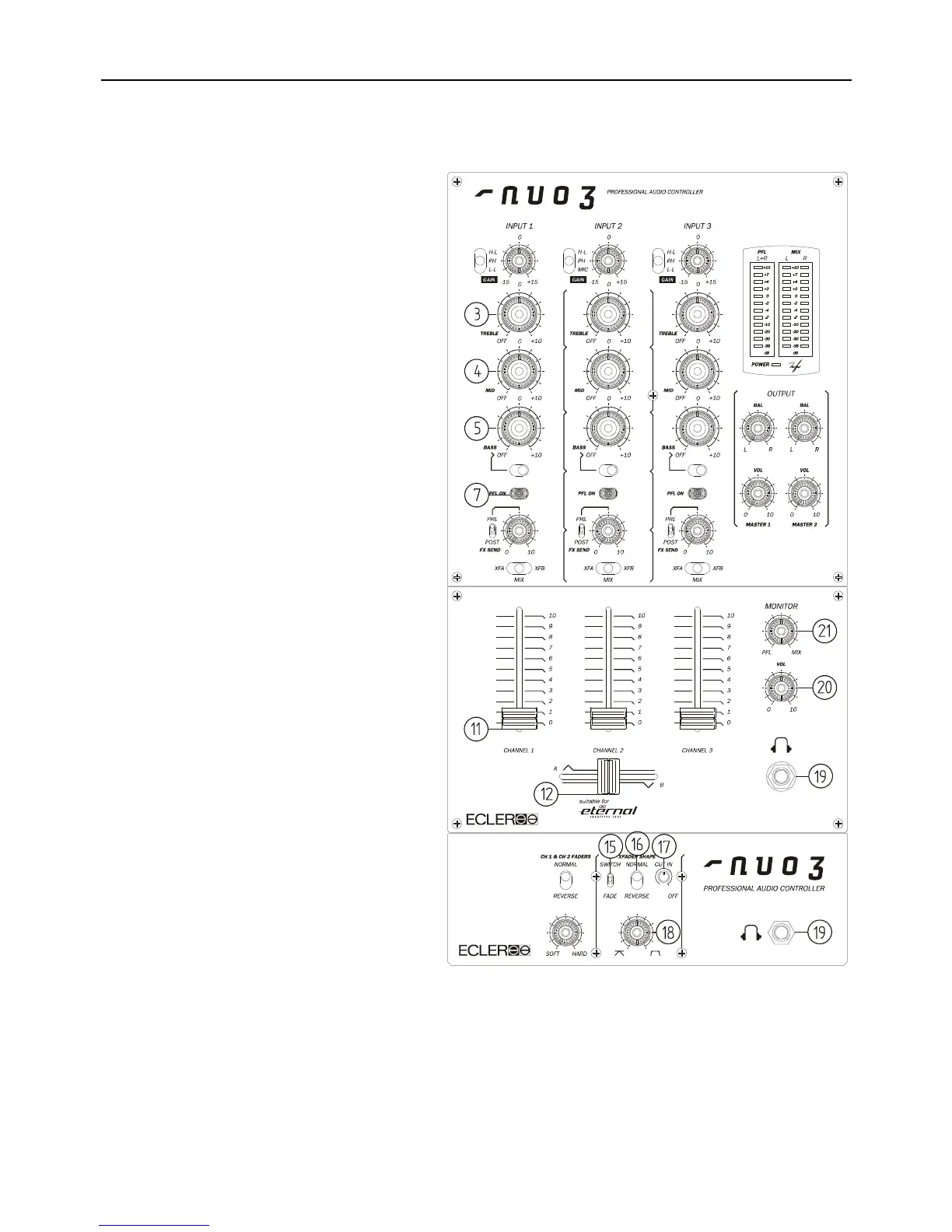
- Set the channel controls. Set Channel 1 GAIN,
TREBLE, MID, BASS rotary controls to their
detented centre position. Set the BASS OFF
switch to its up position (BASS ON). Set the
channel fader to its down position and assign the
XFA/MIX/XFB selector to XFA (your channel is
assigned to crossfader A side).
2
nd
- Adjust the MONITOR VOL (20) to its
minimum, and move the MONITOR PFL/MIX (21)
control to MIX position.
3
rd
- Switch ON the CD Player connected to the
H-LINE input of channel 1.
4
th
- Connect a pair of headphones to the
MONITOR Jack output (19).
5
th
- Connect the AC main power cord to the back
of the mixer and switch ON the mixer.
6
th
- Check that the POWER LED below the VU-
Meter is lit.
7
th
- Start the reproduction of a CD music track.
8
th
- Press the yellow PFL (7) button on channel 1
and adjust GAIN so that the left VU-Meter stays
around 0dBV.
9
th
- Set the channel fader (11) to its up position
and place the crossfader (12) on the "A" side.
10
th
- Adjust the MONITOR VOL (20) in order to
reach a "comfort" sound level in your headphones.
11
th
- Check the powerful 3 band stereo
equalization (3-4-5). The EQ system is designed
for creative sound performance: each band can be
independently isolated (OFF) through a large
ergonomic rotary control, and a BASS OFF switch
allows a fast bass frequency “kill” effect.
12
th
- Check the crossfader (12) action
MIX position bypasses the crossfader function.
The crossfader will allow you to fade the signals
assigned at each side A & B of the slider. The
movement of the crossfader allows you to create a
smooth music track blend or a fast "scratch" sound cuts. The fade curve can be very precisely adjusted thanks to
the CUT-IN (17) knob* (fade-in point), the SWITCH/FADE selector (15) (Rounded or Squared curve), the
REVERSE selector (16) (Reverse the sense of the crossfader) and fine curve control (18).
For further operations, please read the rest of this manual.
*Only if an “eternal” crossfader is installed.


 To Next Page
 Loading...