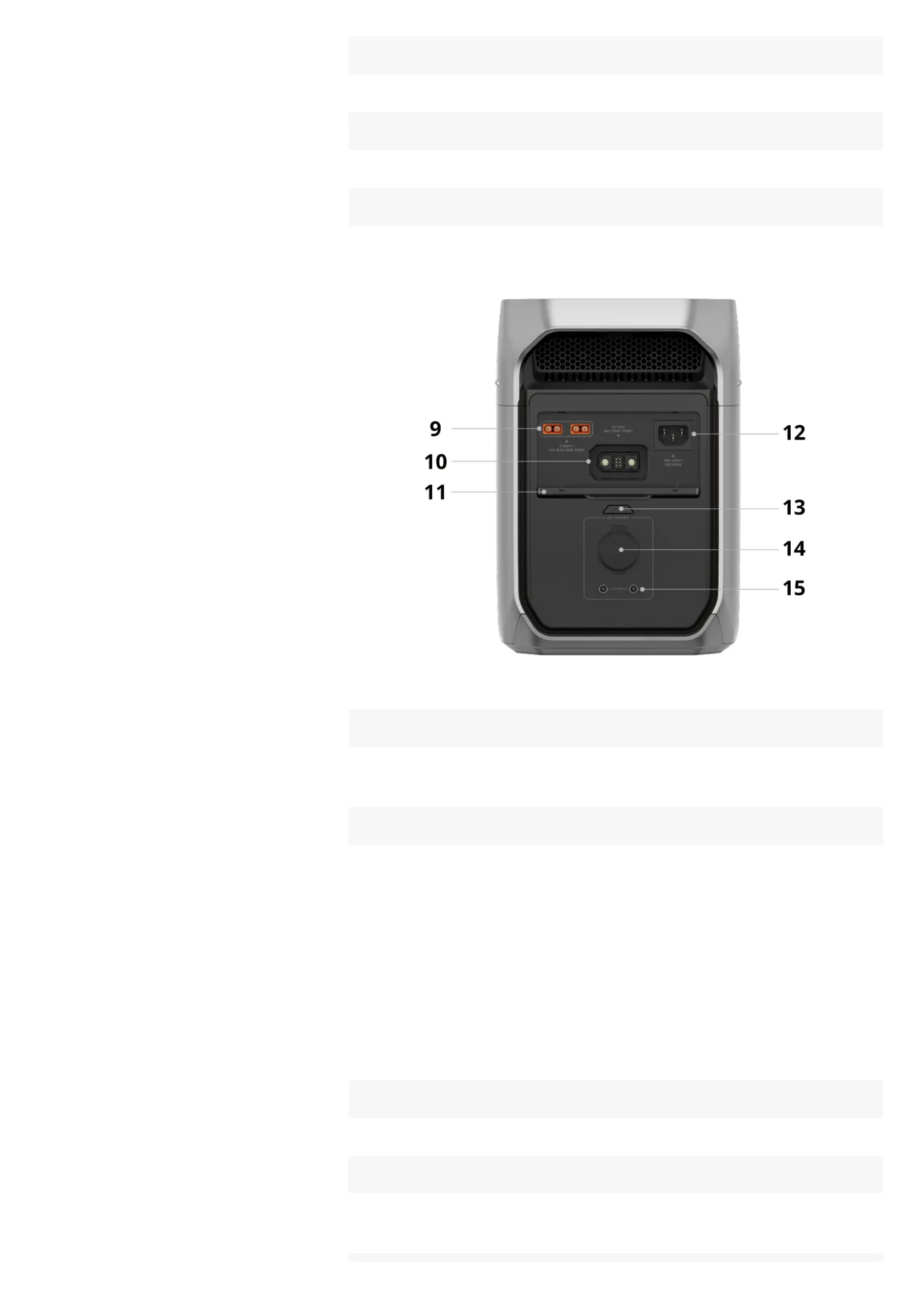
6 Heat vent
Dissipates the internal heat.
7 USB output control button ²
Press once to enable or disable the USB-C and USB-A output ports.
8 USB-A output ports
Supplies power to charge phones, laptops, game consoles, or other devices.
9 Solar/Car charging input port
Connect the power station to solar panels or a vehicle power source
(cigarette lighter socket or on-board battery charger) for charging.
10 Extra battery port
DC power supply
• Connect the power station to an EcoFlow smart device to supply power.
DC charging
• Connect the power station to an EcoFlow alternator charger, smart
generator, or microinverter for charging.
Battery capacity expansion
• Connect the power station to an EcoFlow Smart Extra Battery to expand the
battery capacity.
11 Protective cover
Protects against liquids and dust during long-term storage.
12 AC charging input port
Connects the power station to an AC power source (wall outlet or generator)
for charging.










 To Next Page