Setting the power supply mode
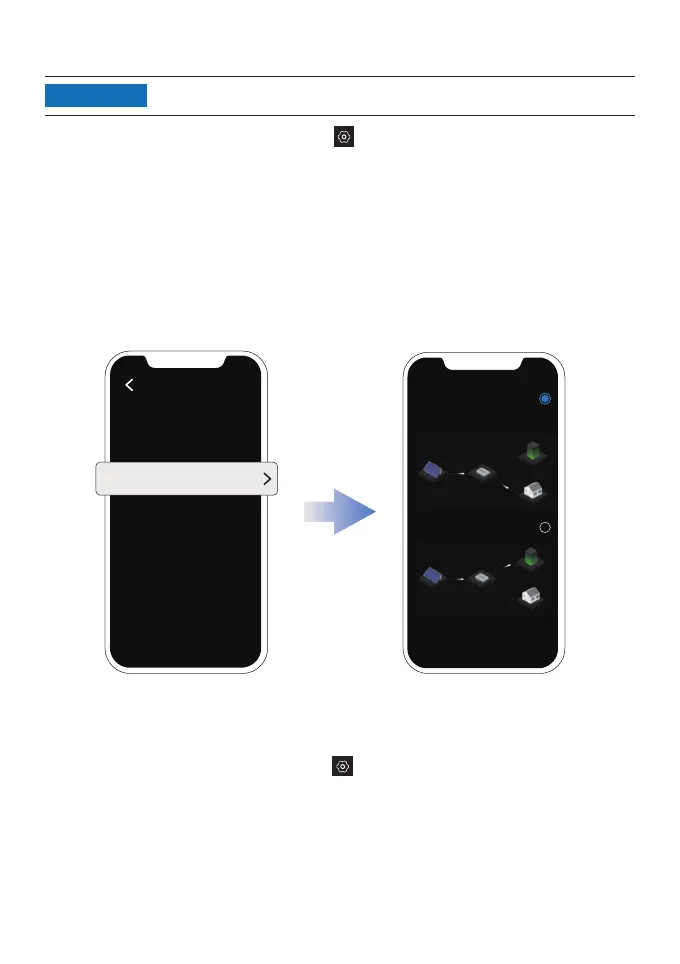
On the page of your Powersystem system, tap
>
"System setting" > "Power supply mode".
Then, select the mode you need.
•
Prioritize power supply: Select this option if you want to prioritize meeting the power
consumption of electrical appliances. In this mode, when the power supply exceeds the
demand for electrical appliances, the portable power station will be charged. When the
demand for electrical appliances is less than the power supply, the portable power station
will discharge.
•
Prioritize power storage: Select this option if you want to prioritize charging the portable
power station until it reaches its charging limit. In this mode, the portable power station will
not discharge.
Power supply mode
System setting
Prioritize power
supply
Prioritize power
storage
This feature can be enabled when the portable power station is connected.
Setting the output power of the system
On the page of your PowerStream system, tap > "System setting" > "Output power of
the system". Then, specify the continuous output power of the microinverter to set the overall
output power of the system.
The output power of the system = continuous output power of the microinverter + power of the
smart plug.
NOTICE
21


 To Next Page