2
Power A Free Life
1.
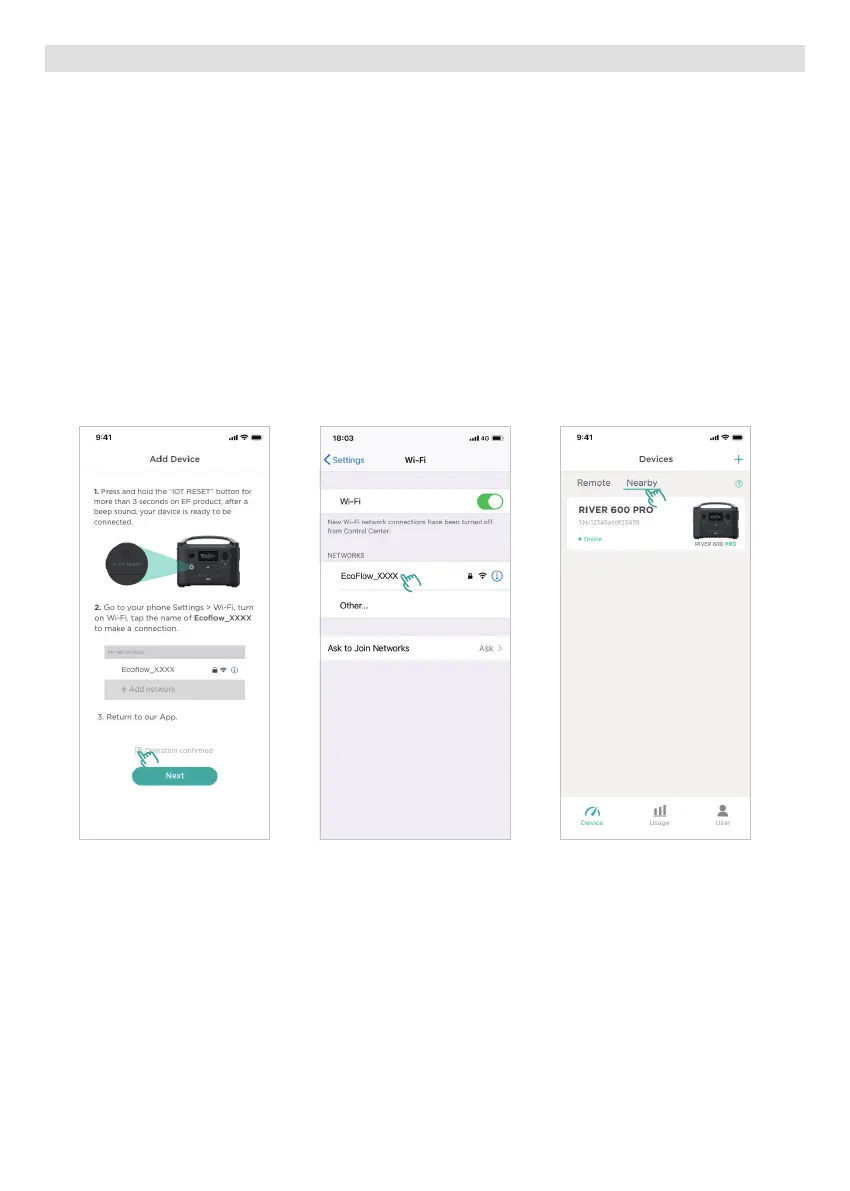
• Open your App, click on the "+" on the top right corner.
• Press and hold the "IOT RESET" button for more than 3 seconds on EF product. After a beep sound, your
device is ready to be connected.
2.
• Go to your phone Settings > Wi-Fi, turn on Wi-Fi and find the new device in the network list:
Ecoflow_XXXX. Tap it to make a connection.
3.
• Return to EcoFlow App, click on "Nearby" and wait for the device to appear. If it doesn't, please scroll down
to refresh the list.
3. Device Connection Guide
1 2 3
Outdoor Mode: Connect to the nearby RIVER 600 hotspot. Make sure the mobile phone is within the
hotspot range).








 To Next Page