
 Need help?
Do you have a question about the EcoFlow RIVER mini and is the answer not in the manual?
Key physical and performance specifications including weight, dimensions, capacity, and certifications.
Details of all output ports, including USB-A, USB-C, Car Charger, and Wireless Output specifications.
Specifications for AC, Solar, and Car charging input ports, including power and voltage details.
Information on battery type, lifespan, cycle life, and protection mechanisms.
Operating and storage temperature ranges for optimal product performance and safety.
Essential usage guidelines and prohibitions to ensure safe operation and prevent product damage.
Guidelines for the proper and safe disposal of the product's battery according to regulations.
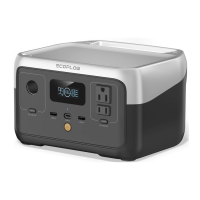
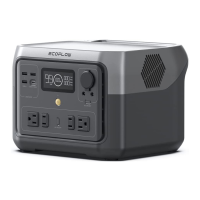
Overview of the product's physical components and their labels.
Explanation of the LCD screen indicators, including battery level, input/output power, and warnings.
Instructions on powering the device on/off, sleep mode, and automatic power-off settings.
Instructions for using USB, 12V DC, and AC output ports, including activation and deactivation.
Information on AC, Solar, and Car charging methods for the product.
Guidance on using the EcoFlow app and the X-Boost feature for enhanced functionality.
Details on the Emergency Power Supply (EPS) function and its UPS-like capabilities.
Answers to common user questions regarding battery, AC output, battery life, cleaning, storage, and airline travel.
Explanation of error icons, their types, and recommended recovery methods for troubleshooting.
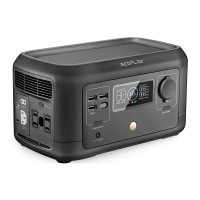
The EcoFlow RIVER mini is a portable power station designed to provide reliable power for various devices, offering both convenience and versatility for users on the go or in situations requiring an emergency power supply. It is part of EcoFlow's RIVER series, known for its compact design and efficient power delivery.
The EcoFlow RIVER mini serves as a portable energy storage system, capable of outputting power through multiple interfaces including AC, USB-A, USB-C, and a 12V DC car outlet. Its primary function is to charge and power a wide range of electronic devices and small appliances. The device incorporates EcoFlow's X-Stream quick charging technology, allowing for rapid recharging from an AC power source. It also supports solar charging and car charging, providing flexible options for replenishing its internal battery.
A key feature of the RIVER mini is its X-Boost function, which is designed to prevent operational failure due to discharge overload protection. When the total output power exceeds the rated output power, X-Boost automatically activates to enable the product to supply power to high-power devices that might otherwise exceed its capacity. This function is particularly suitable for heating and motor equipment, though users should verify its compatibility with specific appliances, especially those with voltage protection or precision instruments, through actual testing. The X-Boost function is enabled by default but can be managed via the EcoFlow app. It is important to note that X-Boost is unavailable when AC output is on during AC charging (bypass mode) or when the X-Boost mode is manually turned off.
The RIVER mini also offers an Emergency Power Supply (EPS) function. When connected to the power grid via the AC input port, the device can power electrical appliances directly from the grid. In the event of a sudden power outage, the product automatically switches to battery power within 30ms, ensuring an uninterrupted power supply for connected devices. This feature is not a specialized UPS function and does not support 0ms switching, making it unsuitable for devices that require 0ms UPS, such as data servers and workstations. Users should confirm that the connected devices meet the requirements and are not sensitive to power interruptions to avoid triggering the product's overload protection.
Operating the EcoFlow RIVER mini is straightforward, with a user-friendly interface and clear indicators. The main power button controls the device's overall on/off state. A short press powers on the device, illuminating the LCD screen and activating the main power indicator in a breathing light mode. The product enters sleep mode after 5 minutes of inactivity, and the LCD screen turns off automatically. Any change in product load or operation will reactivate the screen. A long press of the main power button turns the product off. The default standby time is 30 minutes; if no output power button is active and no load is connected, the device will automatically power off after this period, though the standby time can be adjusted via the app.
Individual output ports have their own power buttons for precise control. For USB output, users must short press the USB power button after the main power is on. This button also turns off the USB power. If the USB power button is on, the product will not automatically power off. Similarly, the 12V DC output port is enabled by a short press of its dedicated power button, which also turns it off. If the 12V DC output button is on, the product will not power off automatically. The AC output port also has a dedicated power button. Its default standby time is 30 minutes, after which it will automatically turn off if no load is detected. Users are advised to turn off the AC output when not in use to conserve battery power.
The LCD screen provides essential information at a glance, including remaining battery percentage, state of charge, battery level indicator, Wi-Fi status, and wireless charging indicator. It also displays input and output power in watts, remaining charge/discharge time, and indicators for high/low temperature warnings, overload warnings, and fan activity.
Charging the RIVER mini is flexible. AC charging utilizes the X-Stream technology for quick replenishment. Solar charging involves connecting the device to a series of solar panels via an MC4 interface, with a reminder to ensure the solar panel's output voltage is within the product's specified range to prevent damage. Car charging is also supported, using the car's charging port, but users are cautioned to ensure the car's ignition is on to avoid draining the car battery and to ensure secure connections.
The EcoFlow app enhances the user experience by allowing remote control and monitoring of the product's information and data. Users can download the app and connect it to the RIVER mini for advanced management and settings adjustments.
Proper storage and maintenance are crucial for extending the lifespan and ensuring the optimal performance of the EcoFlow RIVER mini. The ideal operating and storage temperature range is between 68°F and 86°F (20°C to 30°C). It is important to keep the device away from water, intense heat, and sharp objects. Storing the product in temperatures above 113°F (45°C) or below 14°F (-10°C) for extended periods should be avoided.
To maximize battery life, it is recommended to store the battery with approximately 80% charge. For long-term storage, the RIVER mini enters a hibernation mode to mitigate damage from low charge. Every three months, users should discharge the battery to 30% and then recharge it back to 80%. This cycle helps maintain battery health.
In case of any issues, the device provides error icons on the LCD screen, which correspond to specific problems such as USB-A/USB-C overload, high/low temperature protection for charging and discharge, AC output overload, and fan blocking. The user manual offers a troubleshooting guide with recovery methods for each error. If an alert persists after restarting the product, users are advised to stop using the device and contact customer service for support. It is strictly prohibited to disassemble the product or use unofficial components. The device should be handled with care to prevent damage from impacts, falls, or strong vibrations. If the product's interface becomes dirty, it should be wiped with a dry cloth. In the event of severe damage or if the product falls into water, it should be immediately turned off, placed in a safe open area, and disposed of according to local regulations for hazardous chemicals.
 General
| Input voltage | AC 100 - 120, DC 11-39 V |
|---|---|
| Output voltage | 12.6 V |
| Charging source | AC, USB |
| Battery capacity | 210 Wh |
| Battery technology | - |
| Total output power | 300 W |
| Output current (max) | 8 A |
| Number of simultaneously connected devices (max) | 8 |
| Certification | cTUVus FCC Telec |
| Product color | Black |
| Built-in display | Yes |
| Cables included | AC |
| AC outlets quantity | 2 AC outlet(s) |
| USB Type-A output ports | 3 |
| USB Type-C ports quantity | 1 |
 Weight and Dimensions
| Depth | 140 mm |
|---|---|
| Width | 249 mm |
| Height | 132 mm |
| Weight | 2800 g |
| Package depth | 180 mm |
| Package width | 358 mm |
| Package height | 205 mm |
| Package weight | 3800 g |





 To Next Page
