14
How do I store RIVER Pro?
How do I use RIVER Pro safely?
Can it be upgraded?
Please store RIVER Pro in a dry and cool place. DO NOT place it near water. Please turn off the RIVER Pro
and store it within its recommended use and storage temperature range. If you need to store the RIVER Pro
for a long time, please discharge the RIVER Pro to 30%, then charge it to 85% every 3 months.
Please use RIVER Pro within its recommended operating temperature range. Using RIVER Pro out of the
recommended operating temperature range may cause RIVER Pro to exceed its safe and effective working
limits. RIVER Pro is not waterproof. DO NOT immerse RIVER Pro in water. Doing so will void the warranty. If
RIVER Pro power electrical devices with heating elements (600W) for over a half hour, it is normal to see the
high-temperature protection icon. Please wait for about 1 hour before charging the River Pro, or using it to
power devices again.
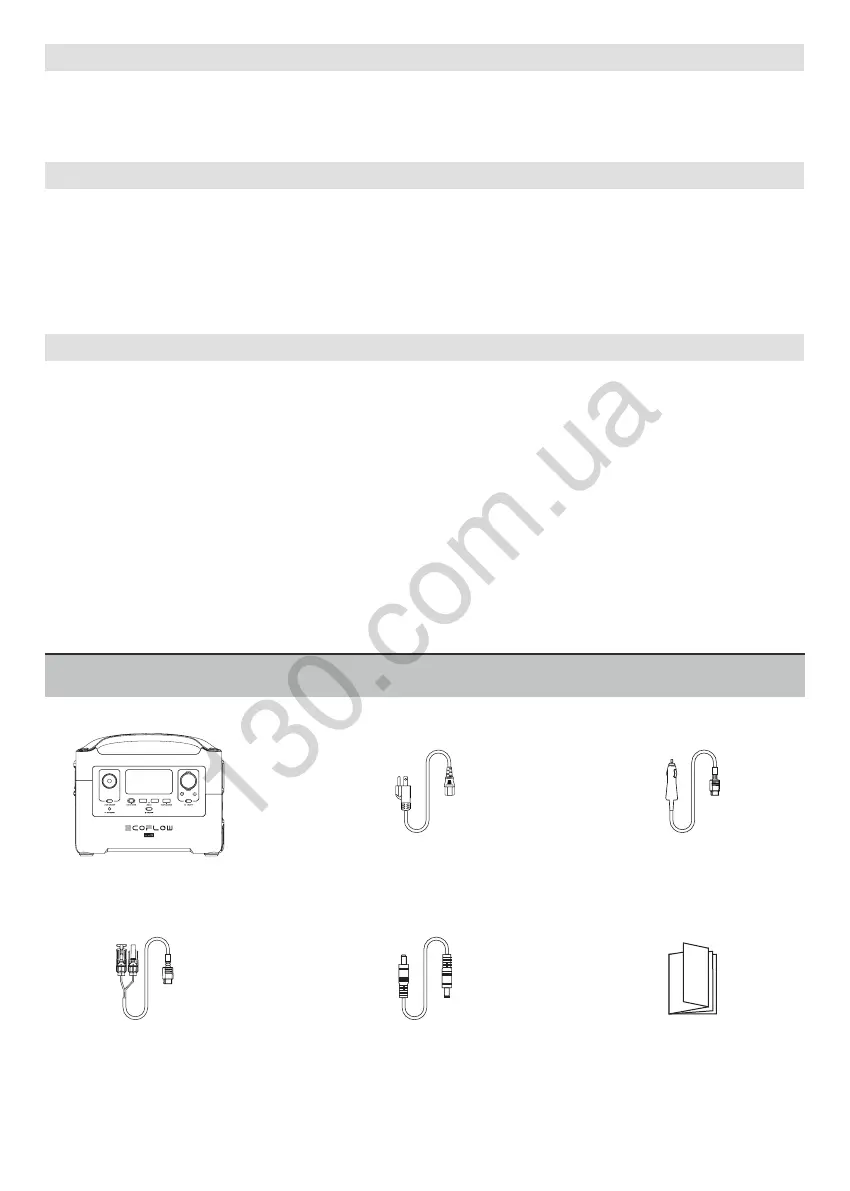
RIVER Pro
User Manual and
Warranty Card
DC5521-DC5525
Cable
AC Charging Cable
(Input)
Car Charging Cable
(Input)
Solar Charging Cable
(MC4 to XT60 Input)
What’s in the Box
The firmware can be upgraded using the EcoFlow App. Turn on the RIVER Pro before firmware upgrade. It is
recommended that the RIVER Pro is connected to an AC power source or has about 50% battery level when
upgrading. Please do not use RIVER Pro to recharge your appliances and devices during firmware upgrade.
For more details, please refer to “How to upgrade firmware” FAQ in the EcoFlow App.
EcoFlow™ is a trademark of Shenzhen EcoFlow Technology Limited (abbreviated as “EcoFlow”) and its affili-
ated companies.





 To Previous Page