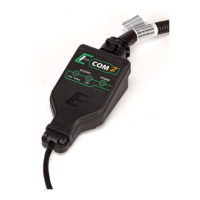
The ECOM™ cable is a USB 2.0 device designed by EControls to facilitate Controller Area Network (CAN) traffic transmission and reception using a computer or laptop. While initially developed to provide a CAN interface for EControls' OEM customers to communicate with their Engine Control Modules (ECMs), it is now available for use in custom software development.
Function Description:
The primary function of the ECOM™ cable is to act as a bridge between a computer's USB port and a CAN bus. It enables the computer to send and receive CAN messages, allowing for monitoring, diagnostics, and control of CAN-based devices, particularly EControls' ECMs. The device supports USB 2.0 connectivity, ensuring a standard and widely compatible interface with modern computers.
The ECOM™ cable is available in multiple variations, designated by the part number E20460XX, where E20460 is the family part number root and XX is an application-specific modifier. These variations are distinguished by their part number and logo color, each tailored for specific applications:
- E2046002 (Green Logo): This is a standard GCP / 4G ECOM™ device. It provides the core functionality for CAN communication without additional specialized features.
- E2046003 (Blue Logo): This variation is a GCP / 4G ECOM™ device that is CANCapture™-Compatible. CANCapture™ is likely a proprietary EControls software tool for advanced CAN bus analysis and data logging, and this version of the ECOM™ cable is designed to work seamlessly with it.
- E2046012 (Green Logo): This is a GCP / 4G ECOM™ v2 device (Standard). The "v2" indicates an updated version of the hardware, potentially offering improved performance, reliability, or additional features compared to the original standard device.
- E2046013 (Blue Logo): Similar to the E2046003, this is a GCP / 4G ECOM™ v2 device that is CANCapture™-Compatible. It combines the enhancements of the v2 hardware with compatibility for the CANCapture™ software.
Important Technical Specifications:
While specific detailed technical specifications like baud rates, voltage ranges, or current consumption are not explicitly listed in the provided document, the following can be inferred:
- Interface: USB 2.0 for connection to a computer/laptop.
- Bus Protocol: Controller Area Network (CAN).
- Hardware Versions: Available in original and "v2" versions, suggesting potential internal hardware improvements in the latter.
- Software Compatibility: Requires a software driver for operation. Driver versions 3.1.0.15 or newer are compatible with 32-bit and 64-bit Windows operating systems, including Windows XP, Vista, 7, 8, and 10. Version 3.5.0.0 or newer is strongly recommended for Windows 10 and is mandatory for ECOM™ v2 hardware.
- Driver Components: The installation includes "Driver Support Files" (required for all operations), "Library and Header Files" (for custom software development using the ECOM™ API), and "Sample Files" (including Microsoft Excel, C#, LabView, and Java examples for programming custom applications).
- Physical Indicators: The device features a POWER LED and an ACTIVITY LED. The POWER LED indicates connection status (red for problems, green for proper connection). The CAN/SERIAL LED (which can flash red) indicates physical CAN errors.
Usage Features:
The ECOM™ cable is designed for ease of installation and use, with features supporting both basic connectivity and advanced software development:
- Driver Installation: A straightforward setup program guides the user through the installation process. It is crucial to detach all ECOM™ devices and close all programs before running the setup.
- Component Selection: During installation, users can choose to install only the essential "Driver Support Files" or include "Library and Header Files" and "Sample Files" for software development. This modular installation allows users to tailor the setup to their specific needs.
- Plug-and-Play (after initial setup): Once the drivers are installed, inserting an ECOM™ device into a new USB slot will trigger Windows to complete the hardware installation automatically. Pop-up bubbles will confirm device recognition and readiness.
- Visual Status Indicators: The POWER LED on the device changes from red to green upon successful connection, providing immediate visual feedback. The ACTIVITY LED indicates ongoing CAN communication.
- Device Manager Integration: Upon successful installation, an 'ECOM Communications Device' entry appears in the Windows Device Manager, allowing users to verify the driver's presence and status.
- EDIS™ Compatibility: The EDIS™ (EControls Display and Interface Software) can be used with the ECOM™ cable to connect to EControls ECMs or other CAN-based devices. The EDIS™ Display connection status indicator provides visual confirmation of a successful connection.
- Custom Software Development: The availability of "Library and Header Files" and "Sample Files" (in various programming languages like C#, Java, and LabView, along with Excel examples) enables developers to create custom applications that interact with the ECOM™ cable and the CAN bus.
Maintenance Features:
The document outlines several troubleshooting steps, which can be considered maintenance-related features, aimed at resolving common issues:
- Driver Reinstallation: If the POWER LED remains red, indicating driver installation problems, the recommended solution is to uninstall and then reinstall the driver using the latest setup executable file.
- Device Manager Check: Users are advised to check the Windows Device Manager for the 'ECOM Communications Device' entry. An error indicator on the icon or its absence points to connection or installation issues, prompting users to check connections and retry installation.
- CAN Bus Troubleshooting:
- Flashing Red CAN/SERIAL LED: This indicates a physical CAN error. Common causes and solutions include:
- Disconnected or Reversed Wiring: Checking and correcting CAN-H and CAN-L wiring.
- Incorrect Baud Rate: Configuring the software to match the correct CAN bus baud rate.
- Missing Terminating Resistor: Ensuring at least one 120 ohm terminating resistor is connected between CAN-H and CAN-L on the bus.
- No Other CAN Node: Connecting and activating another CAN device on the bus if the ECOM™ is attempting to transmit without a recipient.
- Windows 10 Compatibility: For Windows 10 PCs, driver software version 3.5.0.0 or later is mandatory due to the OS's requirement for digitally signed drivers. This ensures successful installation and operation.
- Windows 7 Compatibility: For Windows 7 PCs, it is essential to install the security update KB3033929 (released March 2015). Failure to do so can result in the driver installer reporting an invalid or corrupted driver signature.
In summary, the ECOM™ cable is a versatile USB-to-CAN interface designed for both standard diagnostic and custom development applications, with a focus on reliable connectivity and clear troubleshooting guidance.



 To Next Page
 General