EcoTouch Guest Interface
EcoTouch Guest Screen Controls & User Interface
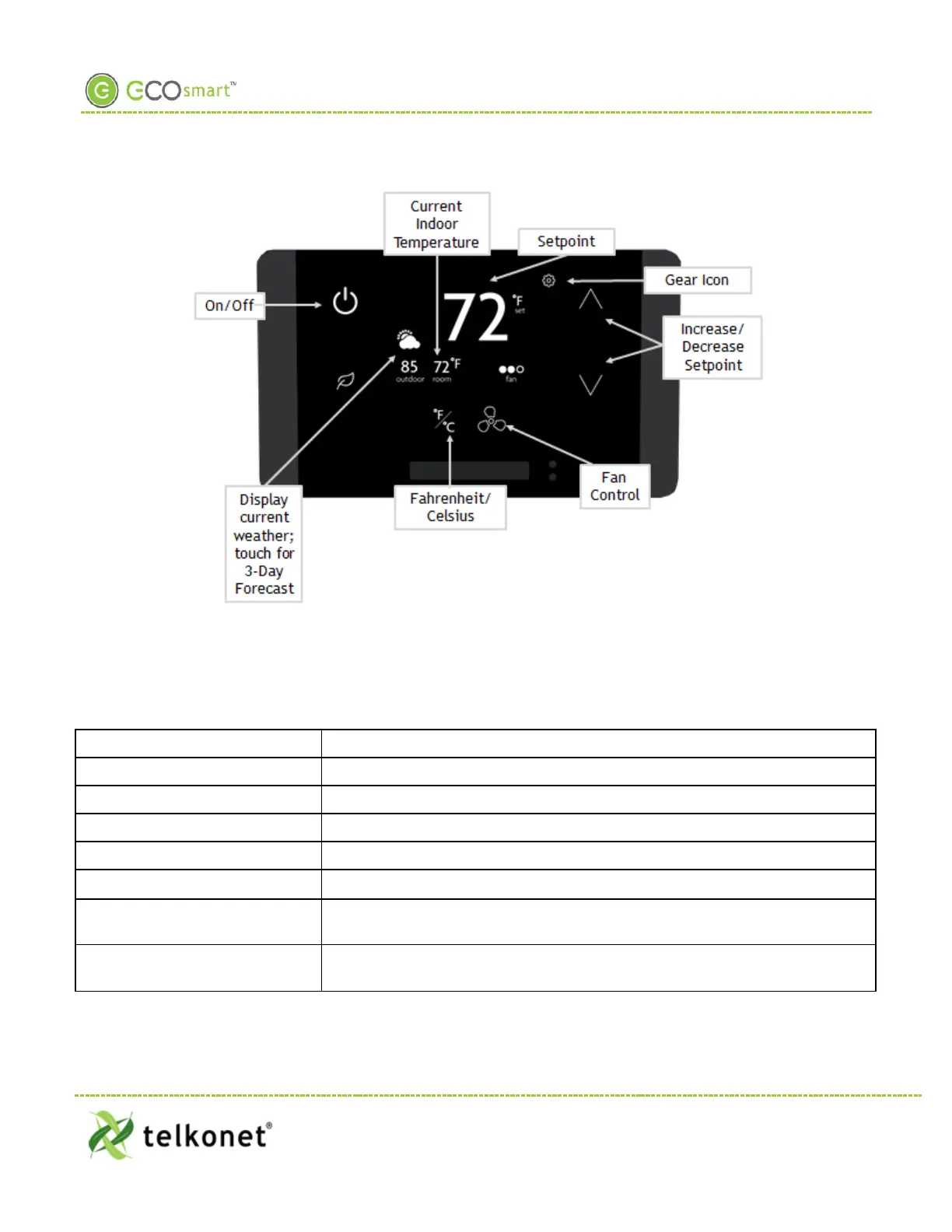
Figure 30: Guest Screen Controls
The EcoTouch front panel controls are shown below. The Administration controls can be locked out of
operation, so they are not visible until a specific unlock sequence is entered. Currently this is the 3-finger tap
as referenced on page 31.
On/Off Turn the system on and off (Optional: On/Heat/Cool/Off)
Current Indoor temperature
Adjust screen brightness; language selection (see below for details)
Increase/Decrease Setpoint
Press up and down arrows to adjust setpoint within the permitted range
Fan Control Press to cycle through available fan speeds: Low, Medium, High, Auto
Fahrenheit/Celsius Toggle between Fahrenheit and Celsius temperature display (not functional
on 3-day forecast screen)
Current Weather Displays current outdoor weather; touch for 3-day forecast (see below for
details)
EcoWave Featuring EcoTouch IO&M Guide Telkonet, Inc.
For Use with Firmware Version 2.x 20800 Swenson Drive, Suite 175
EcoTouch Waukesha, WI 53186
Revision 2 (800) 380-9640
Page 29 www.telkonet.com


 To Next Page