23
EN
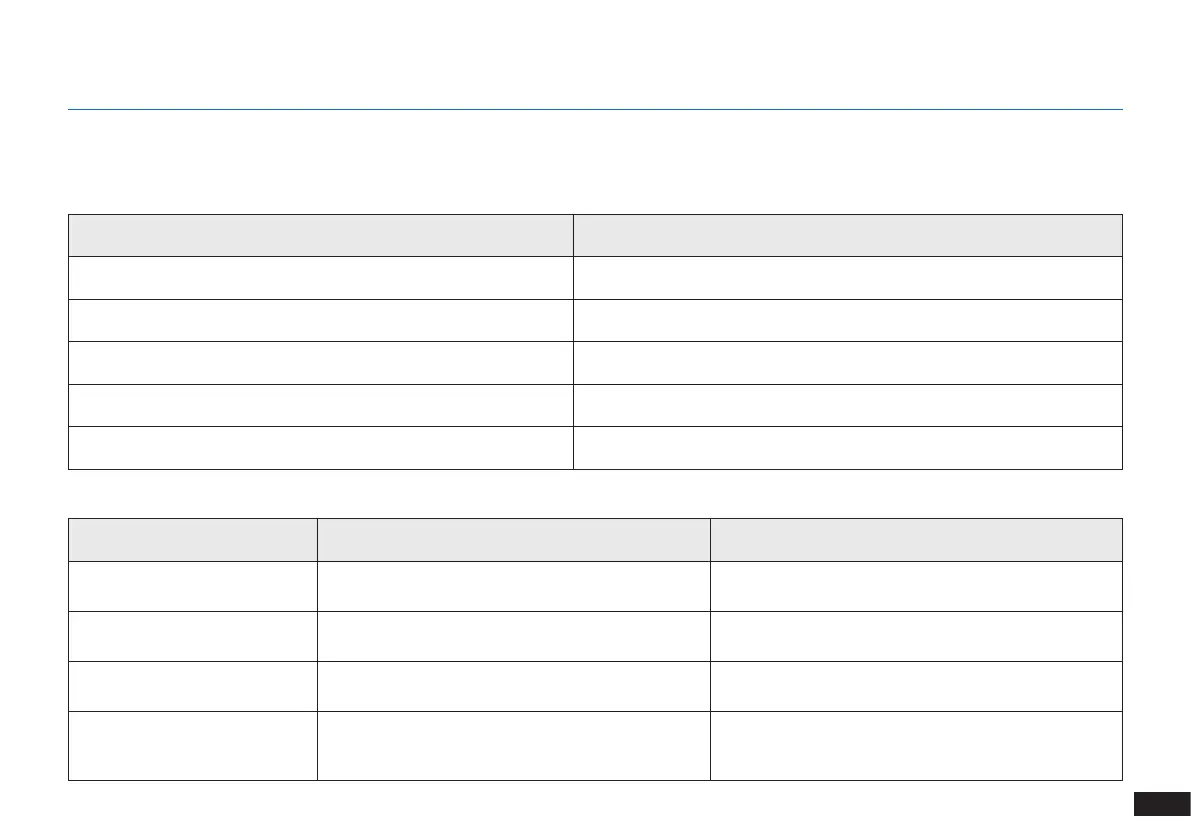
5. Indicator Light and Alarm Sounds
Indicator Light
Alarm Sounds
DEEBOT will tell you something is wrong with an alarm indicator light and sounds. More detailed support is available through the ECOVACS App and
online website.
Scenario Indicator Light
The robot is cleaning AUTO Mode Button glows a solid WHITE
The robot is charging AUTO Mode Button ashes WHITE
The robot has low battery AUTO Mode Button glows a solid RED
The robot has a problem AUTO Mode Button ashes RED
Programmed Cleaning Pattern is enabled Cleaning Mode Switch Indicator lights up
Alarm Sound Problems Solution
One Beep Main Brush or Side Brush is tangled.
Clean Main Brush or Side Brush as mentioned in
Section 4 Maintenance.
Two Beeps Anti-Drop Sensor Malfunction
Use a cleaning cloth to wipe the Anti-Drop Sensor
clean.
Three Beeps Dust Bin is not properly installed.
Make sure the Dust Bin has been installed; if it has,
take it out and put it back in properly.
Continuous Beeps
The Robot is suspended or the Driving Wheels are
tangled.
Put the Robot back on the ground or gently pat the
bumper and clean the Driving Wheel as mentioned in
Section 4 Maintenance.












 To Next Page