EasyManua.ls Logo

ECOVACS DEEBOT 710 - User Manual

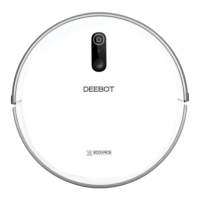
ECOVACS DEEBOT 710
124 pages
Print Icon
To Next Page IconTo Next Page
Loading...
Instruction Manual
Bedienungsanleitung
Manual de instrucciones
Manuel d'instructions
Manuale d'uso

Questions and Answers

  • S
    Stephen ClarkJul 27, 2025
    How to fix ECOVACS DEEBOT 710 not charging?
    • T
      Todd BennettJul 27, 2025
      If your ECOVACS Vacuum Cleaner isn't charging, first ensure that the device is switched ON. Next, check that the Charging Contacts on the robot are properly connected to the Docking Station Pins. If the battery is completely discharged, try to re-activate it by switching ON the DEEBOT, placing it on the Docking Station manually for 3 minutes, removing it, and repeating this process three times before charging normally.
  • H
    heatherdyerAug 2, 2025
    What to do if ECOVACS DEEBOT 710 Vacuum Cleaner is not charging?
    • C
      chamberspamAug 2, 2025
      If your ECOVACS Vacuum Cleaner isn't charging, there could be a few reasons. First, ensure that the Vacuum Cleaner is switched ON. Next, check that the robot’s Charging Contacts have connected to the Docking Station Pins. If the battery is completely discharged, try to re-activate it by switching ON the Vacuum Cleaner, placing it on the Docking Station by hand, removing it after charging for 3 minutes, and repeating this process 3 times before charging normally.
  • H
    Hayley WilliamsonAug 6, 2025
    Why ECOVACS Vacuum Cleaner does not clean at scheduled time?
    • T
      tbrownAug 6, 2025
      If your ECOVACS Vacuum Cleaner does not clean automatically at the scheduled time, ensure that the Time Scheduling function is enabled in the ECOVACS App. Also, make sure that the DEEBOT is switched ON and connected to the Docking Station to maintain a full battery. Check if the Suction Intake is blocked or if there is debris stuck; if so, power OFF the DEEBOT and clean the Dust Bin, Suction Intake, Side Brushes, and Main Brush.
  • K
    Kelly PierceAug 11, 2025
    What to do if ECOVACS DEEBOT 710 Vacuum Cleaner gets stuck?
    • N
      Nicole AlvarezAug 11, 2025
      If your ECOVACS Vacuum Cleaner gets stuck and stops, it may be tangled with objects such as electrical wires, curtains, or carpet fringing. The DEEBOT will attempt to free itself. If it cannot, manually remove the obstacles and restart the device.
  • A
    Angela VillarrealAug 16, 2025
    Why ECOVACS DEEBOT 710 does not start at scheduled time?
    • J
      Jared HooperAug 16, 2025
      If your ECOVACS Vacuum Cleaner isn't cleaning automatically at the scheduled time, it could be due to several reasons. The Time Scheduling function might be cancelled, so program the Vacuum Cleaner to clean at specific times using the ECOVACS App. Also, ensure the Vacuum Cleaner is switched ON and connected to the Docking Station to maintain a full battery. Lastly, check if the robot’s Suction Intake is blocked or if there is debris stuck in its components; if so, power OFF the Vacuum Cleaner and clean the Dust Bin, Suction Intake, Side Brushes and the Main Brush.
  • R
    Robert DuffyAug 21, 2025
    What to do if ECOVACS DEEBOT 710 does not clean the whole area?
    • D
      Deborah Russell DDSAug 21, 2025
      If your ECOVACS Vacuum Cleaner isn't cleaning the whole area, it might be because the cleaning area is not tidy. Remove small objects from the floor and tidy up the area before the Vacuum Cleaner starts cleaning.

Summary

Important Safety Instructions

Correct Disposal of this Product

Package Contents

Package Contents List

Details the items included in the product packaging.

Product Diagrams

Illustrations of the robot and its components.

Operating and Programming

Pre-Cleaning Preparation Notes

Important considerations and warnings before starting the cleaning process.

Setup and Preparation Steps

Instructions for setting up the robot and docking station.

Cleaning Mode Selection

How to choose different cleaning modes for the robot.

Robot Control: Pause, Wake, and Power Off

Procedures for pausing, waking, and turning the robot off.

Maintenance

Dust Bin and Filter Maintenance

Instructions on cleaning and maintaining the dust bin and filters.

Brush Maintenance Guide

Steps for cleaning and maintaining the main and side brushes.

Maintenance of Other Components

Cleaning and care instructions for other robot parts.

Regular Maintenance Schedule

Recommended frequency for maintenance tasks and part replacement.

Indicator Light and Alarm Sounds

Troubleshooting

Technical Specifications

EU-Declaration of conformity

ECOVACS DEEBOT 710 Specifications

General IconGeneral
ShapeRound
Product colorWhite
Built-in displayNo
Remotely operatedYes
Dust container typeDust bag
Noise level65 dB
Wet mopping-
Navigation typeSmartNavi
Integrated sensorsInfrared sensor
Dust capacity (total)0.52 L
Dirt separating methodFiltering
Vacuum cleaner programsAuto, Edge, Spot
Floor surfaces supportedCarpet, Hard floor
Charging time4 h
Battery capacity2600 mAh
Battery technologyLithium
Weight and Dimensions IconWeight and Dimensions
Height81 mm
Weight3100 g
Diameter325 mm

Related product manuals