EasyManua.ls Logo

ECOVACS DEEBOT N8+ - User Manual

ECOVACS DEEBOT N8+
71 pages
Print Icon
To Next Page IconTo Next Page
Loading...
平面印刷品基本技术要求
科沃斯机器人股份有限公司
设计:杨军 日期:2021.03.05 物料名称 说明书
尺寸:145*210mm 材质:封面 157g 哑粉纸 + 内页 105g 哑粉纸 产品型号 ZJ2029
页数:200p 印刷颜色:CMYK 四色印刷 物料编码 451-2029-0304
比例:1:1 装订方式:胶装 版次 A00
变更记录:
ECOVACS:机密图档

Questions and Answers

  • B
    Breanna EstradaAug 20, 2025
    How to fix ECOVACS DEEBOT N8+ DEEBOT not charging?
    • M
      Mary MoralesAug 20, 2025
      If your DEEBOT isn't charging, there could be several reasons. First, ensure that the DEEBOT is switched ON. Check that the robot's charging contacts are connected to the Auto-Empty Station pins and that the power cord is firmly connected to the Auto-Empty Station, which is also connected to the power supply. If the battery is completely discharged, please contact Customer Care for help.
  • D
    Dean HansenAug 22, 2025
    What to do if ECOVACS DEEBOT N8+ DEEBOT cannot return to Auto-Empty Station?
    • L
      Larry ChristianAug 22, 2025
      If your DEEBOT cannot return to the Auto-Empty Station, consider these potential causes: * The Auto-Empty Station might not be placed correctly. * Ensure the Auto-Empty Station is correctly connected. * Avoid manually moving the Auto-Empty Station during cleaning. * Try not to pause DEEBOT for more than 90 minutes. * Make sure DEEBOT starts cleaning from the Auto-Empty Station.
  • E
    Eric HarringtonAug 25, 2025
    Why ECOVACS DEEBOT N8+ DEEBOT is not connecting to Wi-Fi?
    • D
      David GarnerAug 25, 2025
      If your DEEBOT is unable to connect to your home Wi-Fi network, there are several possible causes: * The home Wi-Fi username or password may be entered incorrectly, so ensure you enter the correct credentials. * You may have installed the incorrect app. Please download and install the ECOVACS HOME App. * The DEEBOT may be out of range of your home Wi-Fi signal. Move the DEEBOT within range of your home Wi-Fi signal. * The network setup may have started before DEEBOT was ready. Turn ON the Power Switch and press the RESET Button. DEEBOT is ready for network setup when its Wi-Fi Indicator light flashes slowly. * DEEBOT does not support 5 GHz Wi-Fi. Make sure the robot has been connected with 2.4 GHz Wi-Fi network.
  • B
    bradleydominguezAug 26, 2025
    Why ECOVACS DEEBOT N8+ Vacuum Cleaner DEEBOT doesn't auto-empty after returning to the station?
    • W
      William FletcherAug 27, 2025
      If your DEEBOT does not start auto-emptying after returning to the Auto-Empty Station, consider the following: * Ensure the Dust Container Lid is closed. * Install the Dust Bag and close the Dust Container Lid. * Avoid manually moving DEEBOT to the Auto-Empty Station during cleaning. * Note that it's normal if DEEBOT returns to the Auto-Emptying Station while running Video Manager in the App. * Also, it's normal if Do Not Disturb mode is enabled in ECOVACS HOME App; disable it in the App or start auto-emptying manually. * If the Dust Bag is full, replace it and close the Dust Container Lid. * If none of these causes apply, please contact customer service.
  • L
    lsanfordAug 27, 2025
    How to prevent ECOVACS Vacuum Cleaner DEEBOT from getting stuck?
    • J
      Jon StoneAug 28, 2025
      If your DEEBOT gets stuck while working and stops, it may be due to: * Tangling with objects on the floor such as electrical wires, curtains, or carpet fringing. DEEBOT will attempt to free itself. If this is unsuccessful, manually remove the obstacles and restart it. * Getting stuck under furniture with a similar height entrance. In this case, set a physical barrier or a Virtual Boundary in the ECOVACS HOME App.
  • S
    Shane SilvaAug 30, 2025
    What causes ECOVACS DEEBOT N8+ Vacuum Cleaner DEEBOT to fail auto-emptying the Dust Bin?
    • L
      Lorraine ColemanAug 30, 2025
      If your DEEBOT fails to auto-empty the Dust Bin, check the following: * Ensure the Auto-Empty Dust Bin is installed with two Auto-Empty Outlets on the bottom. * Replace the Dust Bag and close the Dust Container Lid if the Dust Bag is full. * If the Auto-Empty Outlets on the Auto-Empty Dust Bin are stuck by debris, uninstall the Auto-Empty Dust Bin and clean the debris. * Clean the Dust Evacuation Tube if it is blocked.
  • K
    Kevin Porter IVAug 31, 2025
    Why ECOVACS DEEBOT N8+ Vacuum Cleaner DEEBOT returns to the station before finishing?
    • H
      hayesrubenAug 31, 2025
      If DEEBOT returns to the Auto-Empty Station before finishing cleaning, it could be due to: * The working time varying based on floor surface, room complexity, and cleaning mode. When the battery is low, DEEBOT switches to Recharge Mode. Turn on the Continuous Cleaning function in the ECOVACS HOME App to automatically resume cleaning when Continuous Cleaning is enabled. * DEEBOT being unable to reach areas blocked by furniture or barriers. Tidy up the area by placing furniture and small objects properly. * The Auto-Empty Station being too far from the center of the house. Place the Auto-Empty Station against the wall of a central room.
  • E
    Eric MorrisonSep 2, 2025
    Why ECOVACS DEEBOT N8+ DEEBOT is not cleaning at the scheduled time?
    • C
      Christian AlvaradoSep 2, 2025
      If your DEEBOT does not clean automatically at the scheduled time, here are a few things to check: * The Time Scheduling function may be cancelled. Program DEEBOT to clean at specific times using the ECOVACS HOME App. * DEEBOT may be switched OFF. Switch ON DEEBOT. * The robot’s battery may be low. Keep DEEBOT switched ON and connected to the Auto-Empty Station to ensure it has a full battery.
  • B
    bmolinaSep 4, 2025
    Why ECOVACS Vacuum Cleaner DEEBOT misses spots or repeats areas?
    • J
      Jill SnowSep 4, 2025
      If your DEEBOT misses cleaning spots or repeats cleaning areas, it could be due to: * Interference from small objects or barriers on the floor. Remove power cords and small objects to ensure cleaning efficiency. DEEBOT will automatically clean the missed area, so avoid moving DEEBOT manually or blocking its path. * Slippery polished floors. Ensure floor wax is dry before DEEBOT starts cleaning. * Inability to reach areas blocked by furniture or barriers. Tidy up the area by placing furniture and small objects properly. * A blocked TrueMapping Distance Sensor. Remove any objects blocking the sensor.
  • B
    Benjamin PierceSep 6, 2025
    What to do if water isn't coming out of ECOVACS Vacuum Cleaner DEEBOT Reservoir?
    • T
      timothyrobbinsSep 6, 2025
      If water isn't coming out of the Reservoir when DEEBOT is mopping: * The water inlet filter on the bottom of the Reservoir may be clogged. Unscrew the water inlet and clean the filter. * The Reservoir may be out of water. Add water into the Reservoir. * The water outlets on the bottom of DEEBOT may be clogged. Check the water outlets and clean them.

Summary

Important Safety Instructions

Package Contents

Package Contents Overview

Details the components included in the robot's package, such as the robot, auto-empty station, and accessories.

Product Components Diagram

Illustrates and labels the key components and parts of the robot and its auto-empty dust bin.

Operating and Programming

Preparation Notes Before Cleaning

Offers essential tips for preparing the cleaning environment and the robot before starting a cleaning cycle.

Quick Start Guide

Provides step-by-step instructions for the initial setup and assembly of the DEEBOT and its accessories.

Charging the DEEBOT

Details the procedure for charging the DEEBOT, including station placement and power-on instructions.

Using the ECOVACS HOME App

Guides users on connecting and operating the DEEBOT via the ECOVACS HOME mobile application.

Operating the DEEBOT

Explains how to start, pause, and return the DEEBOT to its charging station for operation.

OZMO Mopping System Operation

Details the usage and maintenance of the OZMO mopping system, including water usage and carpet detection.

Maintenance

Regular Maintenance Schedule

Provides a schedule for regular maintenance tasks and replacement frequencies for various robot parts.

OZMO Mopping System Maintenance

Illustrates the cleaning procedures for the OZMO mopping system components, including cloths and reservoir filter.

Auto-Empty Dust Bin and Filter Maintenance

Details the steps for cleaning and maintaining the auto-empty dust bin and its filters.

Main Brush and Side Brush Maintenance

Explains the process for maintaining the main brush and side brushes of the DEEBOT.

Auto-Empty Station Maintenance

Guides on cleaning the auto-empty station, including disposing of the dust bag and cleaning the blower cover.

Dust Evacuation Tube Maintenance

Details the steps for cleaning the dust evacuation tube of the auto-empty station.

Other Component Maintenance

Provides guidance on cleaning other components like charging contacts and auto-empty station pins.

DEEBOT Storage Guide

Explains the correct procedure for storing the DEEBOT when not in use, including charging recommendations.

Indicator Light

DEEBOT Indicator Light Guide

Details the meaning of different indicator lights and their corresponding operational scenarios for the DEEBOT.

Troubleshooting

General Troubleshooting

Provides solutions for common problems encountered with the DEEBOT, categorized by issue.

Wi-Fi Connection Troubleshooting

Offers troubleshooting steps and requirements for establishing a Wi-Fi connection for the DEEBOT.

Technical Specifications

DEEBOT Technical Specifications

Presents detailed technical specifications of the DEEBOT model and its associated accessories.

ECOVACS DEEBOT N8+ Specifications

General IconGeneral
ShapeRound
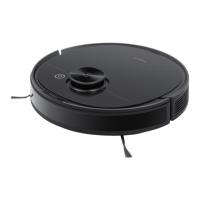
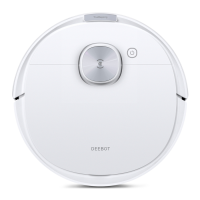
Product colorBlack, White
Dust container typeDust bag
Smartphone remote supportYes
Noise level67 dB
Navigation typeMapping
Number of brushes2
Water tank capacity0.24 L
Dust capacity (base)2.5 L
Dust capacity (total)- L
Base station functionsCharging, Purification
HEPA filtration system-
Vacuum cleaner programsArea, Auto
Floor surfaces supportedCarpet, Laminate, Parquet, Tiles
Dust capacity (vacuum cleaner)0.42 L
Charging time4 h
AC input voltage14.4 V
Battery capacity3200 mAh
Power consumption (typical)40 W
Suction power2300 Pa
Weight and Dimensions IconWeight and Dimensions
Height93 mm

Related product manuals