13 EN
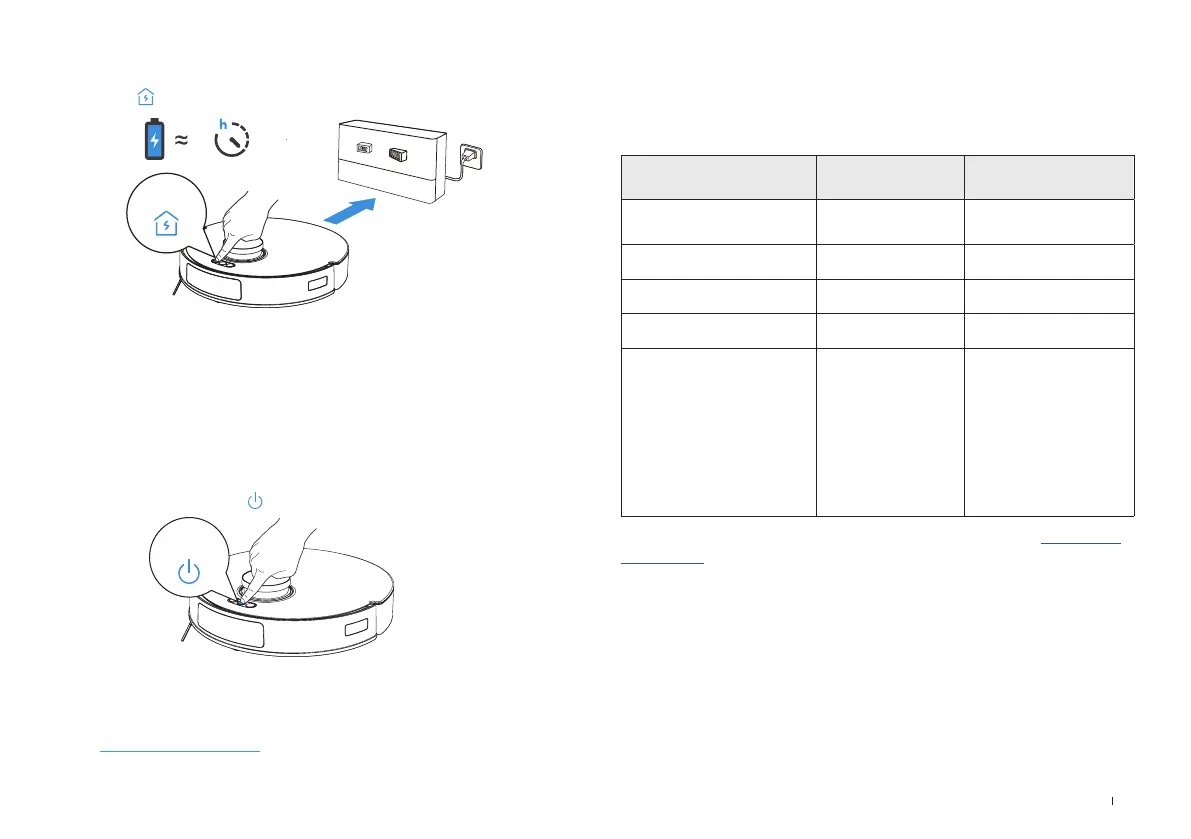
Short press to recall DEEBOT to enter the Docking Station to charge.
6.5
Short press
CHARGE DEEBOT
OPERATE DEEBOT
Before rst vacuuming, please make sure DEEBOT is in the Charging Station
and fully charged. Short press to start cleaning and mapping.
Remove the Mopping Pad Plate/Module before mapping. When creating a map for the
rst time, please follow DEEBOT to help eliminate some minor issues.
For example, DEEBOT may get stuck under the furniture. Please refer to the
following solutions:
① Raise your low sitting furniture if possible;
② Cover the bottom of the furniture;
③ Set up Virtual Boundary via the App.
Note:
• Do not frequently remove washable mopping pads.
• Do not use a rag or any other object to scratch the Moping Pad Plate.
• When the ECOVACS HOME App prompts that the mops need to be replaced,
please replace them in time. Explore more accessories at ECOVACS HOME App
or at https://www.ecovacs.com.
Short press
REGULAR MAINTENANCE
Maintenance Frequency
To ensure optimal performance, perform maintenance tasks and replace parts at
the following frequencies:
Note: Explore more accessories in the ECOVACS HOME App or at https://www.
ecovacs.com.
Part
Maintenance
Frequency
Replacement
Frequency
Washable Mopping Pads After each cleaning Every 1-2 months
Side Brush Every 2 weeks Every 3-6 months
Brush Every week Every 6-12 months
Filter Every week Every 3-6 months
Navigation Module
Obstacle Avoidance Module
Anti-drop Sensors
Carpet Detection Sensor
Edge Sensor
Bumper
Charging Contacts
Universal Wheel
Every week /




 To Next Page