23
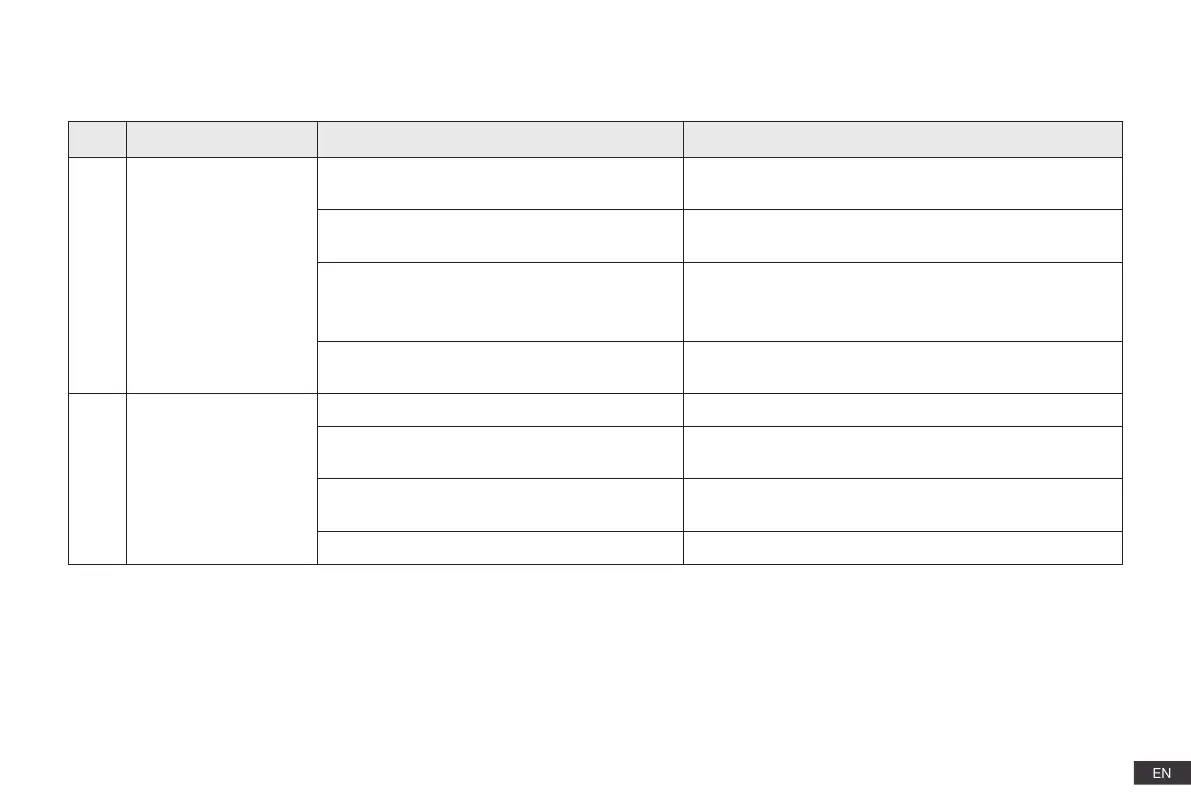
No. Scenario Possible Cause Solution
1
DEEBOT is not able to
connect to the home
Wi-Fi network.
Incorrect home Wi-Fi username or password
entered.
Enter the correct home Wi-Fi username and password.
DEEBOT is not within range of your home Wi-Fi
signal.
Make sure DEEBOT is within range of your home Wi-Fi
signal.
Network setup started before DEEBOT was
ready.
Turn ON Power Switch. Press the RESET Button. DEEBOT
is ready for network setup when its Wi-Fi Indicator light
flashes slowly.
DEEBOT does not support 5 GHz Wi-Fi.
Make sure the robot has been connected with 2.4 GHz
Wi-Fi network.
2
DEEBOT is not
charging.
DEEBOT is not switched ON. Switch ON DEEBOT.
DEEBOT has not connected to the Docking
Station.
Be sure that the robot’s Charging Contacts have connected
to the Docking Station Pins.
The Docking Station is not connected to the
power supply.
Make sure the Docking Station is connected to the power
supply.
The battery is completely discharged. Please contact Customer Care for help.
4. Troubleshooting/4.1 Troubleshooting














 To Next Page