40
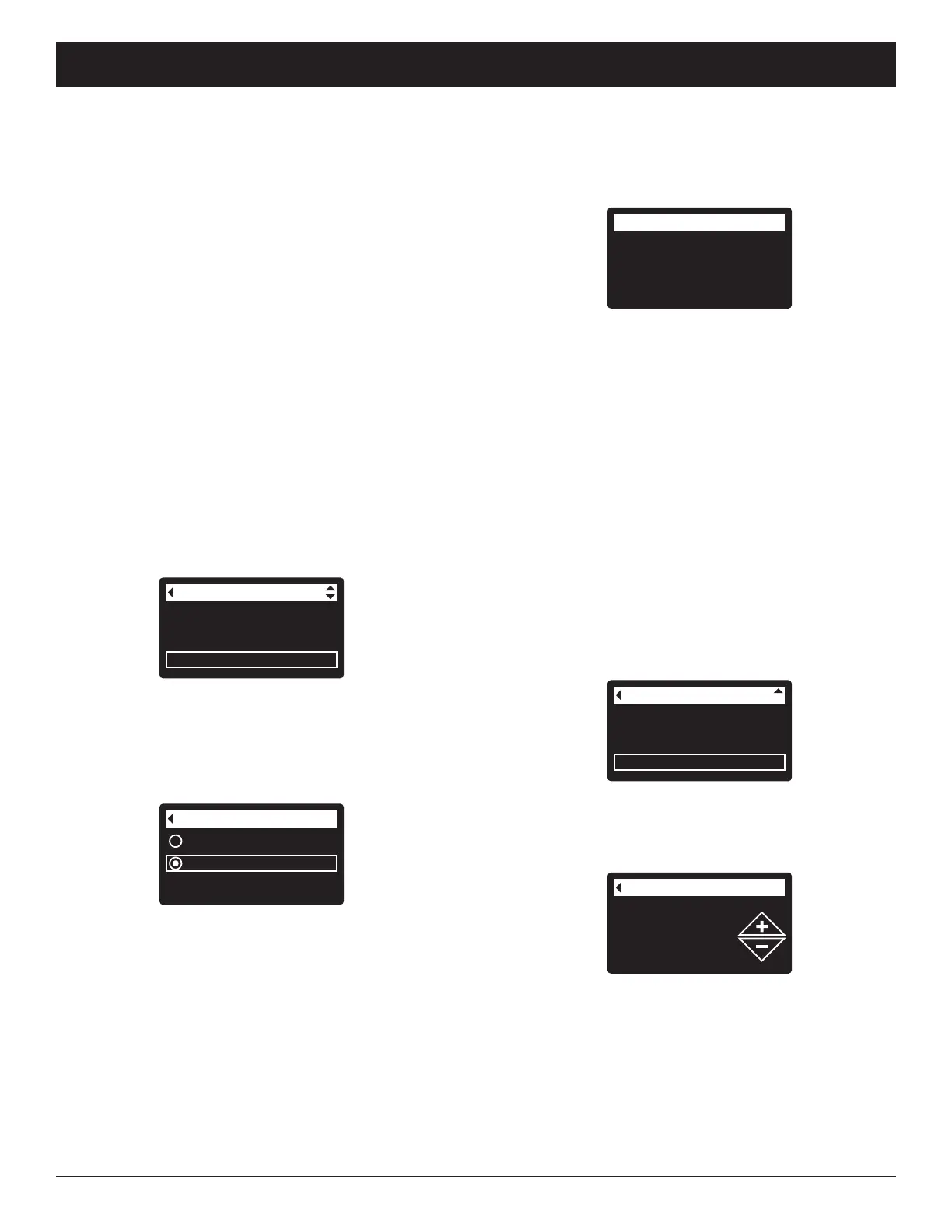
97% feature
Water to drain sensor
Service reminder
Special features
FIG. 148
Service reminder
12 months
0 days
FIG. 149
SERVICE REMINDER (set / reset)
U
se this feature to program the number of months (up
to 24) before a “Service overdue” message will appear
instead of the rolling status screens (See Figure 147).
8. Press the UP (5) or DOWN (6) buttons to set the
number of months until the service reminder
appears. Repeatedly pressing the DOWN (6) but-
ton until the display reads “Off” turns this feature off
and zeros the number of months and days.
9. Press the SELECT (¡) button. The display will go
back to the Special features menu (Figure 148).
10. Press the LEFT (3) button three times to return to
the rolling status screens.
6. Press the DOWN (6) button to scroll through the
menu options until Service reminder is highlighted.
7. Press the SELECT (¡) button to display the Service
reminder screen (See Figure 149).
This message also appears on the remote. This will be
a reminder to call your dealer for service. Once pro-
grammed, this feature displays the number of months
and days left until the service reminder.
Once the “Service overdue” message has appeared,
dealers performing service clear it by setting the num-
ber of months until the next service reminder. Set or
reset the service reminder as follows:
1. From any of the rolling status screens, press the
SELECT (¡) button to display the Main menu.
2. Press the DOWN (6) button to scroll through the
menu options until Advanced settings is highlighted.
3. Press the SELECT (¡) button to display the
Advanced settings menu.
4. Press the DOWN (6) button to scroll through the
menu options until Special features is highlighted.
5. Press the SELECT (¡) button to display the Special
features menu (See Figure 148).
Service reminder
S
ervice overdue
FIG. 147
ECOWATER
S Y S T E M S
Conditioner/Refiner Operation
Off
On
Water to drain sensor
FIG. 146
WATER TO DRAIN SENSOR
(Wi-Fi systems only)
W
hen this feature is On (the default setting), a sensor
in the conditioner/refiner’s valve drain elbow fitting
allows the electronic controller to detect whether water
is continuously flowing to the drain after a recharge
cycle has completed. This could indicate a possible
internal valve leak. If detected, an alert will be sent via
Wi-Fi, and a display screen will ask whether there is
actually water flowing to the drain. Answering No will
reset the water-to-drain sensor.
To turn this feature on or off:
1. From any of the rolling status screens, press the
SELECT (¡) button to display the Main menu.
2. Press the DOWN (6) button to scroll through the
menu options until Advanced settings is highlighted.
3. Press the SELECT (¡) button to display the
Advanced settings menu.
4. Press the DOWN (6) button to scroll through the
menu options until Special features is highlighted.
5. Press the SELECT (¡) button to display the Special
features menu (See Figure 145).
8. If the desired option already has a dot next to it, go
to Step 9. Otherwise, press the DOWN (6) or UP
(5) buttons to scroll to the other option, then press
SELECT (¡) to choose it.
9. Press the SELECT (¡) button. The display will go
back to the Special features menu (Figure 145).
10. Press the LEFT (3) button three times to return to
the rolling status screens.
6. Press the DOWN (6) button to scroll through the
menu options until Water to drain sensor is high-
lighted.
7. Press the SELECT (¡) button to display the Water to
drain sensor screen (See Figure 146).
Auxiliary control
97% feature
Water to drain sensor
Special features
FIG. 145



 To Next Page