COPYRIGHT©EDECOA, ALL RIGHT RESERVED,PSW-USA-Rev2.6
7 / 17
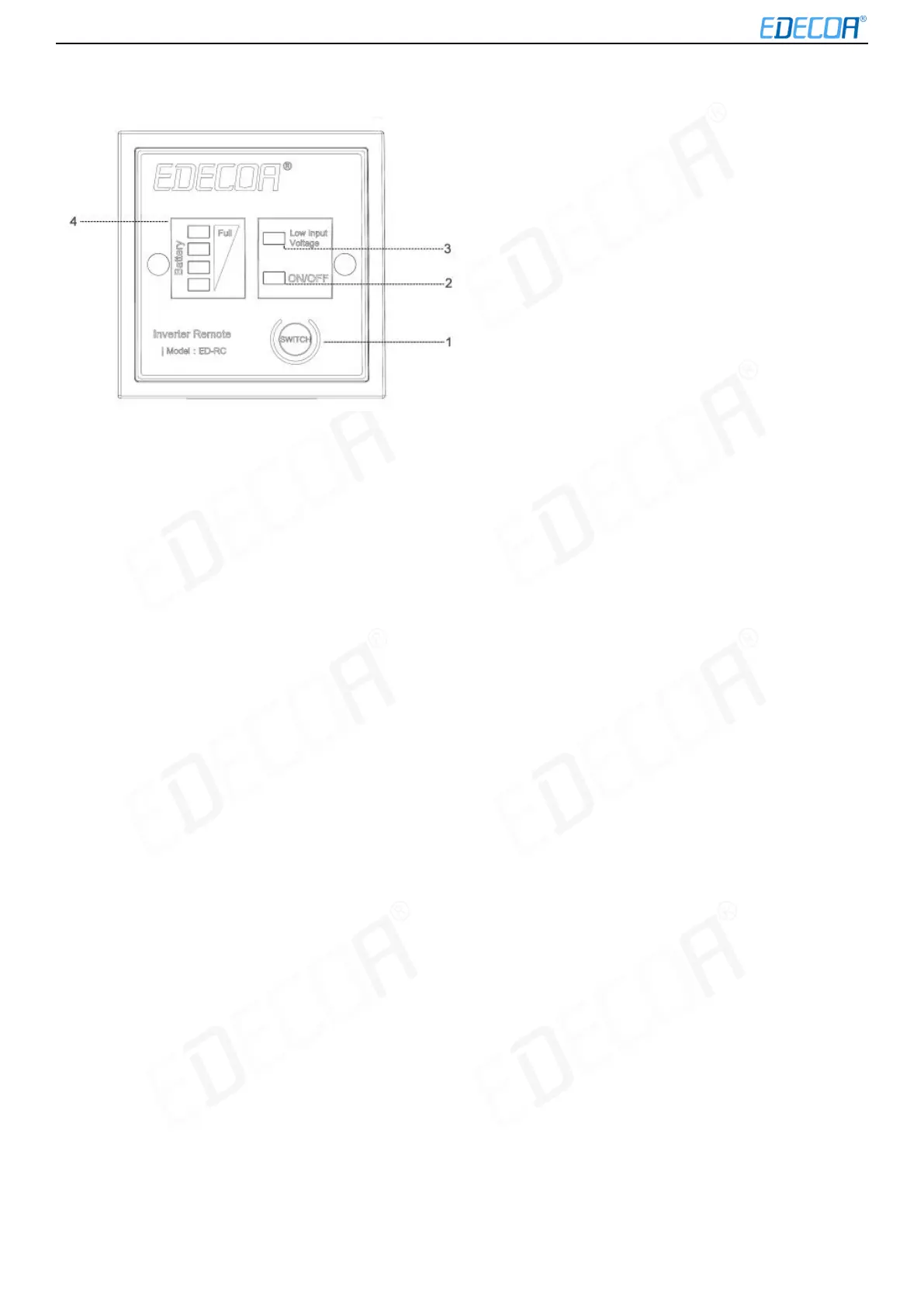
ED-RC remote controller
1. ON/OFF switch
2. Status light: If it is green, it means the inverter is on. If it is off, then the inverter is off.
3. Low input voltage indicator light: If the DC input voltage of the inverter is too low, it will be yellow
4. Battery power indicator light:
If DC voltage ≥12.5V, 4 LED lights will be green
If 12V≤DC voltage≤12.5V, 3 LED lamps will be green
If 10.8V≤DC voltage≤12V, 2 LED lamps will be green
If 10V≤DC voltage≤10.8V only 1 LED lamp will be green
Note: If your inverter is 24v, please multiply the above DC input voltage by 2.
About ED-RC remote cable
ED-RC remote cable is 6.5ft or 13ft long standard RJ45 network cable, it is easy for you to extend the length of it. When
working, the voltage drop through this 6.5ft cable is about 0.02V, you can ignore it. If it is a 33ft long cable, the voltage
drop will be about 0.1V. If you use very long remote cable, please note that the battery power indicator light maybe not
correct.
If the remote cable has problem, it may cause the following problems:
1. The inverter can’t be turned ON/OFF by the remote controller, only the battery power indicator light works.
2. After connecting the remote controller, the inverter will be always on, the inverter can’t be turned off, the battery
power indicator light can’t indicate the actual power.
3. After connecting the remote cable, the inverter will be always on, all LED lights on the remote controller are off, the
inverter can’t be turned off.
4. After connecting the remote controller, all LED lights on the remote controller are off, the inverter can’t be turn on.
5. After connecting the remote controller, the status light sometimes work, sometimes not, the inverter maybe turn off
automatically.
Note: If the remote controller can’t work properly, please try to replace the remote cable first.


 To Next Page