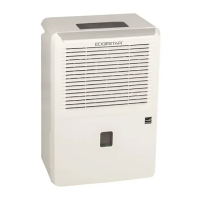
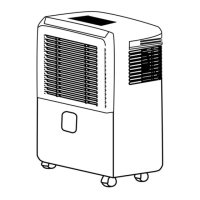
This document describes the EdgeStar DEP501WP / DEP701WP Dehumidifier, an appliance designed for indoor use to reduce humidity levels in a contained room. It is suitable for domestic use in areas like basements or home libraries to prevent damage caused by moisture to books or valuables. The unit is designed to operate in environments with temperatures between 41°F and 95°F.
Function Description:
The dehumidifier works by drawing in moist air, removing excess water content, and then expelling drier air. It features a compressor-based system to achieve dehumidification. The unit has a built-in water bucket to collect condensed water, and it will automatically shut off when the bucket is full, removed, or not properly installed. For continuous operation, the dehumidifier offers multiple draining options, including a built-in pump drain and a continuous gravity drain. An auto-defrost feature is integrated to prevent frost buildup on the evaporator coils when operating in cooler temperatures (below 54°F), which helps maintain efficiency.
Usage Features:
The dehumidifier is controlled via a user-friendly control panel located on the top of the unit.
- Power On/Off: A dedicated power button allows the user to turn the unit on or off. By default, when first powered on, the unit operates in normal fan speed mode.
- Humidity Level Setting: Users can set the desired relative humidity (RH) level between 30% and 90% in 5% increments using "Increase" and "Decrease" buttons. The LED display shows the current room humidity and temporarily displays the desired setting during adjustment. For drier air, the "Decrease" button is used.
- Fan Speed Adjustment: The unit offers two fan speeds: high for maximum moisture removal and normal for quieter operation. The fan speed can be selected by pressing the "Fan Speed" button until the desired mode indicator illuminates.
- Timer Mode: A timer function allows the unit to operate for a user-defined number of hours, from 1 to 24 hours, in 1-hour increments. The timer setting is adjusted using the "Increase" and "Decrease" buttons after activating the timer mode. The timer indicator lights up when active.
- Temperature Display: The control panel includes a display that shows the current room temperature. Users can switch between Celsius (°C) and Fahrenheit (°F) display options.
- Water Full Indicator: A "Bucket Full" indicator light illuminates when the water bucket needs to be emptied, or if it is not installed correctly, prompting the user to take action.
- Auto-Defrost Indicator: A "Defrost Indicator" light signals when the unit is performing its automatic defrost cycle.
- Error Codes: The LED display can show error codes (E1, E2, E3, LO, HI) to indicate specific operational issues such as sensor errors or extreme room temperatures, aiding in troubleshooting.
Draining Options:
The dehumidifier offers three methods for water drainage:
- Manual Drain: Water collects in the removable water bucket. When full, the unit stops operating, and the "Bucket Full" light illuminates. The user must manually remove and empty the bucket. The bucket has a carrying handle for convenience.
- Pump Drain: The unit includes a built-in pump for continuous drainage. A pump drain hose (included) is connected to the pump drain outlet on the back of the unit and routed to a floor drain or suitable drainage port. The pump can lift water up to 16 feet vertically or horizontally. A sensor detects proper hose connection, and an audible 'click' confirms it, automatically activating the pump feature.
- Continuous Gravity Drain: For continuous drainage without the pump, a standard garden hose (3/4" connector fitting, not included) can be attached to the gravity drain port on the back of the unit. The drain hose must be routed to a floor drain or drainage port located below the level of the unit's drain outlet to allow for gravity flow. A rubber gasket should be used to prevent leaks.
Maintenance Features:
Regular maintenance is crucial for the dehumidifier's performance, efficiency, and lifespan.
- Cleaning the Unit: The exterior of the unit should be wiped clean with a soft, dry cloth. Lukewarm water can be used to dampen the cloth if needed. A soft bristle brush and vacuum cleaner can be used to clean between the air intake and exhaust vents. Abrasive chemicals, volatile substances, gasoline, detergents, or chemically treated cloths should not be used. Water should never be sprayed directly on the unit.
- Cleaning the Pre-filter: The pre-filter should be inspected and cleaned periodically, ideally weekly in dusty environments, to prevent lint, dust, and dirt buildup. A clogged filter restricts airflow, reduces performance, and can shorten the unit's lifespan. To clean, the pre-filter is removed after taking out the water bucket. It can be vacuumed, lightly tapped to remove loose debris, or rinsed under lukewarm water (below 104°F) with mild soap if necessary. The filter must be thoroughly air-dried in a cool, shaded place before reinstallation. The filter should never be put in a dishwasher, and the unit should never be operated without the pre-filter.
- Cleaning the Water Bucket: The water bucket should be washed frequently with clean water and a mild detergent to prevent the growth of bacteria, mildew, and mold. After washing, it should be rinsed thoroughly and reinstalled. The water bucket is not dishwasher safe.
- Storage Preparation: For extended storage, the unit should be turned off, unplugged, and allowed 24 hours for excess moisture to drain. All water should be drained from the tank, and the air filter, water tank, and unit should be cleaned. The power cord should be unplugged and carefully wound. The unit should then be covered with a plastic bag and stored upright in a dry, well-ventilated place.
Energy Saving Guide:
To optimize performance and efficiency, users are advised to:
- Avoid covering the air outlet (exhaust) during use.
- Ensure the unit is not placed in front of curtains or drapes that obstruct the air intake.
- Keep curtains, blinds, or drapes closed during the sunniest parts of the day.
- Close all windows and doors in the room where the dehumidifier is operating.
- Maintain indoor relative humidity between 35% and 60% depending on ambient temperature.
- Ensure the unit is on a level surface.
- Wait at least 3 minutes before turning the unit back on after shutting it off to prolong compressor life.
- Regularly inspect and clean the pre-filter.
- Perform routine maintenance as described.


 To Next Page
 General